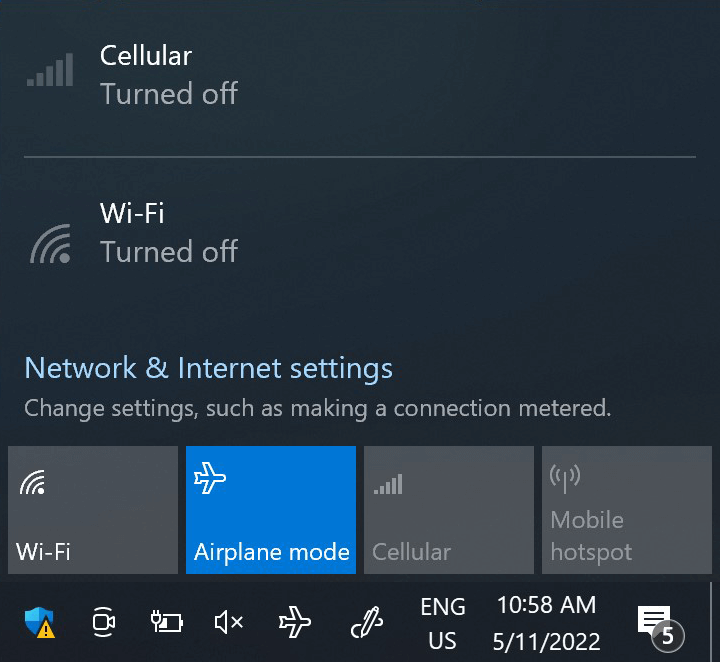
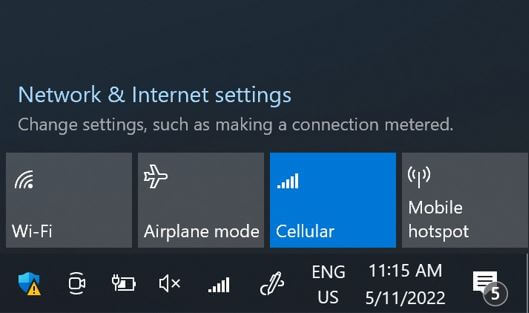
이 단계에서 ‘비행 모드’를 5초 동안 켰다가 끕니다. 이 작업을 수행하면 디바이스에서 네트워크 연결이 새로 고쳐집니다.
네트워크에 연결되면 하단에 네트워크 아이콘이 표시됩니다.
네트워크 아이콘이 없는 경우 다음 단계에 따라 네트워크를 수동으로 선택하세요. 네트워크가 표시되면 다음 단계로 이동합니다.
참고: 수동 선택 후에도 여전히 네트워크 막대가 표시되지 않거나 )가 표시되는 경우, 고객 지원팀에 문의하여 추가 도움을 요청하고 eSIM 프로필의 ICCID를 알려주세요.
훌륭해
의 35364개 리뷰를 기준으로
검증됨
검증된 리뷰
이 사용자는 구매자로 확인되었습니다
Instant service and good connectivity…
Instant service and good connectivity everywhere. Also lets my other half share my hotspot.
customer, 21 Apr 2026
검증됨
검증된 리뷰
이 사용자는 구매자로 확인되었습니다
Excellent cell signal in Nagoyo and…
Excellent cell signal in Nagoyo and surrounding areas.
Jeffery Broad, 21 Apr 2026
검증됨
검증된 리뷰
이 사용자는 구매자로 확인되었습니다
Good service
Good service , next time I will get a number to make calls
customer, 21 Apr 2026
검증됨
검증된 리뷰
이 사용자는 구매자로 확인되었습니다
All perfect
All perfect
Alexandre Scimone, 21 Apr 2026
검증됨
검증된 리뷰
이 사용자는 구매자로 확인되었습니다
easy to connect
easy to connect, good price and great internet
Arunas Sangavicius, 21 Apr 2026
검증됨
검증된 리뷰
이 사용자는 구매자로 확인되었습니다
It worked right as I landed
Simple setup. It worked within 5 minutes after I landed in all countries I visited. Service was good and had no trouble at any time. It's my main travel esim provider for years now.
customer, 21 Apr 2026
검증됨
검증된 리뷰
이 사용자는 구매자로 확인되었습니다
Review
Changed my phone and had issues. Customer service wouldn’t grant the same price that i initially paid it. Overall, i usually have no issues using this company.
Elaine, 21 Apr 2026
검증됨
검증된 리뷰
이 사용자는 구매자로 확인되었습니다
Very easy and fast onboarding for a…
Very easy and fast onboarding for a good price. It worked right away when landing in the US.
Only thing to improve is the clarity at signing up. I confused the country for the destination country, while the country of residence was meant. This changed the currency and limited the IP option.
Martijn Rooijakkers, 21 Apr 2026
검증됨
검증된 리뷰
이 사용자는 구매자로 확인되었습니다
Works everywhere Hassle free
Normand, 21 Apr 2026
검증됨
검증된 리뷰
이 사용자는 구매자로 확인되었습니다
Easy to install and configure
Easy to install and configure, works reliably!
Katrin Laas-Mikko, 21 Apr 2026
검증됨
검증된 리뷰
이 사용자는 구매자로 확인되었습니다
Service continuity
Service continuity. Any problems
customer, 21 Apr 2026
검증됨
검증된 리뷰
이 사용자는 구매자로 확인되었습니다
Great service
Great service, only when on the monrail from Airport to Tokyo City I lost complete serfcice. Not helpful if you want to navigate your stops.
Rest of the time in Japan I had no connection issues.
customer, 21 Apr 2026
검증됨
검증된 리뷰
이 사용자는 구매자로 확인되었습니다
Always a smooth experience
We used Ubigi for an couple of trips now and always the experience is great: prepare all from home, arrive to the destination, have a data plan. (Remember to deactivate data roaming for your regular SIM).
Michael, 21 Apr 2026
검증됨
검증된 리뷰
이 사용자는 구매자로 확인되었습니다
Quick connection and hasn’t missed a…
Quick connection and hasn’t missed a step in our strip.
Cannondale, 21 Apr 2026
감사합니다
귀하의 메시지가 전송되었습니다. 곧 답변드리겠습니다.
감사합니다
귀하의 뉴스레터 구독을 고려했습니다.
eSIM 호환성 확인 방법
스마트폰 / 태블릿:
*#06# 입력. → EID 번호가 나오면 eSIM 지원 기기입니다.
Windows 10 / 11:
Windows+I 를 누르세요. “네트워크 및 인터넷”으로 이동하세요 → 셀룰러 네트워크가 보이면 PC가 eSIM을 지원합니다..
통신사 잠금 해제 여부 확인 방법
iPhone / iPad:
설정 > 일반 > 정보로 이동 통신사 잠금 항목까지 스크롤. → “SIM 제한 없음”이 표시되면 기기는 잠금 해제 상태입니다.
Android:
설정 > 네트워크 및 인터넷 > 모바일 네트워크 자동 네트워크 선택을 끄세요. → 여러 네트워크가 보이면 잠금 해제된 기기입니다.