If you have an Ubigi SIM card, detach it and insert it into your device’s SIM slot
OR
If your device is equipped with an embedded Ubigi eSIM, go to step 2 directly
OR
If you want to install Ubigi on your eSIM PC, click here.
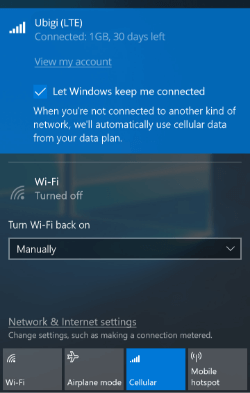
Click on the network icon in the bottom right corner of your screen to open the network tab
on (blue). Ubigi will appear at the top of the flyout*
Tick the box Let Windows manage this connection
*If you do not see Ubigi or Cellular Data in the list please click here
Great
Based on 33650 reviews on
Verified
Verified review
This user has been identified as a buyer
Worked Great and Easy To Set Up!
Worked great and easy to set up. Plus, the prices were better than other competitors. I will gladly use Ubigi in the future!
Ed in Ath, 03 Apr 2026
Verified
Verified review
This user has been identified as a buyer
Very straightforward from choosing your…
Very straightforward from choosing your plan to topping up.
LORNA WILSON, 03 Apr 2026
Verified
Verified review
This user has been identified as a buyer
It’s working fine
It’s working fine
customer, 03 Apr 2026
Verified
Verified review
This user has been identified as a buyer
Was easy to install and activate
Was easy to install and activate. Worked great in several different areas in Australia.
JL, 03 Apr 2026
Verified
Verified review
This user has been identified as a buyer
Works as it should
Works as it should
BJÖRN, 03 Apr 2026
Verified
Verified review
This user has been identified as a buyer
Stable internet connection even at…
Stable internet connection even at Suburb area
FC, 03 Apr 2026
Verified
Verified review
This user has been identified as a buyer
Trusted net connection in Japan
Reliable & stable net connection in urban & rural areas during our vacation in Japan. Easy to install. The service starts immediately. Recommended for travellers.
Hendy F. Suhandri, 03 Apr 2026
Verified
Verified review
This user has been identified as a buyer
Stable data in Japan
I previously had very patchy roaming connection when traveling in Tokyo. It could work in the airport and outskirts but totally failed when in Tokyo. This time around I tried the Japan data package and had seamless experience, at occasion even retaining the connection whilst my local Japanese colleagues had none.
Malaysia Business Traveler, 03 Apr 2026
Verified
Verified review
This user has been identified as a buyer
Easy to use.
Easy to use.
Value for money
Vincent Smith, 03 Apr 2026
Verified
Verified review
This user has been identified as a buyer
Easy to use app to order and install…
Easy to use app to order and install the eSIM on my Android phone
Michiel Buitenwerf, 03 Apr 2026
Verified
Verified review
This user has been identified as a buyer
Works great in Japan
Works great in Japan! Very satisfied!!!
Boris, 03 Apr 2026
Verified
Verified review
This user has been identified as a buyer
Good connextion for a good price
Good connextion for a good price
AD, 02 Apr 2026
Verified
Verified review
This user has been identified as a buyer
Great experience using the Ugibi
Great experience using the Ugibi, seamless user-friendly setup, love the notifications about data usage and remaining balance. Will recommend to anyone traveling to Europe. Love the price too!
Alejandra Romero, 02 Apr 2026
Verified
Verified review
This user has been identified as a buyer
Was very fast and easy
Was very fast and easy. Gave me simple instructions on how to activate the eSIM, while I was traveling.
Marina, 02 Apr 2026
Verified
Verified review
This user has been identified as a buyer
Works in St Kitts West Indies
After finally figuring out how to set up (bit of a learning curve for me since I’m not a techy) it was pretty easy to be connected to WiFi and navigation maps. I used this service in St Kitts. I’d use this on my next travels out of the US if it will work where i travel to.
Krista, 02 Apr 2026
Thank you
Your message has been sent. We’ll get back to you shortly.
Thank you
We have taken into account your subscription to the newsletter
How to check eSIM compatibility
Smartphones / Tablets:
Dial *#06#. → If an EID number appears, your device is eSIM-compatible.
Windows 10 / 11:
Press Windows+I. Go to “Network & Internet” → If you see "Cellular", your PC is eSIM-compatible.
How to check carrier unlocking
iPhone / iPad:
Go to Settings > General > About. Scroll to Carrier Lock. → If you see “No SIM restrictions”, your device is unlocked.
Android:
Go to Settings > Network & Internet > Mobile network. Disable Automatic network selection. → If multiple networks appear, your device is unlocked.
You already have an eSIM in your cart.
Each order can only include one eSIM data plan.
If you choose to add a new one, the current plan will be removed. What would you like to do?










 How to check eSIM compatibility
 How to check carrier unlocking