Then connect to the Ubigi eSIM to create your account and choose a data plan.
What is Ubigi?
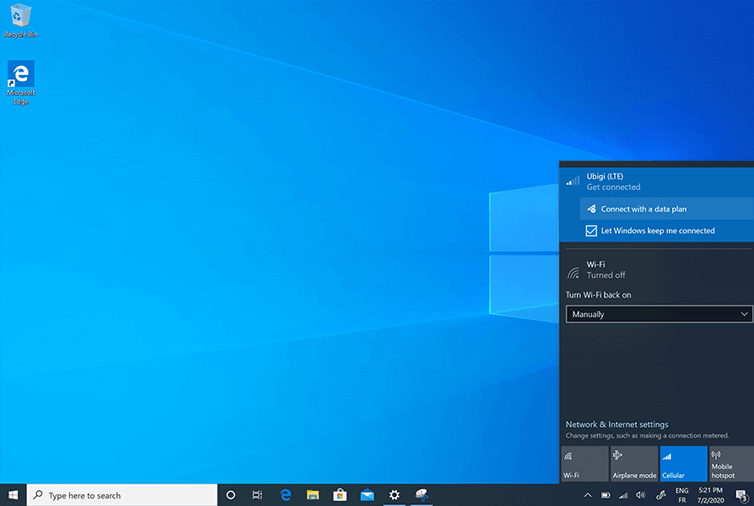
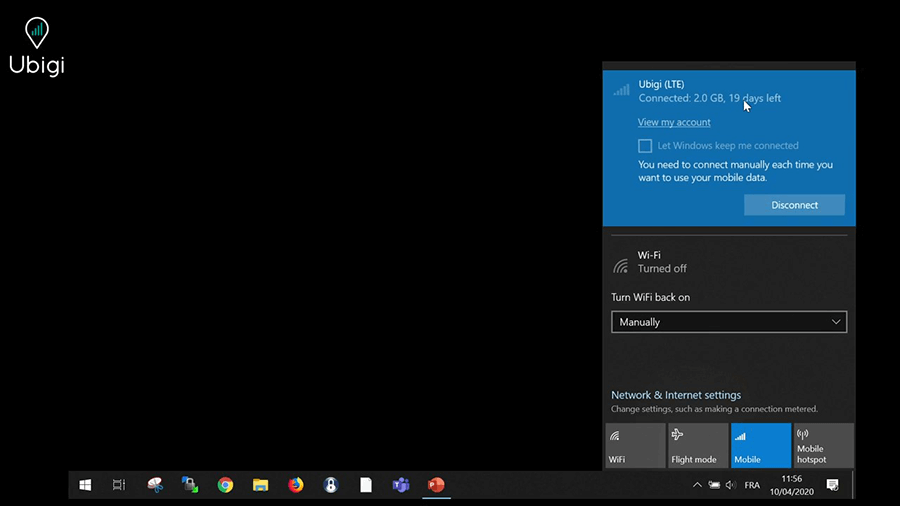
Click on the network icon in the bottom right-hand corner of the screen to open the network tab
Turn-off Wi-Fi and Ethernet modes and stay in Cellular only Wait a couple of minutes for your PC to connect to the local cellular network, Ubigi network will appear at the top of the tab. Let Windows manage this connection and click on “Connect with a data plan” (or “View my account”)
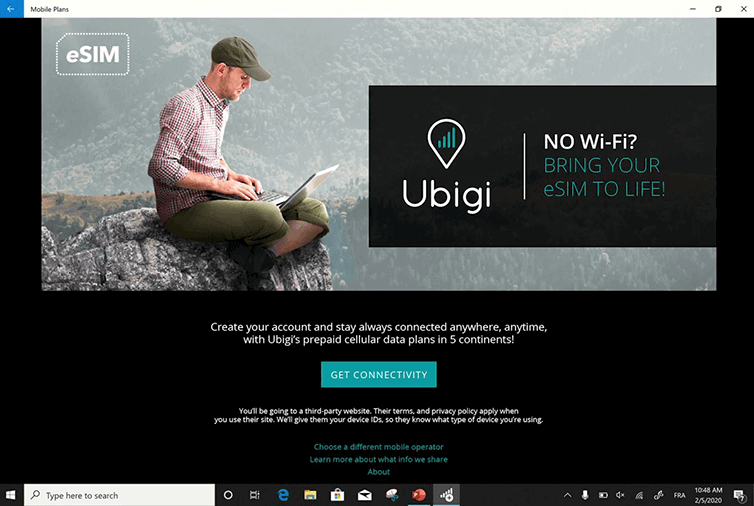
Click on “Get Connectivity”
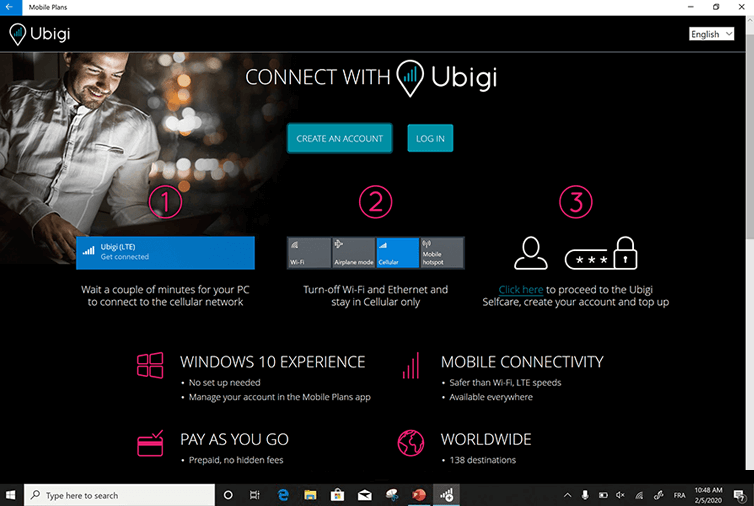
Click now on “Create an account”
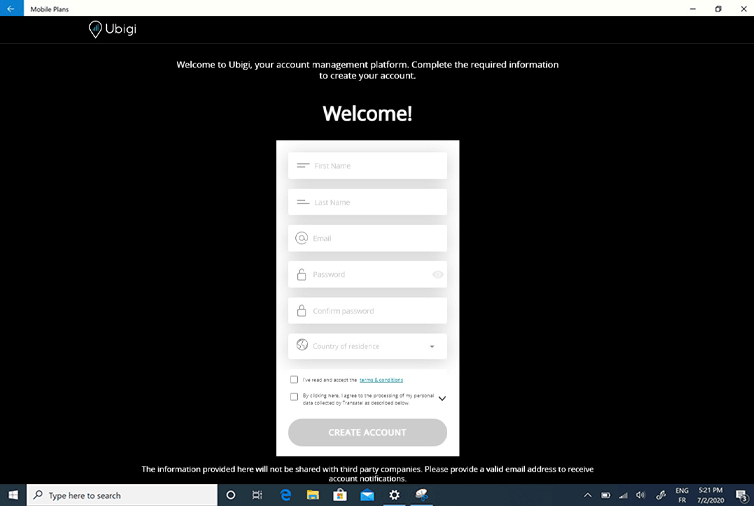
Fill the required fields and click “Create account”
You’ll be able to check your balance anytime in the network bar and access your Ubigi account to top up by cliking on “View my account”
Great
Based on 35670 reviews on
Verified
Verified review
This user has been identified as a buyer
It just worked well, no issues. Would recommend this product.
It just worked well, no issues.
Shane M, 26 Apr 2026
Verified
Verified review
This user has been identified as a buyer
Worked great anywhere I went.
Worked great anywhere I went.
Dale Heasley, 26 Apr 2026
Verified
Verified review
This user has been identified as a buyer
Excellent ESIM card for Tokyo
Excellent ESIM card for Tokyo. My companion is using Sailey, and Ubigi is a tad more reliable. Moving to the interior of Japan and hoping the reliability will continue.
John Barber, 26 Apr 2026
Verified
Verified review
This user has been identified as a buyer
Easy and great value
Easy and great value
Gavin, 25 Apr 2026
Verified
Verified review
This user has been identified as a buyer
Easy to use and goos tariffs
Setting up in the phone and using is easy , and works well . I have used twice in Europe and the tariffs are good
Anivar, 25 Apr 2026
Verified
Verified review
This user has been identified as a buyer
Fit for purpose!
Connected well on arrival and worked well for the duration of our trip
Ali H, 25 Apr 2026
Verified
Verified review
This user has been identified as a buyer
it just worked!
it just worked!
customer, 25 Apr 2026
Verified
Verified review
This user has been identified as a buyer
Stable 5G connection in most of Tokyo
Stable 5G connection in most of Tokyo
customer, 25 Apr 2026
Verified
Verified review
This user has been identified as a buyer
Ubigi works great in Europe. Highly recommended.
We had a bit of difficulty activating the app but once we got it going, the eSim works great. It would be great if Ubigi could provide clearer step by step instructions on activating the eSim on iPhone especially for seniors. We were in London and Europe and had no issues except in Montenegro where there’s no service. I highly recommend Ubigi to anyone travelling to Europe. Rates were quite affordable for 30 days.
LChoy, 25 Apr 2026
Verified
Verified review
This user has been identified as a buyer
As soon as the aircraft touched the…
As soon as the aircraft touched the runway in Morocco it turned itself on. I have not lost signal and I am in a lot of rural and mountainous areas.
Rob J, 25 Apr 2026
Verified
Verified review
This user has been identified as a buyer
Everything worked just fine!
Everything worked just fine!
customer, 25 Apr 2026
Verified
Verified review
This user has been identified as a buyer
Price is good.
Price is good.
customer, 25 Apr 2026
Verified
Verified review
This user has been identified as a buyer
Used it for my trip to Japan
Used it for my trip to Japan. Reception everywhere around Tokyo, Kyoto and Osaka also during travel between those locations. For 11 days couldn't use my whole 10 GB of data. Very happy with my choice.
Velko Nedelchev, 25 Apr 2026
Verified
Verified review
This user has been identified as a buyer
Will use again and again
Very easy, used it a few times when travelling
customer, 25 Apr 2026
Verified
Verified review
This user has been identified as a buyer
100% funktions in Japan
100% funktions in Japan
customer, 25 Apr 2026
Thank you
Your message has been sent. We’ll get back to you shortly.
Thank you
We have taken into account your subscription to the newsletter
How to check eSIM compatibility
Smartphones / Tablets:
Dial *#06#. → If an EID number appears, your device is eSIM-compatible.
Windows 10 / 11:
Press Windows+I. Go to “Network & Internet” → If you see "Cellular", your PC is eSIM-compatible.
How to check carrier unlocking
iPhone / iPad:
Go to Settings > General > About. Scroll to Carrier Lock. → If you see “No SIM restrictions”, your device is unlocked.
Android:
Go to Settings > Network & Internet > Mobile network. Disable Automatic network selection. → If multiple networks appear, your device is unlocked.
You already have an eSIM in your cart.
Each order can only include one eSIM data plan.
If you choose to add a new one, the current plan will be removed. What would you like to do?











 How to check eSIM compatibility
 How to check carrier unlocking