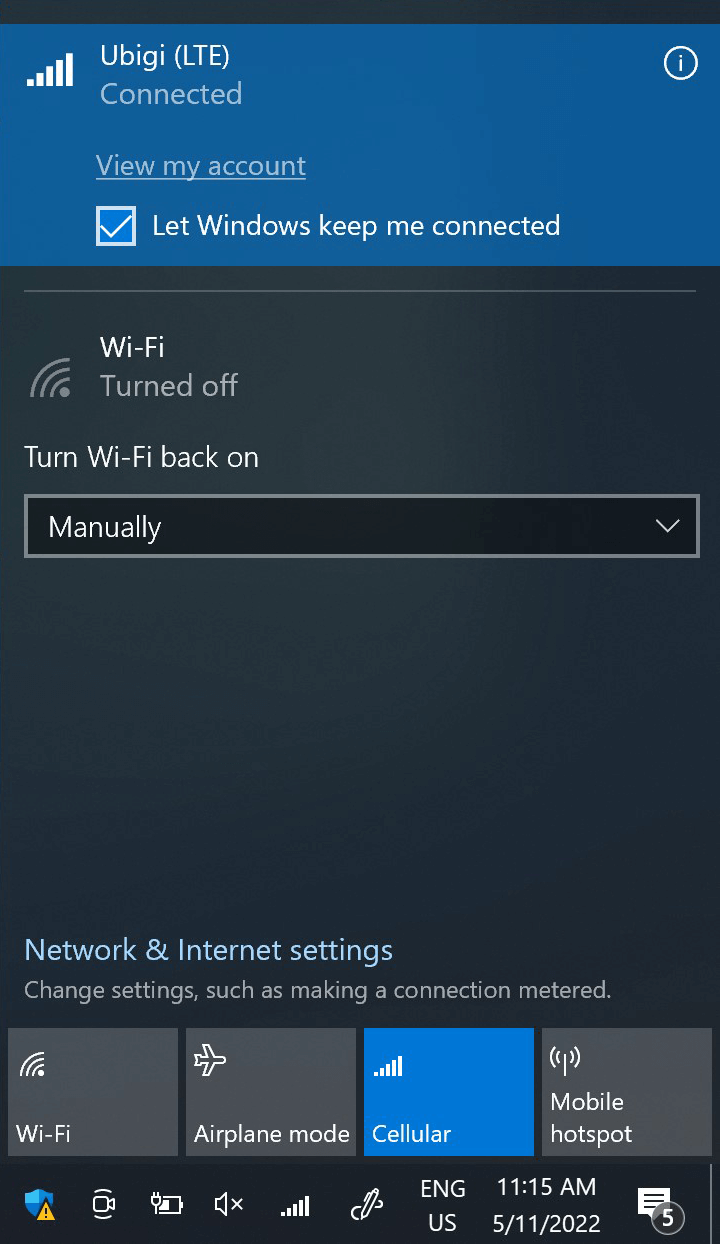
이 단계에서 네트워크 플라이아웃을 열고 “내 계정 보기”를 클릭하여 Ubigi 연결을 테스트합니다. 또는 브라우저를 열고 ubigi .me로 이동합니다.
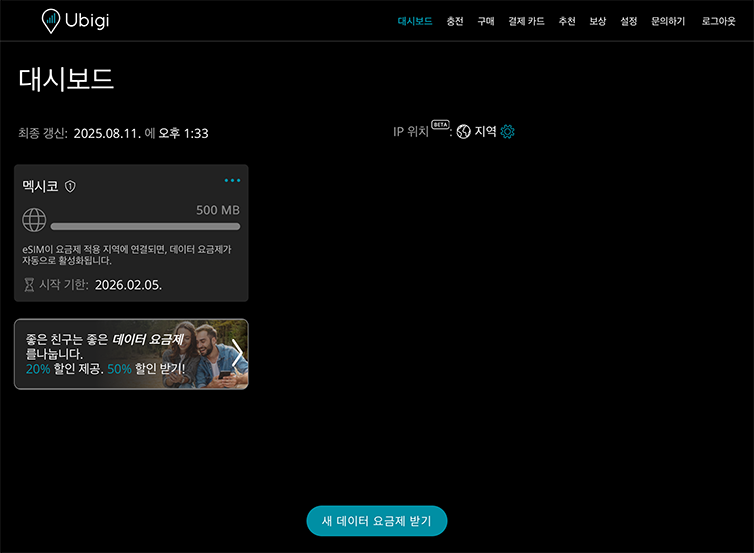
이미 Ubigi 계정이 있는 경우 자동으로 연결됩니다.
아직 Ubigi 계정이 없는 경우 계정 생성 페이지가 표시됩니다:
입력란을 채우고 계정 만들기를 클릭합니다. 계정이 생성되면 계정에 연결됩니다.
이제 더 많은 [목적지] 국가에서 Ubigi 연결을 즐길 수 있습니다!
참고: 이전 단계를 모두 주의 깊게 따랐는데도 계정 또는 계정 생성 페이지에 액세스할 수 없는 경우 고객 지원팀에 문의하여 추가 도움을 받으세요.
훌륭해
의 44917개 리뷰를 기준으로
검증됨
검증된 리뷰
이 사용자는 구매자로 확인되었습니다
10/10 Service while in Japan
10/10 Service while in Japan. All across Japan I had dependable service.
Lewis Kafka, 03 Sep 2026
검증됨
검증된 리뷰
이 사용자는 구매자로 확인되었습니다
I love ubigi
I love ubigi. Easy to use, very practical and useful.
Gemma from Spain, 03 Sep 2026
검증됨
검증된 리뷰
이 사용자는 구매자로 확인되었습니다
It was great
It was great
Ana J, 03 Sep 2026
검증됨
검증된 리뷰
이 사용자는 구매자로 확인되었습니다
worked well and affordable
worked well and affordable
Stephanie Chu, 03 Sep 2026
검증됨
검증된 리뷰
이 사용자는 구매자로 확인되었습니다
It doesn't work sometime everyday even…
It doesn't work sometime everyday even just for google map
customer, 03 Sep 2026
검증됨
검증된 리뷰
이 사용자는 구매자로 확인되었습니다
Zero stress in China
Zero stress in China
customer, 03 Sep 2026
검증됨
검증된 리뷰
이 사용자는 구매자로 확인되었습니다
Great eSIM
Easy to buy, connect and use. Great value for money. Good coverage pretty much everywhere I went. No issues whatsoever.
Lexie Conrad, 03 Sep 2026
검증됨
검증된 리뷰
이 사용자는 구매자로 확인되었습니다
Great connection all throughout our…
Great connection all throughout our stay in Japan. We went to different cities and I can’t remember a time when my internet connection got weak or disconnected.
Alvin Lamucho, 03 Sep 2026
검증됨
검증된 리뷰
이 사용자는 구매자로 확인되었습니다
Small glitch to start -Works great now
Works great - now. Have used this before with no issues. This, upon arrival at destination, the e-sim slot was empty, despite having been purchased and activated before we left home. After about 1/2 hour of bot chat - I was connected with a real person who got us up and running. Took about 45 minutes overall (and finding free wi-fi to chat with)
Will use it again for future trips.
SL, 03 Sep 2026
검증됨
검증된 리뷰
이 사용자는 구매자로 확인되었습니다
I was in Japan for 12 days and stayed…
I was in Japan for 12 days and stayed in Tokyo, Mount Fuji area and Kyoto and didn’t have any signal issues. My internet was fine and the amount of data I bought (25gb) was more than enough for that amount of days. Overall really happy with this eSIM.
Carolina, 03 Sep 2026
검증됨
검증된 리뷰
이 사용자는 구매자로 확인되었습니다
Excellent service
Excellent service, very stable even in locations with poor signal. Didn’t have the opportunity to test the speed but the connection was good enough that I did not think about speed. The setup was really easy. The differentiating factor was having several plans with different duration and capacity. Pretty useful when you are on a budget.
Antonio, 03 Sep 2026
검증됨
검증된 리뷰
이 사용자는 구매자로 확인되었습니다
Travel to Korea
I'm in Korea and have been getting all my data. Thanks.
clee, 02 Sep 2026
검증됨
검증된 리뷰
이 사용자는 구매자로 확인되었습니다
Dependable necessii
Reliable service everywhere
A Trejo, 02 Sep 2026
검증됨
검증된 리뷰
이 사용자는 구매자로 확인되었습니다
I knew about this fantastic e-sim from…
I knew about this fantastic e-sim from myparisroutin on istagram. I an a flight attendant and I had some bad experience from others esim.
Ubigi is really great. I bought USA zone and it works really great.
Luisa
Luisa Luetti, 02 Sep 2026
검증됨
검증된 리뷰
이 사용자는 구매자로 확인되었습니다
It was easy to download the esim and…
It was easy to download the esim and simple to use.
Manon Payette, 02 Sep 2026
감사합니다
귀하의 메시지가 전송되었습니다. 곧 답변드리겠습니다.
감사합니다
귀하의 뉴스레터 구독을 고려했습니다.
eSIM 호환성 확인 방법
스마트폰 / 태블릿:
*#06# 입력. → EID 번호가 나오면 eSIM 지원 기기입니다.
Windows 10 / 11:
Windows+I 를 누르세요. “네트워크 및 인터넷”으로 이동하세요 → 셀룰러 네트워크가 보이면 PC가 eSIM을 지원합니다..
통신사 잠금 해제 여부 확인 방법
iPhone / iPad:
설정 > 일반 > 정보로 이동 통신사 잠금 항목까지 스크롤. → “SIM 제한 없음”이 표시되면 기기는 잠금 해제 상태입니다.
Android:
설정 > 네트워크 및 인터넷 > 모바일 네트워크 자동 네트워크 선택을 끄세요. → 여러 네트워크가 보이면 잠금 해제된 기기입니다.








 eSIM 호환성 확인 방법
 통신사 잠금 해제 여부 확인 방법