Hvordan finder jeg ICCID-nummeret (serienummeret) på mit Ubigi eSIM?
ICCID’et er den reference, der bruges til at identificere dit eSIM. Det består af 19 cifre, der starter med “8988247…” .
Du kan finde det i den oprindelige e-mail, vi sendte dig med Ubigi eSIM-QR-koden.
Du kan også finde det i de e-mails, vi sendte dig, da du købte et datapakke.
Men hvis det er nødvendigt, kan du altid finde det i din enheds indstillinger:
På iOS Gå til Indstillinger > Generelt > Om, og rul helt ned til feltet ”ICCID”. (Kun ICCID-numre for aktive eSIM’er vises).
På Android Gå til Indstillinger, derefter »Om telefonen«, og tryk på »SIM-status«. ICCID’en vises derefter.
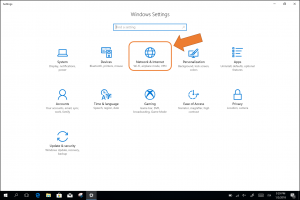
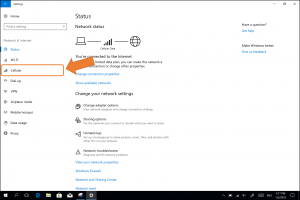
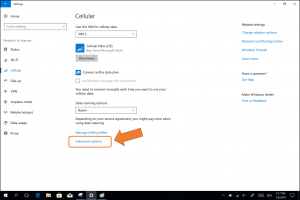
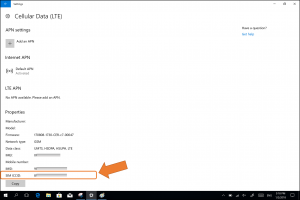
På Windows 10 ( NB: vejledning til Windows 11 nederst på siden) Sådan finder du dit eSIM’s ICCID: – Gå til »Indstillinger« og derefter »Netværk og internet«: – Vælg »Mobilnet« i menuen til venstre – Klik på »Avancerede indstillinger«: ICCID-nummeret vises nederst (SIM-ICCID):
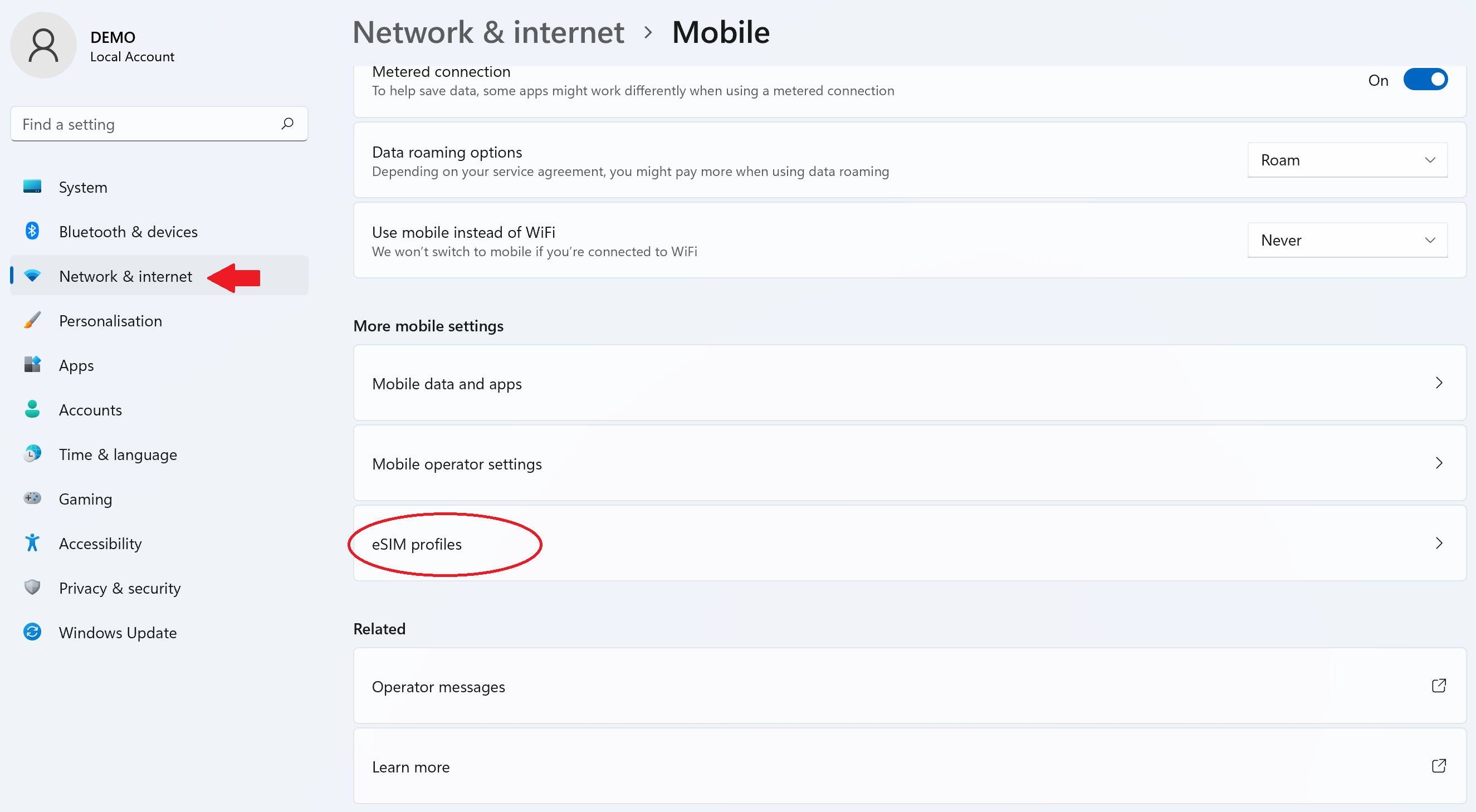
I Windows 11: – Gå til Indstillinger > Netværk og internet > Mobilnetværk, og vælg derefter »eSIM-profiler«:
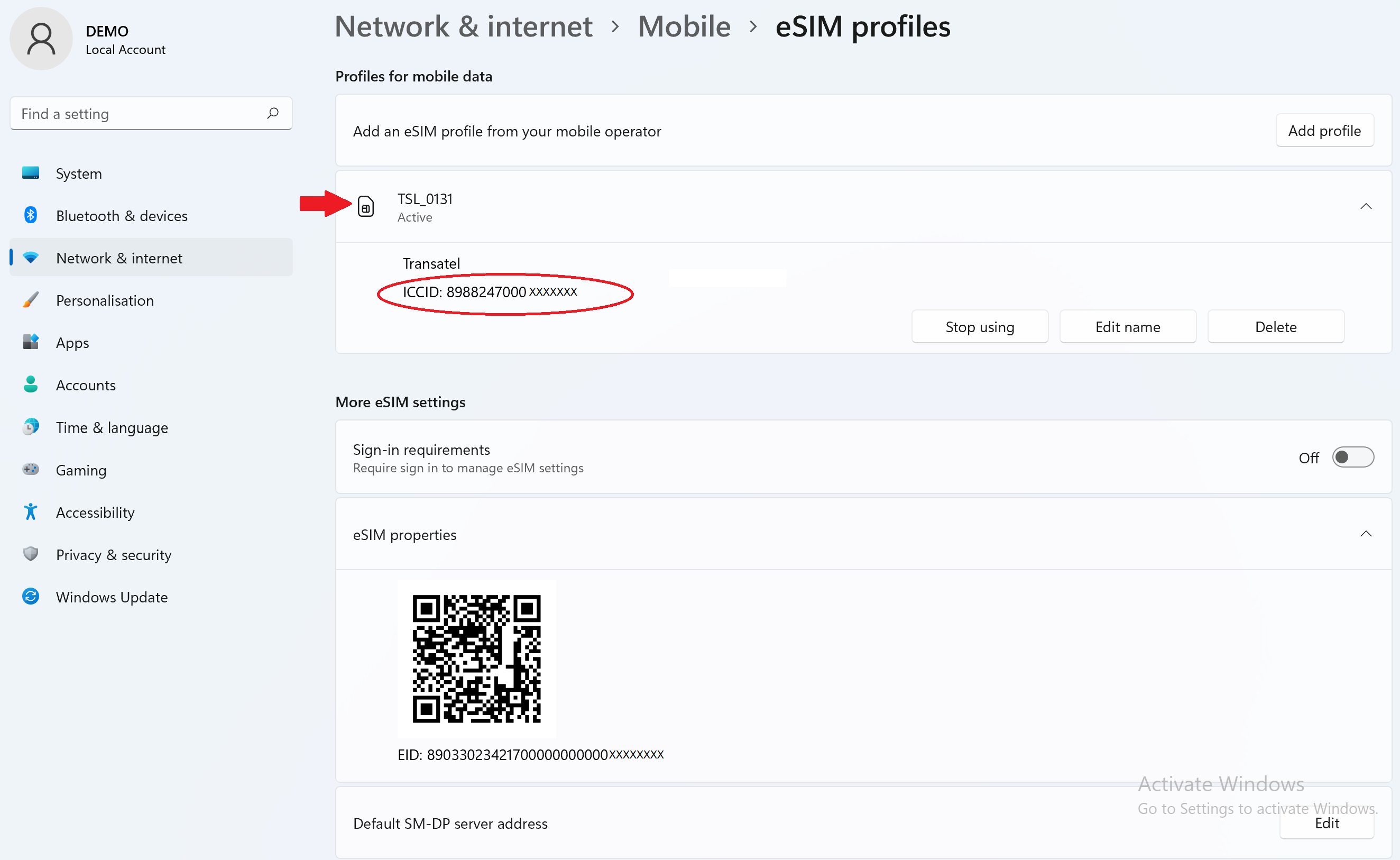
– Klik på profilen for at få vist ICCID-nummeret:
Kontakt
Har du ikke fundet svarene på dine spørgsmål i Hjælp eller OSS?
Har du ikke fundet svarene på dine spørgsmål i Hjælp eller OSS?
Fremragende
Baseret på 47107 anmeldelser på
Verificeret
Verificeret anmeldelse
Denne bruger er blevet identificeret som en køber.
Stable connection
Stable connection
customer, 30 Sep 2026
Verificeret
Verificeret anmeldelse
Denne bruger er blevet identificeret som en køber.
It worked as expected.
It worked as expected.
customer, 30 Sep 2026
Verificeret
Verificeret anmeldelse
Denne bruger er blevet identificeret som en køber.
Occasionally disconnects from data but…
Occasionally disconnects from data but can restore quickly. Overall reliable and smooth connection while travelling in Japan.
customer, 30 Sep 2026
Verificeret
Verificeret anmeldelse
Denne bruger er blevet identificeret som en køber.
Easy to use and very good quality would…
Easy to use and very good quality would recommend
Anthony c, 30 Sep 2026
Verificeret
Verificeret anmeldelse
Denne bruger er blevet identificeret som en køber.
Fantastic experience with Ubigi eSIM
Fantastic experience with Ubigi eSIM. We used in Japan brilliant signal from the start. Easy set up and use. Both my wife and myself had the eSIM and totally worth it. I’ll definitely be using them for every trip away from now on
Martyn Pressdee, 30 Sep 2026
Verificeret
Verificeret anmeldelse
Denne bruger er blevet identificeret som en køber.
Using in in seoul and busan and it’s…
Using in in seoul and busan and it’s perfect. Highly reccomend!
Theo, 30 Sep 2026
Verificeret
Verificeret anmeldelse
Denne bruger er blevet identificeret som en køber.
Easy to use and worked well.
Easy to use and worked well.
customer, 30 Sep 2026
Verificeret
Verificeret anmeldelse
Denne bruger er blevet identificeret som en køber.
I bought an eSIM from Ubigi a couple of…
I bought an eSIM from Ubigi a couple of weeks before I left Australia. It downloaded without a problem. When I arrived in Japan I simply switched off my Telstra eSIM and switched on the Ubigi eSIM. Everything worked instantly and seamlessly.
Paul Sharp, 30 Sep 2026
Verificeret
Verificeret anmeldelse
Denne bruger er blevet identificeret som en køber.
Outstanding e-sim
Outstanding e-sim. Worked well interacted. Loaded in NZ. Did take a few minutes to kick in when we landed in Seoul, but then worked pretty flawlessly. Ubigi app is just elegantly simple. I topped up on the run in seconds. Does exactly what it claims!
customer, 30 Sep 2026
Verificeret
Verificeret anmeldelse
Denne bruger er blevet identificeret som en køber.
A frequent user
I’ve used Ubigi multiple times now. Japan, Australia, and Europe. It has always been reliable and has a wide range of data plans available. It has grown and enhanced its mobile app since I first started using it. Would highly recommend.
Andy, 30 Sep 2026
Verificeret
Verificeret anmeldelse
Denne bruger er blevet identificeret som en køber.
Competitive prices, Easy to use
Easy to use, fair price
Velizar Amov, 30 Sep 2026
Verificeret
Verificeret anmeldelse
Denne bruger er blevet identificeret som en køber.
Never used an eSIM before
Never used an eSIM before and at a stage in life it might be a challenge!!! However - super simple, clear instructions and seamless integration. Also extended cover - app completely straight forward and no inflated additional costs. Thanks
Fabia Bromovsky, 29 Sep 2026
Verificeret
Verificeret anmeldelse
Denne bruger er blevet identificeret som en køber.
Really good connections had no problems using the sim
Great sim. Instant connection and really worked well in turkey
Yogesh Shah, 29 Sep 2026
Verificeret
Verificeret anmeldelse
Denne bruger er blevet identificeret som en køber.
Seamless connectivity
Seamless connectivity
customer, 29 Sep 2026
Verificeret
Verificeret anmeldelse
Denne bruger er blevet identificeret som en køber.
It was very easy to use and did not…
It was very easy to use and did not have any problems using it.
Ana Austin, 29 Sep 2026
Tak
Din besked er blevet sendt. Vi vender tilbage til dig hurtigst muligt.
Tak
Vi har registreret din tilmelding til nyhedsbrevet
Sådan tjekker du eSIM-kompatibilitet
Smartphones / Tablets:
Tast *#06#. → Hvis der vises et EID-nummer, er din enhed eSIM-kompatibel.
Windows 10 / 11:
Tryk på Windows+I. Gå til “Netværk og internet” → Hvis du ser "Mobilnetværk", er din pc eSIM-kompatibel.
Sådan tjekker du operatørlåsen
iPhone / iPad:
Gå til Indstillinger > Generelt > Om. Rul ned til Operatørlås. → Hvis du ser “Ingen SIM-begrænsninger”, er din enhed låst op.
Android:
Gå til Indstillinger > Netværk og internet > Mobilnetværk. Slå Vælg netværk automatisk fra. → Hvis der vises flere netværk, er din enhed låst op.
Du har allerede et eSIM i din kurv.
Hver ordre kan kun indeholde ét eSIM-dataabonnement.
Hvis du vælger at tilføje et nyt, bliver det nuværende abonnement fjernet. Hvad vil du gøre?





 Sådan tjekker du eSIM-kompatibilitet
 Sådan tjekker du operatørlåsen