My Ubigi eSIM profile is installed and active on my Android device, the network is displayed but I don’t have access to the Internet, what should I do?
Important: When you have multiple SIM cards/eSIMs (“plans”) on your phone, it is not possible to activate cellular data on two plans at the same time. You can only apply it to one of them.
You need to verify that Cellular Data is applied to the Ubigi eSIM profile for you to access the Internet. To do that, go to:
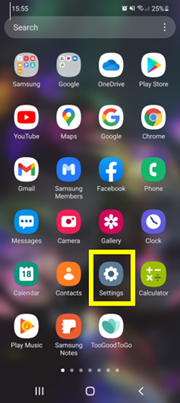
– Go to Settings:
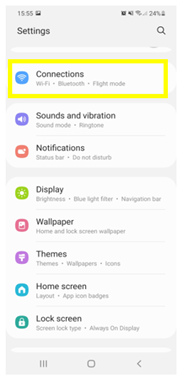
– Then, select Connections:
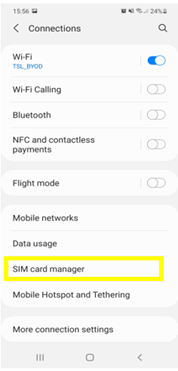
– Then, SIM card manager:
– Go to Mobile data:
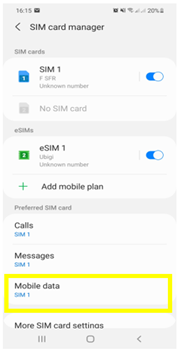
– And apply mobile data to eSIM (Ubigi) and validate :
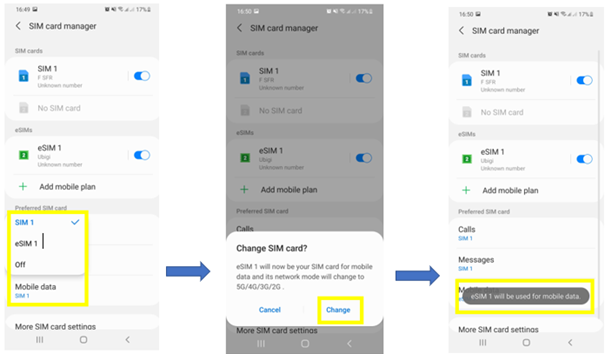
Your phone will now use the mobile data through your Ubigi eSIM.

Contact
You haven’t found the answers to your questions in Assistance or FAQ?
Great
Based on 41989 reviews on
Verified
Verified review
This user has been identified as a buyer
Great to have while abroad!
customer, 23 Jul 2026
Verified
Verified review
This user has been identified as a buyer
Good speed and support despite error at activation
I got an error at activation. The customer support is by mail only, but very reactive. After manual settings, it worked. The network speed in Austria was good.
customer, 23 Jul 2026
Verified
Verified review
This user has been identified as a buyer
Easy to install
Easy to install, good rates, simple the best
Nemanja Subotinovic, 23 Jul 2026
Verified
Verified review
This user has been identified as a buyer
Easy and good!
Easy and good!
customer, 23 Jul 2026
Verified
Verified review
This user has been identified as a buyer
It worked really well
It worked really well. I am please with the service and recomended
L. N, 23 Jul 2026
Verified
Verified review
This user has been identified as a buyer
Easy to purchase and activate on iOS
Easy to purchase and activate on iOS, worked flawlessly after arriving.
Claus Christensen, 23 Jul 2026
Verified
Verified review
This user has been identified as a buyer
Easy to use app and super reliable fast…
Easy to use app and super reliable fast service!!
Dave k, 23 Jul 2026
Verified
Verified review
This user has been identified as a buyer
easy to use
easy to use, really recommendeddd
customer, 23 Jul 2026
Verified
Verified review
This user has been identified as a buyer
Connection was amazing it helped me a…
Connection was amazing it helped me a lot only couple of places that I can’t get the signal but it was a short time. So *****
customer, 23 Jul 2026
Verified
Verified review
This user has been identified as a buyer
Perfection
Perfection
customer, 23 Jul 2026
Verified
Verified review
This user has been identified as a buyer
Good price, coverage and speed
It works! Not crazy expensive, easy to set up and good coverage.
customer, 23 Jul 2026
Verified
Verified review
This user has been identified as a buyer
Worked right away once we landed…
Worked right away once we landed without any problems. Fast connection 5G. Coverage is very good.
Mohamed Baghdady, 23 Jul 2026
Verified
Verified review
This user has been identified as a buyer
Service is just on point
customer, 23 Jul 2026
Verified
Verified review
This user has been identified as a buyer
Very easy to buy and install
Very easy to buy and install. Only grudge was that didn’t have full and clear coverage. Whilst speaking with my son back home I was cutting in and out. And if I was on the beach my texts didn’t send until I was off it for some reason,
Julie Watson, 23 Jul 2026
Verified
Verified review
This user has been identified as a buyer
Good connections
Good connections
Francis , 23 Jul 2026
Thank you
Your message has been sent. We’ll get back to you shortly.
Thank you
We have taken into account your subscription to the newsletter
How to check eSIM compatibility
Smartphones / Tablets:
Dial *#06#. → If an EID number appears, your device is eSIM-compatible.
Windows 10 / 11:
Press Windows+I. Go to “Network & Internet” → If you see "Cellular", your PC is eSIM-compatible.
How to check carrier unlocking
iPhone / iPad:
Go to Settings > General > About. Scroll to Carrier Lock. → If you see “No SIM restrictions”, your device is unlocked.
Android:
Go to Settings > Network & Internet > Mobile network. Disable Automatic network selection. → If multiple networks appear, your device is unlocked.
You already have an eSIM in your cart.
Each order can only include one eSIM data plan.
If you choose to add a new one, the current plan will be removed. What would you like to do?

