Bagaimana saya boleh mencari ICCID (nombor siri) eSIM Ubigi saya?
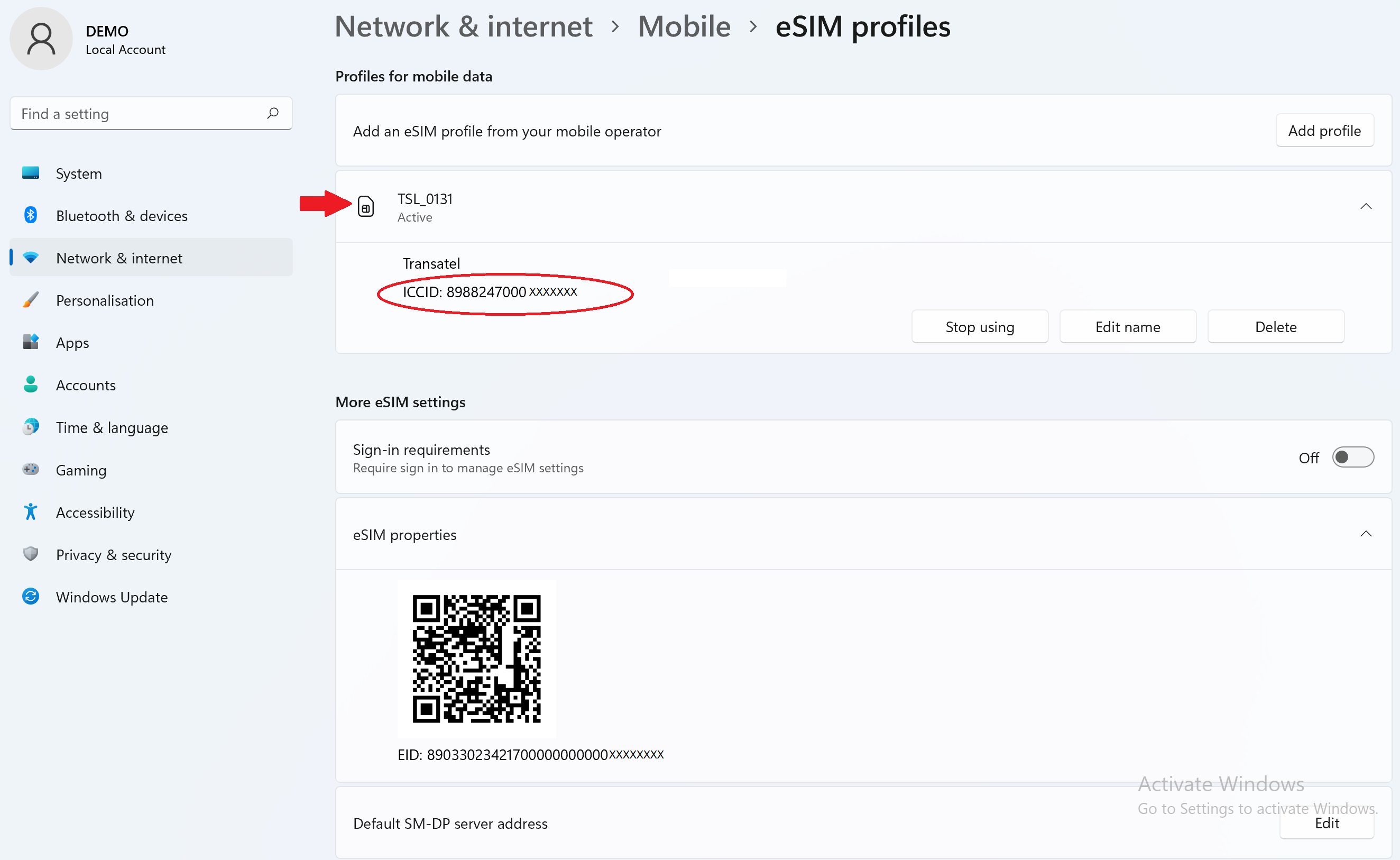
ICCID ialah rujukan yang digunakan untuk mengenal pasti eSIM anda. Ia terdiri daripada 19 digit, bermula dengan “8988247…” .
Ia boleh didapati dalam e-mel asal yang kami hantar kepada anda dengan kod QR Ubigi eSIM.
Ia juga boleh didapati dalam e-mel yang kami hantar kepada anda apabila anda membeli pelan data.
Tetapi jika perlu, anda sentiasa boleh mendapatkannya dalam tetapan peranti anda:
Pada iOS
Pergi ke Tetapan > Umum > Maklumat, dan tatal ke bawah sehingga ke medan “ICCID”. (Hanya ICCID untuk eSIM aktif akan dipaparkan).
Pada Android
Pergi ke Tetapan, kemudian “Tentang telefon”, dan ketuk “Status SIM”. ICCID akan dipaparkan.
Pada Windows 10 ( NB: arahan untuk Windows 11 di bahagian bawah halaman)
Untuk mencari ICCID eSIM anda:
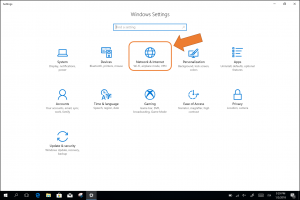
– Pergi ke “Settings”, kemudian “Networks & Internet”:
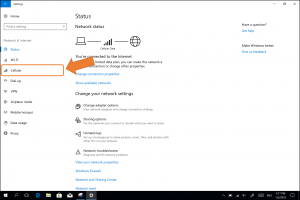
– Pilih “Cellular” dalam menu di sebelah kiri
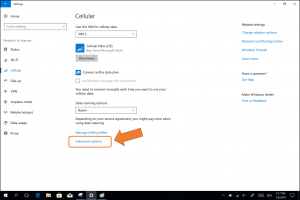
– Klik pada “advanced options”:
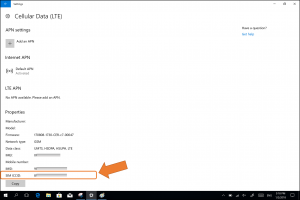
ICCID akan muncul di bahagian bawah (SIM ICCID):
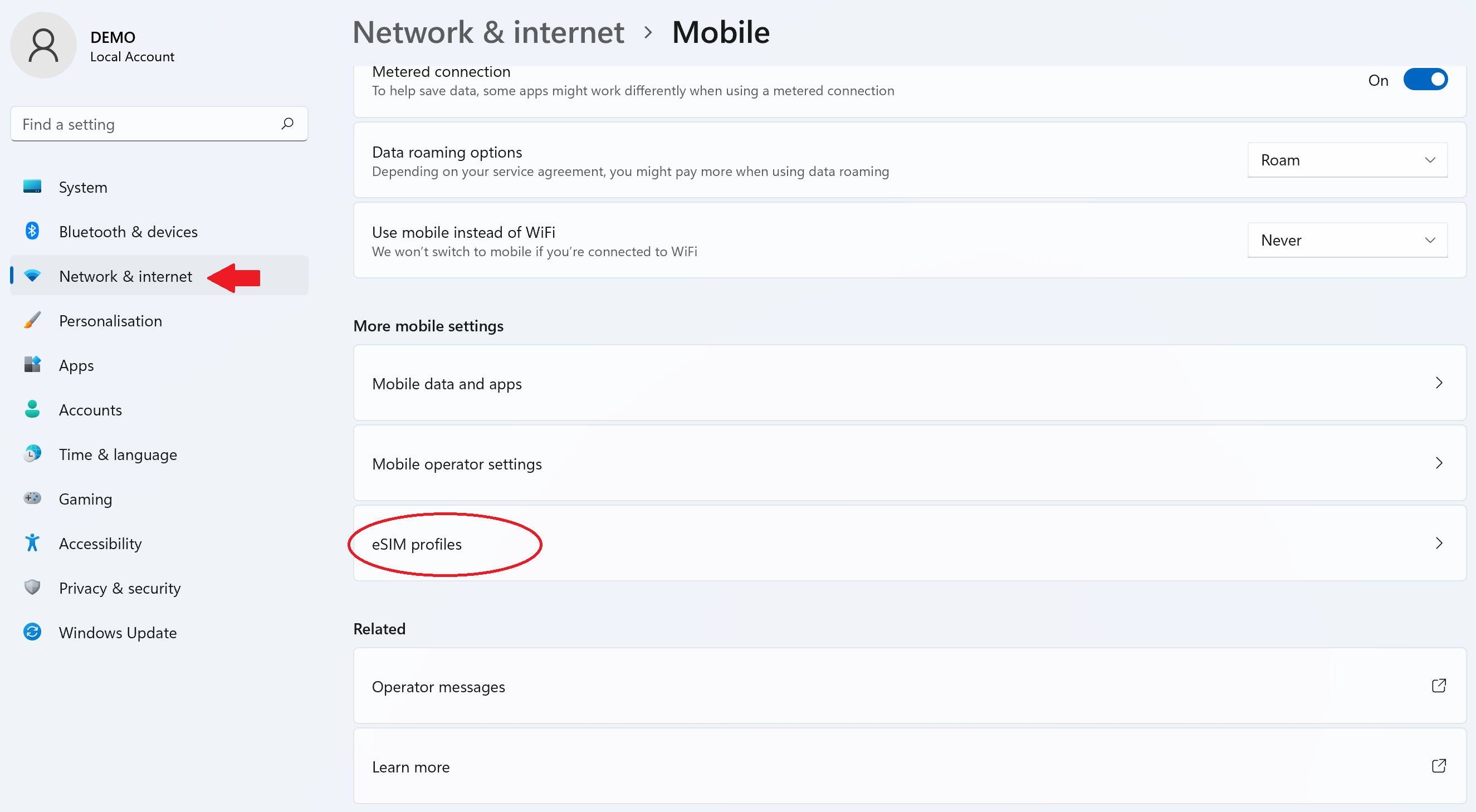
Pada Windows 11:
– Pergi ke Tetapan > Rangkaian dan Internet > Selular kemudian pilih “Profil eSIM”:
– Klik pada profil untuk memaparkan ICCID:
Hubungi
Anda belum menemui jawapan kepada soalan anda dalam Bantuan atau FAQ?
Anda belum menemui jawapan kepada soalan anda dalam Bantuan atau FAQ?
Hebat
Berdasarkan 49936 ulasan sur
Disahkan
Ulasan disahkan
Pengguna ini telah dikenal pasti sebagai pembeli.
So easy to use
So easy to use, great value for money and as soon as we landed in the USA it worked! Also easy to top up the allowance on the App.
MrHappy, 28 Oct 2026
Disahkan
Ulasan disahkan
Pengguna ini telah dikenal pasti sebagai pembeli.
Good speed and easy connection in seoul…
Good speed and easy connection in seoul and japan
Zohaib, 28 Oct 2026
Disahkan
Ulasan disahkan
Pengguna ini telah dikenal pasti sebagai pembeli.
Easy
Easy, straight forward and working! Can't ask for more.
Dorit Lederman, 28 Oct 2026
Disahkan
Ulasan disahkan
Pengguna ini telah dikenal pasti sebagai pembeli.
Perfect eSim to keep me connected with…
Perfect eSim to keep me connected with family back home and navigating directions while exploring new destinations.
customer, 28 Oct 2026
Disahkan
Ulasan disahkan
Pengguna ini telah dikenal pasti sebagai pembeli.
Seemless
Seemless, worked without any issues.
Happy customer, 28 Oct 2026
Disahkan
Ulasan disahkan
Pengguna ini telah dikenal pasti sebagai pembeli.
Very easy to install it was seamless
Very easy to install it was seamless. There were some areas where connection was spotty, but just had to connect to wifi again
customer, 28 Oct 2026
Disahkan
Ulasan disahkan
Pengguna ini telah dikenal pasti sebagai pembeli.
The sim didn’t work
The sim didn’t work
customer, 28 Oct 2026
Disahkan
Ulasan disahkan
Pengguna ini telah dikenal pasti sebagai pembeli.
One of the best decision I have made…
One of the best decision I have made for the foreign trip, the e-SIM experience was awesome without any interruptions in the high traffic areas as well.
Rian Mercer, 28 Oct 2026
Disahkan
Ulasan disahkan
Pengguna ini telah dikenal pasti sebagai pembeli.
User experience
User experience
Customer, 28 Oct 2026
Disahkan
Ulasan disahkan
Pengguna ini telah dikenal pasti sebagai pembeli.
Easy to enroll
Easy to enroll, easy to begin, just what I needed.
customer, 28 Oct 2026
Disahkan
Ulasan disahkan
Pengguna ini telah dikenal pasti sebagai pembeli.
Best ESIM I’ve had overseas
Best ESIM I’ve had overseas. Specially for Japan.
customer, 28 Oct 2026
Disahkan
Ulasan disahkan
Pengguna ini telah dikenal pasti sebagai pembeli.
Best of the Best
Best of the Best, second to none. When it comes to usage in Japan, Ubigi is better than Mobal, Sakura Mobile, Rakuten, trifa and other competitors. I use it with my travel router and I couldn't be happier, I hold 5G connectivity better with them, have never seen signal drops and the Smart IP is a nice feature. Great quality for the price and the ability to top up is very smooth and seamless. Unlimited data plans are also perfect, I would love to have more above the 60GB data cap before the unlimited data speeds changes to 2Mbps but Ubigi is still by far the best! I've always recommended Ubigi to friends and family and will continue to do so.
Anthony, 28 Oct 2026
Disahkan
Ulasan disahkan
Pengguna ini telah dikenal pasti sebagai pembeli.
Seamless
Seamless, straight forward and easy to use. I downloaded it at at the airport before my flight, off of reviews. Don't regret it. Now I get to use it for all my travels.
customer, 28 Oct 2026
Disahkan
Ulasan disahkan
Pengguna ini telah dikenal pasti sebagai pembeli.
It is an amazing book about Mystery of…
It is an amazing book about Mystery of Princess Diana!
The story begins with facts and then swings to dreams, speculations, alternative reality, total craziness. But then the reader realizes that s/he must start from scratch to re-create the story. And the story sometimes is annoying, but fascinating. It is not only a good reading experience but also an experience of shape shifting words inside the story. Great storytelling skills and bravery to go in places where not easy to go.
Read this!
Paul, 28 Oct 2026
Disahkan
Ulasan disahkan
Pengguna ini telah dikenal pasti sebagai pembeli.
It functioned really good
It functioned really good
Uwe Röhricht, 28 Oct 2026
Terima kasih
Mesej anda telah dihantar. Kami akan kembali kepada anda sebentar lagi.
Terima kasih
Kami telah mengambil kira langganan anda kepada buletin.
Cara menyemak keserasian eSIM
Telefon pintar/tablet:
Dial *#06#. → Jika nombor EID muncul, peranti anda serasi dengan eSIM.
Windows 10 / 11:
Tekan Windows+I. Buka Rangkaian & Internet → Jika anda melihat "Cellular", PC anda serasi eSIM.
Cara menyemak pembukaan kunci pembawa
iPhone / iPad:
Pergi ke Tetapan > Am > Berkenaan. Tatal ke Kunci Pengendali. → Jika anda melihat "Tiada sekatan SIM", peranti anda telah dibuka kuncinya.
Android:
Pergi ke Tetapan > Rangkaian & Internet > Rangkaian mudah alih. Lumpuhkan pemilihan rangkaian automatik. → Jika berbilang rangkaian muncul, peranti anda telah dibuka kuncinya.
Anda sudah mempunyai eSIM dalam troli anda.
Setiap pesanan hanya boleh merangkumi satu pelan data eSIM.
Jika anda memilih untuk menambah yang baru, pelan semasa akan dialihkan. Apa yang anda ingin lakukan?




 Cara menyemak keserasian eSIM
 Cara menyemak pembukaan kunci pembawa