다시 사용하고 싶을 때 iPhone에서 Ubigi eSIM 프로필을 활성화하려면 어떻게 해야 하나요?
일시적으로 비활성화한 후 iPhone에서 Ubigi eSIM 프로필을 다시 활성화해야 하는 경우 다음과 같이 하세요:
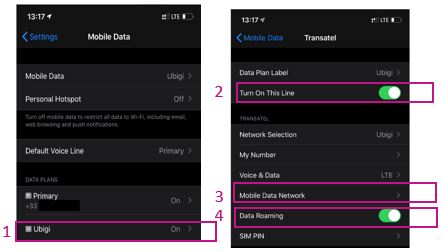
1 – 설정 > 모바일 데이터 > 데이터 요금제에서 Ubigi*(또는 아직 프로필 이름을 변경하지 않은 경우 “보조”)를 선택합니다: 2 – “이 회선 켜기” 옆의 버튼을 눌러 프로필을 활성화합니다. 활성화되면 한 번 돌아가서 프로필로 돌아와 그 아래의 하위 메뉴가 표시되도록 합니다
3 – “모바일 데이터 네트워크” 섹션에서 “셀룰러 데이터”라는 첫 번째 섹션의 “액세스 포인트 이름” 필드에 mbb를 언급합니다(다른 모든 필드는 비워 두세요)
4 – 돌아가서 “데이터 로밍” 옵션을 활성화합니다
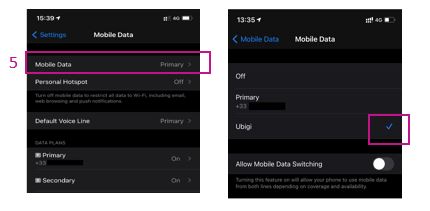
5 – 돌아가서 모바일 데이터 섹션에서 데이터를 Ubigi eSIM 프로필에 적용합니다(또는 아직 프로필 이름을 변경하지 않은 경우 “보조”):
이제 Ubigi eSIM 연결을 사용할 수 있습니다!
(참고: 프로필을 활성화/비활성화하면 이러한 설정이 저장됩니다. 프로필을 삭제하면 모든 설정이 지워집니다.
아래 동영상에서도 해당 지침을 확인할 수 있습니다.
여행 중이거나 사용하지 않을 때는 다시 필요할 때까지 위에서 설명한 대로 간단히 비활성화/재활성화할 수 있으므로절대 삭제하지 않는 것이 좋습니다 .
Great service in every country we visited. Super easy to use. The app notifications were very reassuring!
Nat R, 21 Aug 2026
검증됨
검증된 리뷰
이 사용자는 구매자로 확인되었습니다
worked immediately
worked immediately
customer, 21 Aug 2026
검증됨
검증된 리뷰
이 사용자는 구매자로 확인되었습니다
The eSim was easy to install and use
The eSim was easy to install and use. I did use Ai to make sure I turned off all my normal carrier channels so that I wasn't paying extra on my cell plan.
Family G, 21 Aug 2026
검증됨
검증된 리뷰
이 사용자는 구매자로 확인되었습니다
Ubigi japan
Easy to use, great connectivity, help centre is top notch!
AA, 21 Aug 2026
검증됨
검증된 리뷰
이 사용자는 구매자로 확인되었습니다
Good experience
Good experience
Kamal, 21 Aug 2026
검증됨
검증된 리뷰
이 사용자는 구매자로 확인되었습니다
Works very well
Works very well, including WiFi calling over data line
customer, 21 Aug 2026
검증됨
검증된 리뷰
이 사용자는 구매자로 확인되었습니다
User experience
Smooth usage, no issues since using from day one.
Gnana Krishnanoorthy, 21 Aug 2026
검증됨
검증된 리뷰
이 사용자는 구매자로 확인되었습니다
Good product
Good product
Alexander, 21 Aug 2026
검증됨
검증된 리뷰
이 사용자는 구매자로 확인되었습니다
Easy setup with great coverage.
Easy setup with great coverage.
Michael, 21 Aug 2026
검증됨
검증된 리뷰
이 사용자는 구매자로 확인되었습니다
Second time using Ubigi in Japan
Second time using Ubigi in Japan - both times no issues at all. Fast connection. Highly recommend!
JCChi, 21 Aug 2026
검증됨
검증된 리뷰
이 사용자는 구매자로 확인되었습니다
Great service, but referral policy needs improvement
Overall, I have been very satisfied with Ubigi’s pricing, network quality and reliability.
However, I find the referral program disappointing. Because my very first purchase years ago was made through the website, my existing account is permanently excluded from the program, even though I now purchase plans through the app.
I find it unfortunate that the original purchase channel matters more than customer loyalty. This was also not clear to me when I made my first purchase.
I hope Ubigi will reconsider this policy in the future.
Mark, 21 Aug 2026
검증됨
검증된 리뷰
이 사용자는 구매자로 확인되었습니다
The SIM is perfect for travelling
The SIM is perfect for travelling, highly recommended.
customer, 21 Aug 2026
검증됨
검증된 리뷰
이 사용자는 구매자로 확인되었습니다
Good reception and easy to use.
Good reception and easy to use.
Mel, 21 Aug 2026
검증됨
검증된 리뷰
이 사용자는 구매자로 확인되었습니다
Working great in switzerland
Working great in switzerland
Andre, 21 Aug 2026
검증됨
검증된 리뷰
이 사용자는 구매자로 확인되었습니다
easy installation
easy installation
great reception
Kko, 21 Aug 2026
감사합니다
귀하의 메시지가 전송되었습니다. 곧 답변드리겠습니다.
감사합니다
귀하의 뉴스레터 구독을 고려했습니다.
eSIM 호환성 확인 방법
스마트폰 / 태블릿:
*#06# 입력. → EID 번호가 나오면 eSIM 지원 기기입니다.
Windows 10 / 11:
Windows+I 를 누르세요. “네트워크 및 인터넷”으로 이동하세요 → 셀룰러 네트워크가 보이면 PC가 eSIM을 지원합니다..
통신사 잠금 해제 여부 확인 방법
iPhone / iPad:
설정 > 일반 > 정보로 이동 통신사 잠금 항목까지 스크롤. → “SIM 제한 없음”이 표시되면 기기는 잠금 해제 상태입니다.
Android:
설정 > 네트워크 및 인터넷 > 모바일 네트워크 자동 네트워크 선택을 끄세요. → 여러 네트워크가 보이면 잠금 해제된 기기입니다.





 eSIM 호환성 확인 방법
 통신사 잠금 해제 여부 확인 방법