다시 사용하고 싶을 때 iPhone에서 Ubigi eSIM 프로필을 활성화하려면 어떻게 해야 하나요?
일시적으로 비활성화한 후 iPhone에서 Ubigi eSIM 프로필을 다시 활성화해야 하는 경우 다음과 같이 하세요:
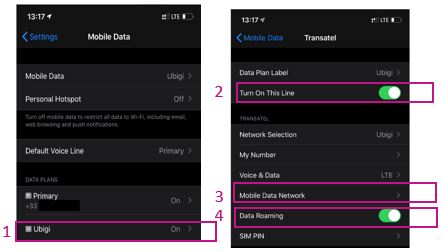
1 – 설정 > 모바일 데이터 > 데이터 요금제에서 Ubigi*(또는 아직 프로필 이름을 변경하지 않은 경우 “보조”)를 선택합니다: 2 – “이 회선 켜기” 옆의 버튼을 눌러 프로필을 활성화합니다. 활성화되면 한 번 돌아가서 프로필로 돌아와 그 아래의 하위 메뉴가 표시되도록 합니다
3 – “모바일 데이터 네트워크” 섹션에서 “셀룰러 데이터”라는 첫 번째 섹션의 “액세스 포인트 이름” 필드에 mbb를 언급합니다(다른 모든 필드는 비워 두세요)
4 – 돌아가서 “데이터 로밍” 옵션을 활성화합니다
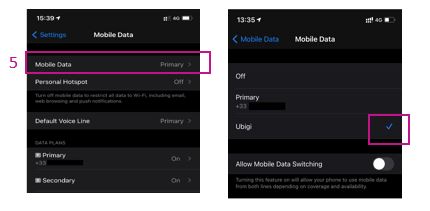
5 – 돌아가서 모바일 데이터 섹션에서 데이터를 Ubigi eSIM 프로필에 적용합니다(또는 아직 프로필 이름을 변경하지 않은 경우 “보조”):
이제 Ubigi eSIM 연결을 사용할 수 있습니다!
(참고: 프로필을 활성화/비활성화하면 이러한 설정이 저장됩니다. 프로필을 삭제하면 모든 설정이 지워집니다.
아래 동영상에서도 해당 지침을 확인할 수 있습니다.
여행 중이거나 사용하지 않을 때는 다시 필요할 때까지 위에서 설명한 대로 간단히 비활성화/재활성화할 수 있으므로절대 삭제하지 않는 것이 좋습니다 .
Easy to set up and use. So far no issues with coverage in rural France
Miss Buckley, 22 Aug 2026
검증됨
검증된 리뷰
이 사용자는 구매자로 확인되었습니다
Excellent reception
Excellent reception
customer, 22 Aug 2026
검증됨
검증된 리뷰
이 사용자는 구매자로 확인되었습니다
It works just fine
It works just fine
caio, 22 Aug 2026
검증됨
검증된 리뷰
이 사용자는 구매자로 확인되었습니다
Very good effective good price
Very good effective good price
I recommended l will use same application in next trip it solve my problem and I can used in Europe countries
Thank you
Sanaa Abbassi, 22 Aug 2026
검증됨
검증된 리뷰
이 사용자는 구매자로 확인되었습니다
very helpful and reliable
very helpful and reliable, better than Verizon eSim.
norair Vertanus, 22 Aug 2026
검증됨
검증된 리뷰
이 사용자는 구매자로 확인되었습니다
Reliable service
Reliable service
customer, 22 Aug 2026
검증됨
검증된 리뷰
이 사용자는 구매자로 확인되었습니다
Easy to set up
Easy to set up, use and reliable.
customer, 22 Aug 2026
검증됨
검증된 리뷰
이 사용자는 구매자로 확인되었습니다
easy and stable good connection
easy, good connection and stable connection.
customer, 22 Aug 2026
검증됨
검증된 리뷰
이 사용자는 구매자로 확인되었습니다
Upon landing the eSim was automatically…
Upon landing the eSim was automatically activated
which was very helpful.
Maria Rosa Meyer, 22 Aug 2026
검증됨
검증된 리뷰
이 사용자는 구매자로 확인되었습니다
Quick response customer service ans…
Quick response customer service ans reliable connection
customer, 22 Aug 2026
검증됨
검증된 리뷰
이 사용자는 구매자로 확인되었습니다
Easy to set up and it's working…
Easy to set up and it's working perfectly!!
Kathryn Weiss, 22 Aug 2026
검증됨
검증된 리뷰
이 사용자는 구매자로 확인되었습니다
Worked perfectly
Worked perfectly, no complaints I would use it again
customer, 22 Aug 2026
검증됨
검증된 리뷰
이 사용자는 구매자로 확인되었습니다
The connection was super strong and…
The connection was super strong and great during my 7 day trip to Japan. Was easy to set up and would definitely recommend and use them again
customer, 22 Aug 2026
검증됨
검증된 리뷰
이 사용자는 구매자로 확인되었습니다
In kansai airport...
In kansai airport.... No good.
customer, 22 Aug 2026
검증됨
검증된 리뷰
이 사용자는 구매자로 확인되었습니다
RELIABLE and saving grace
RELIABLE
I’ve faced many problems with other providers like airlo, Ubigi has been my saving grace. I used it this week as my provider didn't work in Paris, I quickly brought an unlimited package for 1 week. No messing around, you make sure to tick it in settings as a primary mobile data AND BOOM
CONSTANT and reliable connection !!! No disconnect, eveything like public transport ON TIME !! even underground it worked !!!
Jasmine Flowers , 22 Aug 2026
감사합니다
귀하의 메시지가 전송되었습니다. 곧 답변드리겠습니다.
감사합니다
귀하의 뉴스레터 구독을 고려했습니다.
eSIM 호환성 확인 방법
스마트폰 / 태블릿:
*#06# 입력. → EID 번호가 나오면 eSIM 지원 기기입니다.
Windows 10 / 11:
Windows+I 를 누르세요. “네트워크 및 인터넷”으로 이동하세요 → 셀룰러 네트워크가 보이면 PC가 eSIM을 지원합니다..
통신사 잠금 해제 여부 확인 방법
iPhone / iPad:
설정 > 일반 > 정보로 이동 통신사 잠금 항목까지 스크롤. → “SIM 제한 없음”이 표시되면 기기는 잠금 해제 상태입니다.
Android:
설정 > 네트워크 및 인터넷 > 모바일 네트워크 자동 네트워크 선택을 끄세요. → 여러 네트워크가 보이면 잠금 해제된 기기입니다.





 eSIM 호환성 확인 방법
 통신사 잠금 해제 여부 확인 방법