Skip to content
← Back to questions
How can I enable my Ubigi eSIM profile on my iPhone when I want to use it again?


If you need to reactivate your Ubigi eSIM profile on your iPhone after having deactivated it temporarily, go on your device to:

1 – Go to Settings > Mobile Data > in Data plans, choose Ubigi* (or “secondary” if you have not renamed the profile yet):
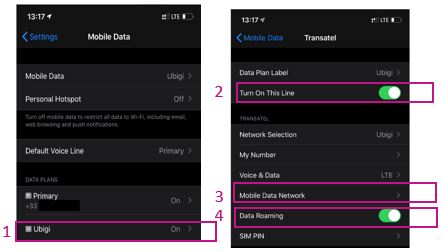
2 – Then press the button next to “Turn on this line” to activate the profile.
Once it is activated, go back once and come back to the profile so that the sub-menus below it are displayed

3 – In the section “Mobile Data Network” > mention mbb in the field “Access Point Name” for the first section named “Cellular Data” (leave all other fields empty)

4 – Go back and activate the “Data Roaming” option

5 – Go back and in the Mobile data section, apply the data to your Ubigi eSIM profile (or “secondary” if you have not renamed the profile yet):
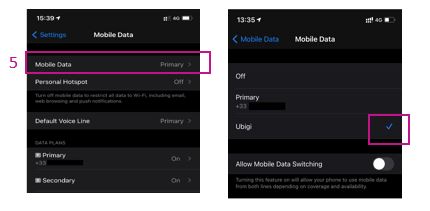

You can now use your Ubigi eSIM connection!

(NB: These settings are stored if you simply activate/deactivate the profile. Everything will be erased if you delete the profile)

You can also find those instructions on the video below.

We recommend you to never delete your Ubigi eSIM when you travel or when you do not use it as you can simply deactivate/reactivate it as described above until you need it again.

For more information about how to manage your eSIM profiles, go to our support page here.

Looking for something specific?

Other frequently asked questions:

Will data latency be impacted by the IP location feature?

Why is my Ubigi connection not working?

For which countries is the IP location feature available?

In which countries is the IP location feature supported?

IP location feature: Do I need to install an additional app to benefit from this feature?

What is the difference between a Country of Residence IP address and a Regional IP address?

Is the IP location feature free?

IP location feature: which devices are supported?

Can I make phone calls with Ubigi eSIM data plans?

I am stuck on the "FINAL STEP" page, and the message "Waiting for Ubigi cellular connectivity" has been displayed for several minutes. How can I resolve this?

I restored my data on my (new) iPhone, but my eSIM profile does not work. What to do?

I am about to travel. How do I manage my Ubigi eSIM profile on my device ?

Resolve an issue with Ubigi eSIM profile on Android device

Resolve an issue with Ubigi eSIM profile on iPhone

iMessage does not work with my Ubigi eSIM profile. What to do ?

How do I know if my Ubigi eSIM profile is activated on my iPhone/iPad?

How to get and install a Ubigi eSIM profile on iPhone?

How to get and install a Ubigi eSIM profile on an Android device?

How to get and install a Ubigi eSIM profile on iPad?

How to get and install a new Ubigi eSIM profile on my Windows 10 or Windows 11 laptop or tablet?

How do I activate my Ubigi services with my Windows 10 or Windows 11 device equipped with a Ubigi physical SIM card?

How do I activate my Ubigi services with my Windows 10 or Windows 11 laptop or tablet equipped with a Ubigi eSIM?

How can I buy a data plan from the Ubigi application on iPhone or iPad?

How can I check if my Ubigi eSIM profile is installed on my iPad?

How do I know if my Ubigi eSIM profile is activated and ready to use on my Android device?

How can I check if my Ubigi eSIM profile is installed on my iPhone?

My Ubigi eSIM profile is installed and active on my iPhone/iPad but I don't have any network displayed, what can I do?

My eSIM Ubigi profile is installed and active on my iPhone/iPad, the network is displayed but I don't have access to the Internet, what should I do?

Mobile data is applied to the Ubigi eSIM profile on my iPhone/iPad but I can't access the internet, what can I do?

How do I know if my Ubigi profile is installed on my Android device?

My Ubigi eSIM profile is installed and active on my Android device but I don’t have any network displayed, what can I do?

I can not connect with my Ubigi eSIM

My Ubigi eSIM profile is installed and active on my Android device, the network is displayed but I don’t have access to the Internet, what should I do?

Mobile data is applied to the Ubigi eSIM profile on my Android device, but impossible to access the internet, what can I do?

Which mobile devices support Ubigi eSIM?

How do I know if my Ubigi eSIM profile is activated on my Windows 10 or Windows 11 device?

What is a one-off and a recurring Ubigi data plans?

How do I check the APN configuration of my Ubigi eSIM on Windows 10 or Windows 11?

My Ubigi eSIM profile is activated on my Windows 10 or Windows 11 device but I do not have a network, what should I do?

What is the best way to contact Ubigi support?

How to use Ubigi with a dual SIM device?

How to use tethering with a Windows 10 or Windows 11 device to share the Ubigi connectivity?

How to use tethering with an iPhone/iPad to share the Ubigi connectivity?

How to use tethering with an Android device to share the Ubigi connectivity?

I did not use my Ubigi data plan, can I get a refund?

My device does not show "Ubigi" as carrier name, is it normal?

How can I find the ICCID of my Ubigi eSIM?

How to set the APN for Ubigi eSIM?

The Ubigi antenna pictogram is not displayed in Japan, why?

How to reset my password for my Ubigi eSIM account?

How can I create my Ubigi account on iPad?

How can I create my Ubigi account on an Android device?

How can I create my Ubigi account on a Windows 10 or Windows 11 device?

How can I create my Ubigi account on iPhone?

How can I change my Ubigi password?

How can I check the remaining balance of my Ubigi eSIM?

How to delete my Ubigi account?

How can I buy a data plan from the Ubigi application on an Android device?

How can I buy a data plan from the Ubigi application by using a Windows 10 or Windows 11 device?

Do I need Wi-Fi to purchase a Ubigi data plan?

I paid for a Ubigi data plan but it does not appear in my account, what should I do?

I purchased the wrong data plan and did not use it, how can I change it?

How to get an invoice for my Ubigi data plan purchase?

I do not get the “eSIM – Mobile Data in my device” button on my iPad to install my Ubigi profile. Why and what should I do?

How to reinstall the Ubigi eSIM profile I deleted on my Windows 10 or Windows 11 device?

Does my Ubigi eSIM profile have a validity period and will expire one day?

I have a new Windows10 device. How can I reinstall my Ubigi eSIM profile on it?

I lost my device. How can I block my Ubigi eSIM account?

How can I disable my Ubigi eSIM on my iPhone when I travel or when I do not use it?

I have multiple  Ubigi eSIM profiles. Can I manage them all under one Ubigi account?

How can I enable my Ubigi eSIM profile on my iPad when I want to use it again?

How can I disable my Ubigi eSIM profile on my iPad when I travel or when I do not use it?

How can I disable my Ubigi eSIM on my Android device when I travel or when I do not use it?

How can I enable my Ubigi eSIM on my Android device when I want to use it again?

How to delete a Ubigi eSIM profile on iPhone/iPad?

How to delete a Ubigi eSIM profile on an Android device?

How to delete a Ubigi eSIM profile on a Windows 10 or Windows 11 device ?

How can I find PIN, PIN2 or PUK codes for my Ubigi eSIM?

Ubigi connection is not working. Should I disable any active DNS or VPN on my device?

Great Trustpilot stars Trustpilot
Trustpilot stars
Based on 41144 reviews on Trustpilot
5 stars Verified
Verified review
This user has been identified as a buyer
Provided exactly what we needed.
The service worked great and set up was quick and straightforward.
Jayson Kilcoyne, 11 Jul 2026
5 stars Verified
Verified review
This user has been identified as a buyer
best value for price
customer, 11 Jul 2026
4 stars Verified
Verified review
This user has been identified as a buyer
It doesn't work for phone numbers.
It only gives the Internet. Overall it was easy to install, easy to use. I didn't have any problems.
customer, 11 Jul 2026
5 stars Verified
Verified review
This user has been identified as a buyer
Fast easy to us
Fast easy to us
Lam, 11 Jul 2026
5 stars Verified
Verified review
This user has been identified as a buyer
tres simple d utilisation
customer, 11 Jul 2026
5 stars Verified
Verified review
This user has been identified as a buyer
Fast speed and excellent connection
Michael, 11 Jul 2026
5 stars Verified
Verified review
This user has been identified as a buyer
Easy To Set Up
Easy to set up, connection was good/fast. I was able to use the app to check my remaining data balance.
Miso, 11 Jul 2026
5 stars Verified
Verified review
This user has been identified as a buyer
Purchased a Europe Extended plan for…
Purchased a Europe Extended plan for Iceland and France. Ot has been so easy to install, use, and monitor my data usage. I've had service everywhere I've wanted it! Last time I came to France I relied on my cellphone companies international plan and that was a big mistake. Ubigi has been such an upgrade.
Robbie, 11 Jul 2026
5 stars Verified
Verified review
This user has been identified as a buyer
Fast and reliable
Excellent, seamless experience. Used in Japan and the connection was stable and fast throughout my 2 weeks there. Very easy to set up and activate.
Ary, 11 Jul 2026
5 stars Verified
Verified review
This user has been identified as a buyer
Worked as expected
Worked as expected. No surprises, no issues. Mostly around Tokyo and Kamakura and Yokohama.
customer, 11 Jul 2026
5 stars Verified
Verified review
This user has been identified as a buyer
Servicee was clear and understandable.
customer, 11 Jul 2026
5 stars Verified
Verified review
This user has been identified as a buyer
Infinite data !!
Infinite data !!! 🙂
customer, 11 Jul 2026
5 stars Verified
Verified review
This user has been identified as a buyer
Great easy to use app
Great easy to use app, value for money service.
Sunny Jim, 11 Jul 2026
5 stars Verified
Verified review
This user has been identified as a buyer
Easy and Continuous Connection
I connected easily as I arrived to airport and had no connection problem throughout Japan
Arman, 11 Jul 2026
5 stars Verified
Verified review
This user has been identified as a buyer
Good quality and smooth conecting to…
Good quality and smooth conecting to interneet world
Harryken, 11 Jul 2026

Your message has been sent.
We’ll get back to you shortly.

We have taken into account your subscription to the newsletter

