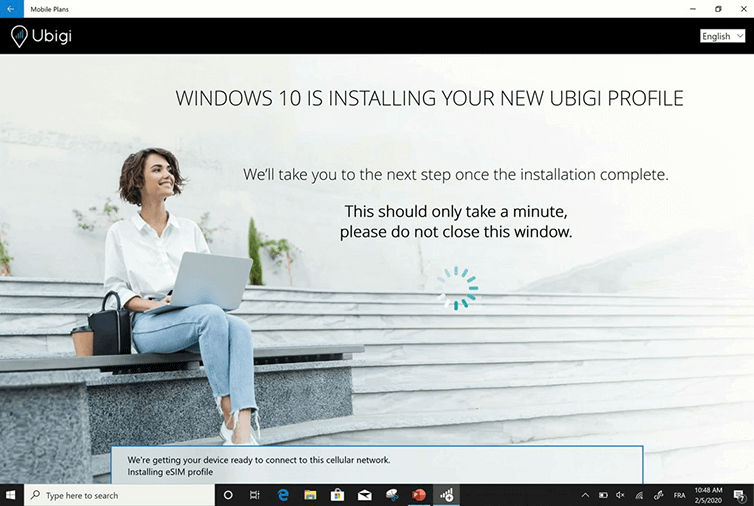
The installation of your profile starts automatically!
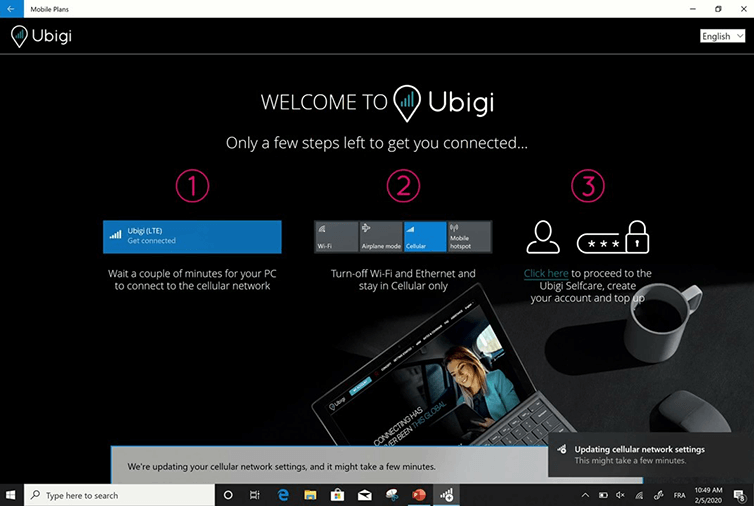
Your Ubigi eSIM profile is now installed!
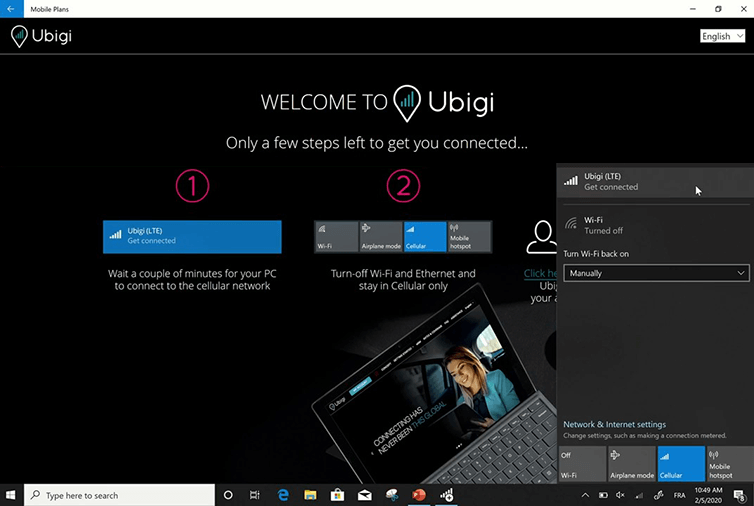
Wait a few seconds until your SIM has attached to the cellular network
Then switch off Wi-Fi and stay in Cellular mode only Click on “Ubigi (LTE) Get Connected”
Great
Based on 31272 reviews on
Verified
Verified review
This user has been identified as a buyer
Overall great experience
Overall great experience. Very easy to setup. No Signal a few times.
customer, 10 Feb 2026
Verified
Verified review
This user has been identified as a buyer
Easy app and easy renewal
Easy app and easy renewal . Don’t like USD default value and would be better served by local currency or home currency amounts for pricing
BG, 10 Feb 2026
Verified
Verified review
This user has been identified as a buyer
Great price
Great price, easy to install.
I am successfully using esim in London UK as stop gap measure until my monthly mobile data renews.
a shah, 10 Feb 2026
Verified
Verified review
This user has been identified as a buyer
Easy to use
Easy to use. Great connection. Smooth activation process.
customer, 10 Feb 2026
Verified
Verified review
This user has been identified as a buyer
Easy to install and use
Very easy to install, worked great for my week in Tokyo, great value, would definitely use Ubigi again on my next Trip.
Stephen, 10 Feb 2026
Verified
Verified review
This user has been identified as a buyer
Easy to install and set up
Easy to install and set up. I was able to use almost immediately after landing in Vietnam. Will use again when travelling overseas.
customer, 10 Feb 2026
Verified
Verified review
This user has been identified as a buyer
I had internet even in the subway in…
I had internet even in the subway in Japan. Great service
customer, 10 Feb 2026
Verified
Verified review
This user has been identified as a buyer
Just great
Just great. Always worked and i had 5g, rarely LTE, overall just great!
customer, 09 Feb 2026
Verified
Verified review
This user has been identified as a buyer
To activate, need to be able to access your home country network while traveling
To use Ubigi it appears that you need to be able to access your home country network from a country that you are traveling to. Hopefully you can do this via WiFi, because if you could do it using cellular, you would not be buying Ubigi. Perhaps this was more an issues of the settings on my iPhone than Ubigi--I can't tell--but the activation of the Ubigi eSIM required being in the country where I was going to use the eSIM, and at the same time being able to connect to the network of my home country. It took a while and some terror on my part, but within half an hour or an hour I got the Ubigi eSIM working.
concerned traveler, 09 Feb 2026
Verified
Verified review
This user has been identified as a buyer
Great coverage in Mexico
Picked up a ubigi esim for both my wife and myself during a trip to Cancun. The coverage was excellent the whole time.
LondonDave, 09 Feb 2026
Verified
Verified review
This user has been identified as a buyer
Used Ubigi in Vietnam this and last…
Used Ubigi in Vietnam this and last year never a problem
SA, 09 Feb 2026
Verified
Verified review
This user has been identified as a buyer
Great service during my trip.
Great service during my trip.
customer, 09 Feb 2026
Verified
Verified review
This user has been identified as a buyer
Efficient and quick
Straightforward instructions and instant connection on arrival at my destination.
Susie, 09 Feb 2026
Verified
Verified review
This user has been identified as a buyer
Easy setup & use.
Easy setup & use.
David, 09 Feb 2026
Verified
Verified review
This user has been identified as a buyer
Worked great all across Japan for me
Worked great all across Japan for me
B Norman, 09 Feb 2026
Thank you
Your message has been sent. We’ll get back to you shortly.
Thank you
We have taken into account your subscription to the newsletter
How to check eSIM compatibility
Smartphones / Tablets:
Dial *#06#. → If an EID number appears, your device is eSIM-compatible.
Windows 10 / 11:
Press Windows+I. Go to “Network & Internet” → If you see "Cellular", your PC is eSIM-compatible.
How to check carrier unlocking
iPhone / iPad:
Go to Settings > General > About. Scroll to Carrier Lock. → If you see “No SIM restrictions”, your device is unlocked.
Android:
Go to Settings > Network & Internet > Mobile network. Disable Automatic network selection. → If multiple networks appear, your device is unlocked.
You already have an eSIM in your cart.
Each order can only include one eSIM data plan.
If you choose to add a new one, the current plan will be removed. What would you like to do?










 How to check eSIM compatibility
 How to check carrier unlocking