Suriin kung naka-install ang iyong eSIM profile ay naka-install sa iyong device.
Suriin ang eSIM aktibasyon ng profile
Suriin kung naka-aktibo ang iyong eSIM profile ay naka-aktibo sa iyong device.
I-apply ang data sa eSIM profile
Siguraduhing na-apply ang data sa iyong Ubigi eSIM profile.
Suriin ang konfigurasyon ng APN
Siguraduhin na ang APN ay tama ang pag-set up para sa ang iyong koneksyon sa Ubigi.
Suriin ang display ng network
Suriin ang katayuan ng network para sa iyong koneksyon sa Ubigi.
Panghuling pagsusuri!
Suriin ang account paglikha at Pag-access sa Internet.
Pagkatapos, kailangan mo na ngayong suriin kung naka-aktibo na ang iyong eSIM profile sa iyong device.
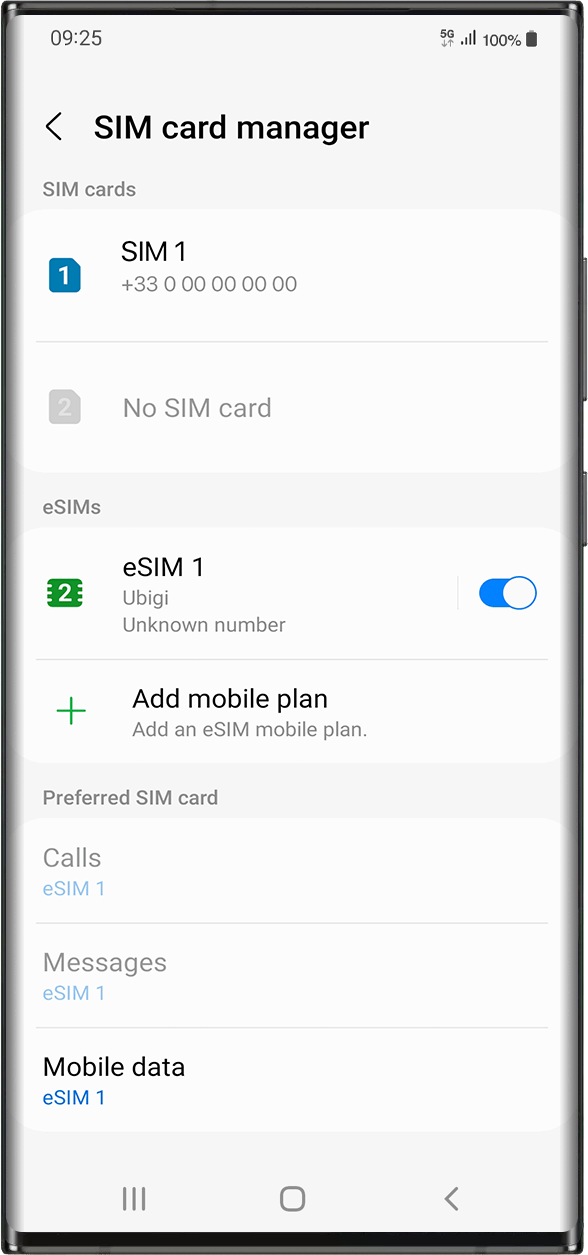
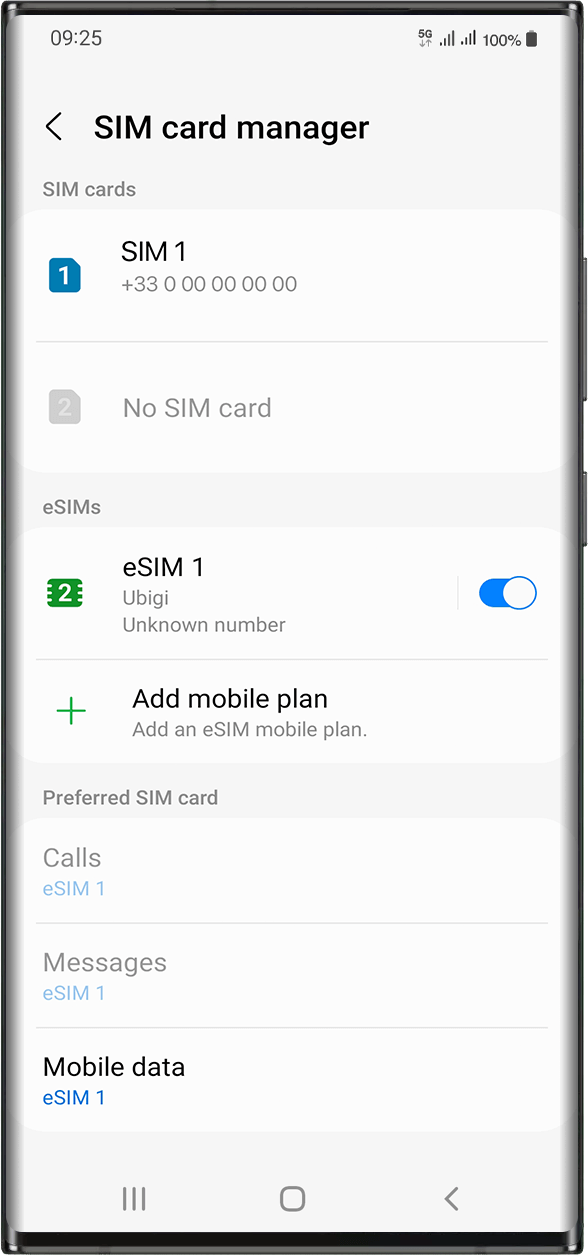
Pumunta sa: Mga Setting > Mga Koneksyon > sa ilalim ng eSIMs, piliin ang naka-install na eSIM profile (lumalabas bilang “eSIM1, eSIM2,…” o sa ilalim ng pangalang binago mo).
I-activate ang profile sa pamamagitan ng pagpindot ng button sa kanan para i-on ito(magiging asul).
Kapag na-activate na ang iyong profile, lilitaw ang dobleng signal ng network sa itaas ng iyong screen.
Tandaan: lilitaw lamang ang dobleng network signal kung mayroon ka ring pisikal na SIM card na naka-install sa iyong device.
Magaling
Batay sa 47821 na mga pagsusuri sur
Na-verify
Na-verify na review
Ang user na ito ay kinilala bilang mamimili.
Ease of use and fair consumption of…
Ease of use and fair consumption of data. Note: Please add Arabic to the interface for easy dealing and attracting many customers
Samy Elshaarawy, 07 Oct 2026
Na-verify
Na-verify na review
Ang user na ito ay kinilala bilang mamimili.
Really easy to use in japan
Really easy to use in japan
Tim, 07 Oct 2026
Na-verify
Na-verify na review
Ang user na ito ay kinilala bilang mamimili.
Great connectivity and ease of installation
1. It is very to install the e-sim and it works as soon as you arrive.
2. We traveled for 14 days in India and we had pretty good connections all the time, except in a few areas such as the Sariska tiger reserve where no connection was possible for any providers.
3. I had unlimited data for the duration of my stay and it was perfect as I had to upload/download very heavy files.
DIDIER, 07 Oct 2026
Na-verify
Na-verify na review
Ang user na ito ay kinilala bilang mamimili.
Super network
Super network. It worked well in the Shinkansen (Bullet Train) even worked well on Mt Fuji.
customer, 07 Oct 2026
Na-verify
Na-verify na review
Ang user na ito ay kinilala bilang mamimili.
Many thanks..
Many thanks..
customer, 07 Oct 2026
Na-verify
Na-verify na review
Ang user na ito ay kinilala bilang mamimili.
I had issues setting it up on Nothing…
I had issues setting it up on Nothing (3) phone. There was no Chinese Telecom network available on manual network selection, and automatic network selection did not work. I got no useful support from ubigi. I noticed that once connected, the signal bars disappear after a few seconds, followed by no network. I managed to connect by turning ESiM off then on, and quicky switching off the automatic network selection before the signal bars disappeared. Once that was done, everything worked great!
AS, 07 Oct 2026
Na-verify
Na-verify na review
Ang user na ito ay kinilala bilang mamimili.
Bloody marvellous
Bloody marvellous
Ryan McEnoy, 07 Oct 2026
Na-verify
Na-verify na review
Ang user na ito ay kinilala bilang mamimili.
Great coverage and easy set up!
Great coverage and easy set up!
Helen OZ, 07 Oct 2026
Na-verify
Na-verify na review
Ang user na ito ay kinilala bilang mamimili.
Using Ubigi esim for two weeks overseas
Joining Ubigi esim was quite easy. I appreciated the communication between me and the company. My communications and calls using Whatsapp went well.
I was happy with my experience with this esim company.
Marie-Louise, 07 Oct 2026
Na-verify
Na-verify na review
Ang user na ito ay kinilala bilang mamimili.
Great
Great. Everything like said.
Me, 07 Oct 2026
Na-verify
Na-verify na review
Ang user na ito ay kinilala bilang mamimili.
Service was ok
Service was ok. No drops
Elvis, 07 Oct 2026
Na-verify
Na-verify na review
Ang user na ito ay kinilala bilang mamimili.
Very simple to use and I had no…
Very simple to use and I had no problems in Japan. Love it.
Mark Brewer, 07 Oct 2026
Na-verify
Na-verify na review
Ang user na ito ay kinilala bilang mamimili.
Very easy to install and use
Very easy to install and use. The esim automaticly started when I arrive to my destiny
customer, 07 Oct 2026
Na-verify
Na-verify na review
Ang user na ito ay kinilala bilang mamimili.
This is my second go with ubigi in…
This is my second go with ubigi in Japan in the last year. First time the esim didn't work because of an unspecified Android update issue. We resolved it, but they're was no CS guidance to fix. This time this issue was there was no explanation when I purchased this esim that the first one was no longer active. I had been under the impression that it just been recharged when the purchase was made. Again very little CS guidance on how to fix, thank God for hotel wifi. Service is good once established, bit getting to that point had been a repeated challenge.
Matthew, 07 Oct 2026
Na-verify
Na-verify na review
Ang user na ito ay kinilala bilang mamimili.
Worked good.
Five of us traveled to Portugal, but mine was the only phone that worked—thanks to Ubigi.
Helena, 07 Oct 2026
Salamat
Naipadala na ang iyong mensahe. Makikipag-ugnayan kami sa iyo sa lalong madaling panahon.
Salamat
Isinasaalang-alang na namin ang iyong pag-subscribe sa newsletter.
Palitan ng bagong plano
Mga smartphone/mga tablet:
I-dial ang *#06#. → Kung lumitaw ang isang EID na numero, eSIM-compatible ang iyong aparato.
Windows 10 / 11:
Pindutin ang Windows+I. Pumunta sa "Network at Internet" → Kung nakikita mo ang "Cellular", eSIM-compatible ang iyong PC.
Paano suriin ang pag-unlock ng carrier
iPhone / iPad:
Pumunta sa Mga Setting > Pangkalahatan > Tungkol sa Mag-scroll sa Carrier Lock. → Kung makikita mo ang Walang mga paghihigpit sa SIM, naka-unlock ang iyong aparato.
Android:
Pumunta sa Mga Setting > Network at Internet > Mobile network. I-disable ang Awtomatikong pagpili ng network. → Kung lumalabas ang maraming network, naka-unlock ang iyong device.
Mayroon ka nang eSIM sa iyong cart.
Bawat order ay maaari lamang maglaman ng isang eSIM data plan.
Kung pipiliin mong magdagdag ng bago, matatanggal ang kasalukuyang plano. Ano ang nais mong gawin?








 Palitan ng bagong plano
  Paano suriin ang pag-unlock ng carrier