eSIM Ubigi profilim iPhone/iPad’imde yüklü ve etkin, ağ görüntüleniyor ancak İnternet erişimim yok, ne yapmalıyım?
Önemli: iPhone/iPad’inizde birden fazla SIM kart/eSIM (“plan”) varsa, hücresel veriyi aynı anda iki plan üzerinde etkinleştirmek mümkün değildir. Sadece birine uygulayabilirsiniz.
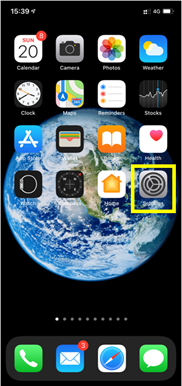
İnternete erişebilmeniz için Hücresel Verinin Ubigi eSIM profiline uygulandığını doğrulamanız gerekir. Bunu yapmak için şu adrese gidin:
– Ayarlar:
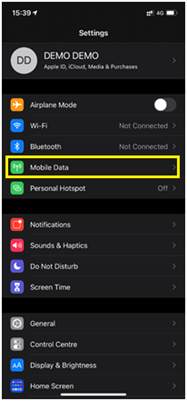
– Ardından, Mobil Veri’yi seçin:
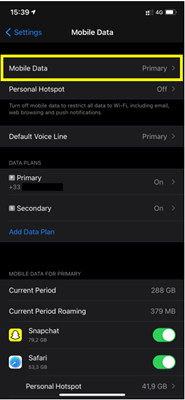
– Ardından, Mobil veri’yi tekrar seçin:
– Son olarak Hücresel Veri’ye girin ve “ikincil “i seçin:
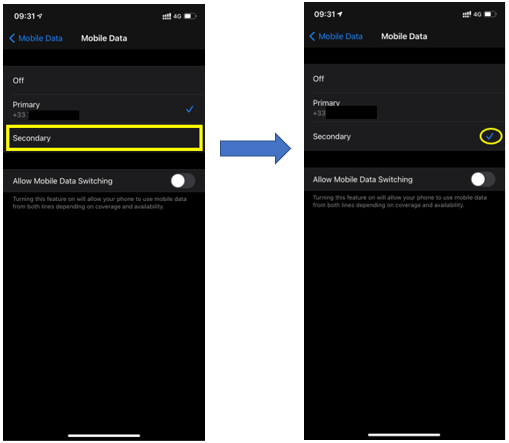
iPhone/iPad’iniz artık Ubigi eSIM profilinizdeki hücresel veri bağlantısını kullanacak ve onunla İnternet’e erişebileceksiniz.

Temas etmek
Sorularınızın yanıtlarını Yardım veya SSS bölümünde bulamadınız mı?
Harika
'ta 29721 yorum temel alınarak
Doğrulanmış
Doğrulanmış yorum
Bu kullanıcı alıcı olarak tanımlanmıştır.
Easy to use
Easy to use. Great experience and good price.
Patti Atwood, 13 Dec 2025
Doğrulanmış
Doğrulanmış yorum
Bu kullanıcı alıcı olarak tanımlanmıştır.
Good Value , Good Coverage
So far for my Japan trip, I have had great internet for my stay. No dropouts, good coverage, reliable!
BILLY, 13 Dec 2025
Doğrulanmış
Doğrulanmış yorum
Bu kullanıcı alıcı olarak tanımlanmıştır.
Old person here...took a while to sort…
Old person here...took a while to sort it out as I had never used an esim before. Once I had it going properly it has been great.
Kris Kowitz, 13 Dec 2025
Doğrulanmış
Doğrulanmış yorum
Bu kullanıcı alıcı olarak tanımlanmıştır.
It’s easy to use and it works the…
It’s easy to use and it works the moment I land wherever I am
customer, 13 Dec 2025
Doğrulanmış
Doğrulanmış yorum
Bu kullanıcı alıcı olarak tanımlanmıştır.
It was perfect
It was perfect
It started when i needed it to and ended when it was time.
Made my time in japan a breeze. Will use ubigi again without a doubt
Alan Nguyen, 13 Dec 2025
Doğrulanmış
Doğrulanmış yorum
Bu kullanıcı alıcı olarak tanımlanmıştır.
Have used their service for multiple…
Have used their service for multiple countries now. Have had no issues with them
Ewan Douglas, 13 Dec 2025
Doğrulanmış
Doğrulanmış yorum
Bu kullanıcı alıcı olarak tanımlanmıştır.
eSIM in Taipei Taiwan
On my trip to Taipei Taiwan, I used the eSIM app to purchase cellular data for my iPhone. It was a seamless process through the app to set up exactly what I needed and purchase the eSIM prior to my trip. Upon arrival, I was able to turn on the service using the hotel WiFi. (Or I could have used the airport WiFi) I f needed, I could have easily added more data through the app. All around an easy and reliable way to set up phone service while traveling.
Lani A., 13 Dec 2025
Doğrulanmış
Doğrulanmış yorum
Bu kullanıcı alıcı olarak tanımlanmıştır.
Easy to setup
Easy to setup
Fay, 13 Dec 2025
Doğrulanmış
Doğrulanmış yorum
Bu kullanıcı alıcı olarak tanımlanmıştır.
Great coverage so far.
customer, 13 Dec 2025
Doğrulanmış
Doğrulanmış yorum
Bu kullanıcı alıcı olarak tanımlanmıştır.
The app was easy to install
The app was easy to install. I was travelling from USA to Japan. I got the 15 day unlimited package before i left US and the best thing is it was easy to activate the esim when i landed in Tokyo.
Had no problems with data or using internet. Could make whatsapp call but had no real tel number and regular calls could not be made. this was not a issue
customer, 13 Dec 2025
Doğrulanmış
Doğrulanmış yorum
Bu kullanıcı alıcı olarak tanımlanmıştır.
Really simple to set up and use
Really simple to set up and use. I’ve used Ubigi for traveling from USA to Taiwan and Japan and it was fine both times. I wish we had more customizable plans though.
S Moh, 13 Dec 2025
Doğrulanmış
Doğrulanmış yorum
Bu kullanıcı alıcı olarak tanımlanmıştır.
Clear and easy
Clear and easy. No hassle! No hiccups. So glad I went with Ubigi for eSIM - would definitely do that again and again!
Heidi Piovoso, 13 Dec 2025
Doğrulanmış
Doğrulanmış yorum
Bu kullanıcı alıcı olarak tanımlanmıştır.
Easy to Use for a Good Price
Was easy to use and activate, very effortless. Once it was set up, I could use it with ease. I turned it on in Japan and it worked immediately, I liked the price as it was good for the data I bought. If you use a moderate amount of data, 15 was just enough for 3 weeks. I spent most of the time using it to research places, would use hotel wi-fi when I could, and didn't watch videos or used data heavy websites.
Aspen Machado, 13 Dec 2025
Doğrulanmış
Doğrulanmış yorum
Bu kullanıcı alıcı olarak tanımlanmıştır.
Great coverage with no issues
First time eSim user. Easy to use and no issues in countries with the coverage purchase.
Dave Chin, 13 Dec 2025
Doğrulanmış
Doğrulanmış yorum
Bu kullanıcı alıcı olarak tanımlanmıştır.
Great experience
Great experience
Carla S, 13 Dec 2025
Teşekkür ederim
Mesajınız gönderildi. En kısa sürede size geri döneceğiz.
Teşekkür ederim
Bülten aboneliğinizi dikkate aldık
eSIM uyumluluğu nasıl kontrol edilir
Akıllı telefonlar / Tabletler:
*#06# tuşlayın. → Bir EID numarası görünürse cihazınız eSIM ile uyumludur.
Windows 10 / 11:
Windows+I tuşlarına basın. “Ağ ve İnternet” bölümüne gidin → Hücresel ağ görünüyorsa PC’niz eSIM uyumludur.
Operatör kilidi nasıl kontrol edilir
iPhone / iPad:
Ayarlar > Genel > Hakkında bölümüne gidin. Operatör Kilidi alanına inin. → “SIM kısıtlaması yok” yazıyorsa cihazınız kilitsizdir.
Android:
Ayarlar > Ağ ve İnternet > Mobil ağ. Otomatik ağ seçimini kapatın. → Birden fazla ağ görünüyorsa cihazınız kilitsizdir.
Sepetinizde zaten bir eSIM var.
Her sipariş yalnızca bir eSIM veri planı içerebilir.
Yeni bir plan eklemeyi seçerseniz, mevcut plan kaldırılacaktır. Ne yapmak istersiniz?

