Hur kan jag inaktivera min Ubigi eSIM-profil på min iPhone när jag reser eller när jag inte använder den?
Så här inaktiverar du tillfälligt ditt Ubigi eSIM:
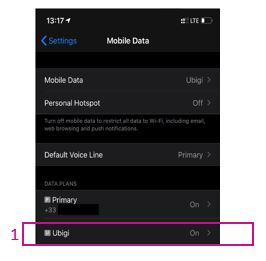
1 – Gå till Inställningar > Mobildata och välj sedan din Ubigi eSIM-profil (eller ”Sekundär” om du inte har bytt namn på profilen ännu).
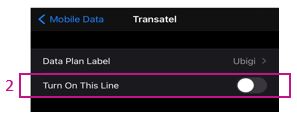
2 – Stäng av reglaget bredvid ”Aktivera denna linje” för att inaktivera profilen (reglaget blir då grått). Din eSIM-profil är nu inaktiverad.
Du kan också hitta dessa instruktioner i videon nedan.
Vi rekommenderar att du inte raderar ditt Ubigi eSIM när du reser eller när du inte använder det. Du kan helt enkelt inaktivera och återaktivera det enligt beskrivningen ovan när du behöver det igen.
För mer information om hur du hanterar dina eSIM-profiler, besök vår supportsida.
Kontakt
Du har inte hittat svaren på dina frågor i Assistans eller FAQ?
Du har inte hittat svaren på dina frågor i Assistans eller FAQ?
Jättebra
Baserat på 43172 recensioner op
Verifierad
Verifierad recension
Den här användaren har identifierats som en köpare.
Always reliable!
Always reliable!
customer, 09 Aug 2026
Verifierad
Verifierad recension
Den här användaren har identifierats som en köpare.
I cannot extend the days after the due…
I cannot extend the days after the due day
customer, 09 Aug 2026
Verifierad
Verifierad recension
Den här användaren har identifierats som en köpare.
Excellent!
Very easy and quick to use, fair pricing. Very good
Sebastian Pankonin, 09 Aug 2026
Verifierad
Verifierad recension
Den här användaren har identifierats som en köpare.
Good service
I’ve been using Ubigi for some time now in Bangkok, Thailand and it’s been good! Sometimes the connection is unsteady in crowded or far away places but it’s been good! Would recommend.
customer, 09 Aug 2026
Verifierad
Verifierad recension
Den här användaren har identifierats som en köpare.
Awesome connectivity established in each country!
The connectivity established in each country we visited (France, Spain) was seamless and I was able to text, email and use all my phone apps without any problem.
jblaisekim, 09 Aug 2026
Verifierad
Verifierad recension
Den här användaren har identifierats som en köpare.
The important thing was that I always…
The important thing was that I always had a signal even at the metro in Tokyo. I didn't measure the speed but for the maps and some messages it was more than enough. So for my needs it was great
Nikos P, 09 Aug 2026
Verifierad
Verifierad recension
Den här användaren har identifierats som en köpare.
Worked very well!
Worked very well!
ANABEL RODRIGUEZ Gomez, 09 Aug 2026
Verifierad
Verifierad recension
Den här användaren har identifierats som en köpare.
Great but a bit expensive.
Great but a bit expensive.. if it’s a bit cheaper should be amazing
Mahmoud El Gabry, 09 Aug 2026
Verifierad
Verifierad recension
Den här användaren har identifierats som en köpare.
Top and easy
Top and easy
customer, 09 Aug 2026
Verifierad
Verifierad recension
Den här användaren har identifierats som en köpare.
Reliable service throughout Tokyo.
Reliable service throughout Tokyo.
Paolo, 09 Aug 2026
Verifierad
Verifierad recension
Den här användaren har identifierats som en köpare.
Easy to install
Easy to install, and realy good internet speed
Nikola Filipovic, 09 Aug 2026
Verifierad
Verifierad recension
Den här användaren har identifierats som en köpare.
When there were connection
When there were connection, it work great. There was a few spots in Edinburgh I did not have a good connections. Other than that work fine.
customer, 09 Aug 2026
Verifierad
Verifierad recension
Den här användaren har identifierats som en köpare.
The service was just great!
The service was just great!
Bashar, 09 Aug 2026
Verifierad
Verifierad recension
Den här användaren har identifierats som en köpare.
It just worked
It just worked. Simple to use and great value
Bill, 09 Aug 2026
Verifierad
Verifierad recension
Den här användaren har identifierats som en köpare.
Connection is very good
Connection is very good, thanks!
customer, 09 Aug 2026
Tack
Ditt meddelande har skickats. Vi återkommer till dig inom kort.
Tack
Vi har registrerat din prenumeration på nyhetsbrevet
Så kontrollerar du eSIM-kompatibilitet
Smartphones / Surfplattor:
Slå *#06#. → Om ett EID-nummer visas är din enhet kompatibel med eSIM.
Windows 10 / 11:
Tryck på Windows+I. Gå till ”Nätverk och internet” → Om du ser "Mobilnät" är din dator kompatibel med eSIM.
Så kontrollerar du om operatörslåset är borttaget
iPhone / iPad:
Gå till Inställningar > Allmänt > Om. Skrolla ner till Operatörslås. → Om det står ”Inga SIM-begränsningar” är din enhet olåst.
Android:
Gå till Inställningar > Nätverk och internet > Mobilnät. Inaktivera Automatiskt nätverksval. → Om flera nätverk visas är din enhet olåst.
Du har redan ett eSIM i din varukorg.
Varje beställning kan endast innehålla en eSIM-surfplatta.
Om du väljer att lägga till en ny kommer den nuvarande surfplattan att tas bort. Vad vill du göra?





 Så kontrollerar du eSIM-kompatibilitet
 Så kontrollerar du om operatörslåset är borttaget