Skip to content
← 返回问题
我的 iPhone/iPad 上已安装并激活 Ubigi eSIM 配置文件,但没有显示任何网络,我该怎么办?

当您的 Ubigi eSIM 配置文件(”辅助 “计划)未连接任何网络时,您的 iPhone/iPad 上将显示如下信息:

– 阶梯形网络代表您主线路的信号状态
– 正下方的虚线网络代表您的 Ubigi eSIM(”辅助 “计划)的信号状态
当所有点均为灰色时,这表示活动 eSIM 配置文件未连接到网络。

要获取网络,您必须执行手动网络搜索。为此,请在 iPhone/iPad 上访问:

– 设置:
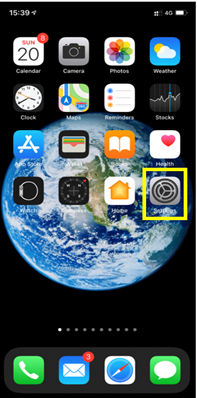
– 然后选择移动数据:
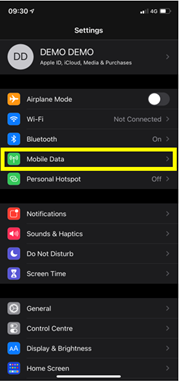
– 然后在数据计划中选择您的 eSIM 配置文件(”Secondary”/”Ubigi”):
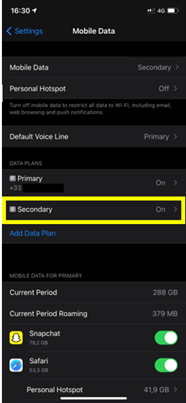
– 选择网络选择
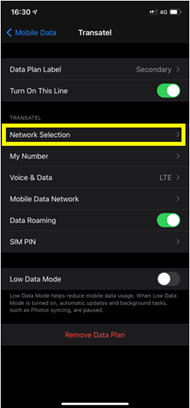
– 之后,停用自动模式以执行手动搜索:
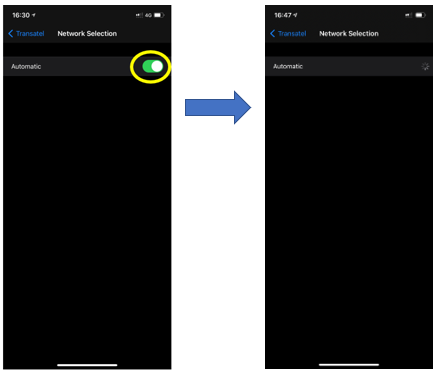
– 最后,在显示可用网络列表时,选择 Ubigi 网络:
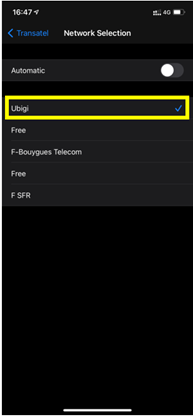
注意 :您将看到 Ubigi 或您所在国家/地区电信合作伙伴的名称(请参阅我们按 国家/地区分列的电信合作伙伴列表,以便选择正确的网络)。

在寻找特定的东西吗?

Cross

其他常见问题:

我恢复了(新)iPhone 上的数据,但我的 eSIM 配置文件无法使用。怎么办?

我即将旅行。如何管理我设备上的 Ubigi eSIM 卡?

解决安卓设备上的 Ubigi eSIM 配置文件问题

解决 iPhone 上的 Ubigi eSIM 配置文件问题

iMessage 无法与我的 Ubigi eSIM 配置文件一起使用。怎么办?

如何知道我的 Ubigi eSIM 配置文件是否已在 iPhone/iPad 上激活?

如何在 iPhone 上获取并安装 Ubigi eSIM 配置文件?

如何在安卓设备上获取并安装Ubigi eSIM个人档案?

如何通过 iPhone 或 iPad 上的 Ubigi 应用程序购买数据计划?

如何检查我的 iPhone 上是否安装了 Ubigi eSIM 配置文件?

我的 eSIM Ubigi 配置文件已在 iPhone/iPad 上安装并激活,网络已显示,但无法上网,怎么办?

我如何知道我的 Ubigi eSIM 配置文件是否已安装在我的安卓设备上?

我的安卓设备上已安装并激活 Ubigi eSIM 配置文件,网络已显示,但无法上网,我该怎么办?

移动数据已应用到我的 Android 设备上的 Ubigi eSIM 配置文件,但无法访问互联网,我该怎么办?

我可以用 Ubigi eSIM 数据计划打电话吗?

如何找到我的 Ubigi eSIM 的 ICCID(序列号)?

如何重置我的 Ubigi eSIM 账户密码?

如何查看 Ubigi eSIM 的余额?

如何删除我的 Ubigi 账户?

我购买了错误的数据计划,但没有使用,如何更改?

如何获得购买 Ubigi 数据计划的发票?

我有一部新的安卓设备。如何将我的 Ubigi eSIM 配置文件重新安装到新设备上?

当我想重新使用 iPhone 上的 Ubigi eSIM 个人档案时,我该如何启用?

当我旅行或不使用 iPhone 时,如何禁用我的 Ubigi eSIM 配置文件?

当我想在安卓设备上重新使用我的 Ubigi eSIM 配置文件时,我该如何启用它?

如何删除 iPhone/iPad 上的 Ubigi eSIM 配置文件?

Ubigi 连接失效。我是否应该禁用设备上的 DNS 或 VPN?

太棒了 Trustpilot stars Trustpilot
Trustpilot stars
基于 Trustpilot 上48055条评论
5 stars 已验证
已验证评论
该用户已被识别为买家
Perfect Experience
Everything worked perfectly during our trip to the UK! The internet connection was excellent, and Ubigi was easy to use. I would highly recommend it to anyone traveling abroad!
Irina, 09 Oct 2026
5 stars 已验证
已验证评论
该用户已被识别为买家
Fast
Fast, easy, cheap!
James Andrew Hannam, 09 Oct 2026
5 stars 已验证
已验证评论
该用户已被识别为买家
Simple
Simple, practical, affordable, and reliable. It worked flawlessly.
Dave, 09 Oct 2026
5 stars 已验证
已验证评论
该用户已被识别为买家
Worked perfect no issues
Eric Fitton, 09 Oct 2026
5 stars 已验证
已验证评论
该用户已被识别为买家
Very good!!
Very good!!
customer Mario, 09 Oct 2026
5 stars 已验证
已验证评论
该用户已被识别为买家
Great connection
Great connection
Joms, 09 Oct 2026
5 stars 已验证
已验证评论
该用户已被识别为买家
Top class
Top performance
customer, 09 Oct 2026
5 stars 已验证
已验证评论
该用户已被识别为买家
Easy setup good price
Alan, 09 Oct 2026
5 stars 已验证
已验证评论
该用户已被识别为买家
Good internet connection everywhere !
customer, 09 Oct 2026
5 stars 已验证
已验证评论
该用户已被识别为买家
Staying connected while traveling…
Staying connected while traveling abroad is so important. Ubigi made that possible
customer, 09 Oct 2026
4 stars 已验证
已验证评论
该用户已被识别为买家
East to activate
East to activate, easy to use and displays a reminder on gigabytes use. It's not good value for money. You get fewer gigs for a higher price compared to other providers."
customer, 09 Oct 2026
5 stars 已验证
已验证评论
该用户已被识别为买家
Great value
Great value, consistent and reliable network service, and efficient purchasing procedure. Would definitely recommend.
Regan Welsh, 09 Oct 2026
5 stars 已验证
已验证评论
该用户已被识别为买家
Easy to use and worked perfectly the…
Easy to use and worked perfectly the entire time I was in Japan.
customer, 09 Oct 2026
5 stars 已验证
已验证评论
该用户已被识别为买家
Great experience
Easy to use. Good , competitive price, amazing coverage at the destination chosen by me. I’m definitely going to choose Ubigi again for my next trip
Aneta R, 09 Oct 2026
5 stars 已验证
已验证评论
该用户已被识别为买家
So easy to install and top up.
customer, 09 Oct 2026
cross

您的信息已发送。
我们会尽快与您联系。

cross

我们已考虑到您订阅了新闻通讯。

cross

