My Ubigi eSIM profile is installed and active on my iPhone/iPad but I don’t have any network displayed, what can I do?
When your Ubigi eSIM profile (“secondary” Plan) does not attach any network, it will be displayed as follows on your iPhone/iPad: – the stepped network represents the signal status of your main line – the dotted network just below represents the signal status of your Ubigi eSIM (“secondary” plan) When the dots are all greyed out, it means that there is no connection to the network with the active eSIM profile.
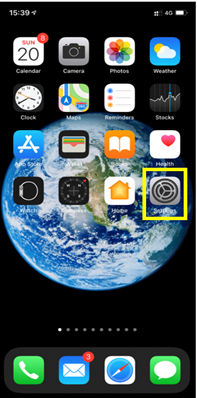
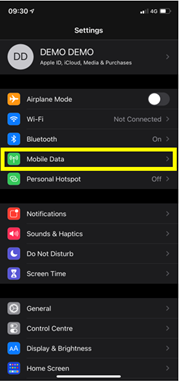
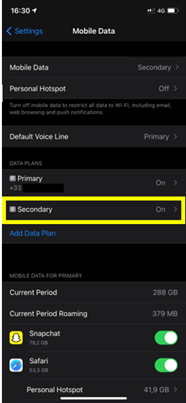
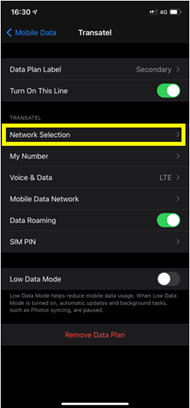
To get a network, you must perform a manual network search. To do that, in your iPhone/iPad go to :
– Settings:
– Then select Mobile Data:
– Then in DATA PLANS, select your eSIM profile (“Secondary”/”Ubigi”):
– Choose Network selection
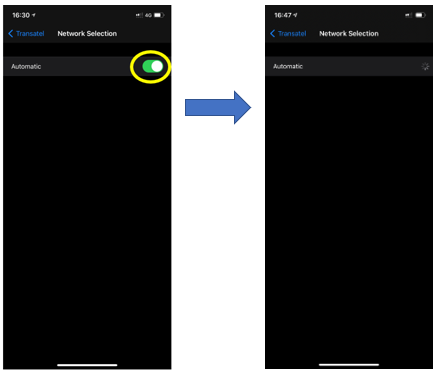
– After that, deactivate the automatic mode in order to perform a manual search:
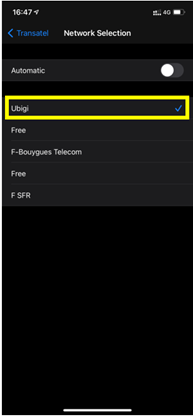
– Finally, when the list of available networks is displayed, select the Ubigi network:
Note : You will see Ubigi appear or the name of our telecom partner in the country in which you are located (see here the list of our telecom partners by country in order to select the correct network).
Contact
You haven’t found the answers to your questions in Assistance or FAQ?
You haven’t found the answers to your questions in Assistance or FAQ?
Great
Based on 46579 reviews on
Verified
Verified review
This user has been identified as a buyer
It ıs very useful
It was easy to set up on my mobile phone and I didn't have any problem during to use it.
Beria Rodwell, 25 Sep 2026
Verified
Verified review
This user has been identified as a buyer
Amazing 5G and service
Amazing 5G and service
customer, 25 Sep 2026
Verified
Verified review
This user has been identified as a buyer
It was simple
It was simple, good, and inexpensive.
customer, 25 Sep 2026
Verified
Verified review
This user has been identified as a buyer
Easy to use reasonable price
Easy to use reasonable price
Allison Child Wheatley, 25 Sep 2026
Verified
Verified review
This user has been identified as a buyer
I used Ubigi during my trip to Japan…
I used Ubigi during my trip to Japan and had an excellent experience. The eSIM was easy to install, activation was seamless, and I had reliable high-speed data throughout my stay. Coverage was excellent in major cities as well as during train travel. It made staying connected completely hassle-free. Highly recommended for travelers visiting Japan.
customer, 25 Sep 2026
Verified
Verified review
This user has been identified as a buyer
Service was very good everywhere I went…
Service was very good everywhere I went in Tokyo, Kyoto and Osaka.
James Robson, 25 Sep 2026
Verified
Verified review
This user has been identified as a buyer
It was really easy to install and use…
It was really easy to install and use and worked exactly as it said it would. Highly recommended.
Noel customer, 25 Sep 2026
Verified
Verified review
This user has been identified as a buyer
Easy to use
Easy to use. Working without problems.
Anna, 24 Sep 2026
Verified
Verified review
This user has been identified as a buyer
No problems with connection from…
No problems with connection from country to country in Europe. Awesome
Auds, 24 Sep 2026
Verified
Verified review
This user has been identified as a buyer
no problems with ubigi in thailand
no problems - whatsoever.
activating the e-sim on arrival worked fine.
quality of connection was fine.
i had a package for thailand.
even recharging during the stay made no difficulties at all.
will use it again, when i am outside "my hemisphere"
old Folkie, 24 Sep 2026
Verified
Verified review
This user has been identified as a buyer
Nice data plan
Data activated automatically and works as intended.
MasterixG, 24 Sep 2026
Verified
Verified review
This user has been identified as a buyer
The car was better than expected
The car was better than expected.
Great service.
Maria Paz, 24 Sep 2026
Verified
Verified review
This user has been identified as a buyer
Easy install
Easy install. Everything worked perfectly first time. Thanks
customer, 24 Sep 2026
Verified
Verified review
This user has been identified as a buyer
The service was better than my local…
The service was better than my local provider in the US. It didn’t disappoint. Fast 5G speed. Will use again.
customer, 24 Sep 2026
Verified
Verified review
This user has been identified as a buyer
Easy to use
Easy to use, good value for money and works perfectly 👍
Sue Renforth, 24 Sep 2026
Thank you
Your message has been sent. We’ll get back to you shortly.
Thank you
We have taken into account your subscription to the newsletter
How to check eSIM compatibility
Smartphones / Tablets:
Dial *#06#. → If an EID number appears, your device is eSIM-compatible.
Windows 10 / 11:
Press Windows+I. Go to “Network & Internet” → If you see "Cellular", your PC is eSIM-compatible.
How to check carrier unlocking
iPhone / iPad:
Go to Settings > General > About. Scroll to Carrier Lock. → If you see “No SIM restrictions”, your device is unlocked.
Android:
Go to Settings > Network & Internet > Mobile network. Disable Automatic network selection. → If multiple networks appear, your device is unlocked.
You already have an eSIM in your cart.
Each order can only include one eSIM data plan.
If you choose to add a new one, the current plan will be removed. What would you like to do?





 How to check eSIM compatibility
 How to check carrier unlocking