Check if your eSIM profile is installed on your device.
Check eSIM profile activation
Check if your eSIM profile is activated on your device.
Apply data to eSIM profile
Ensure data is applied to your Ubigi eSIM profile.
Check APN configuration
Ensure that the APN is correctly set for your Ubigi connectivty.
Check network display
Check the network status for your Ubigi connectivity.
Final checks!
Check account creation and Internet access.
Now ensure that the APN (Access Point Name) is correctly set on your device.
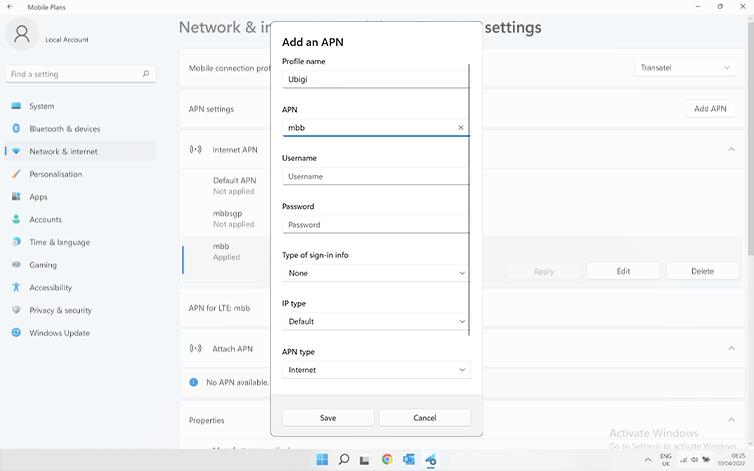
Go to: Settings > Networks & Internet > Mobile, then Mobile operator settings. If the Ubigi APN “mbb” appears on the list under “APN Settings” section, go to the next step.
If the Ubigi APN “mbb” does not appear, click on “Add an APN” and fill in:
– Profile name: Ubigi
– APN: mbb
Click on save. This new APN will appear in the “APN settings” list.
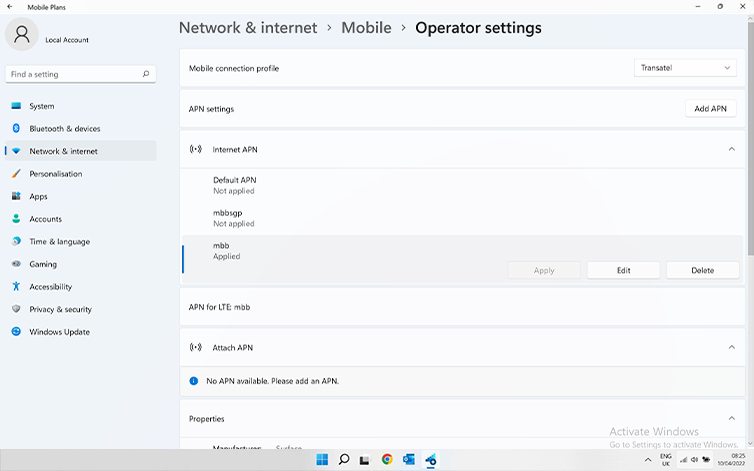
Make sure that the Ubigi APN appears as “Applied”. If not click on it and select apply.
Great
Based on 29681 reviews on
Verified
Verified review
This user has been identified as a buyer
I didn’t have to think about my data…
I didn’t have to think about my data during my 2 week trip in Japan. Never dropped; it was seamless.
Daniela Gallo, 12 Dec 2025
Verified
Verified review
This user has been identified as a buyer
Using my eSIM is seamless.
customer, 12 Dec 2025
Verified
Verified review
This user has been identified as a buyer
Good service!
Good service!! Sometimes patchy and slow but mostly very reliable and consistent service. Will definitely try them again when I am in Japan!
Joe, 12 Dec 2025
Verified
Verified review
This user has been identified as a buyer
All was easy and perfect
All was easy and perfect. Great 5g everywhere
Tomas Aldás, 12 Dec 2025
Verified
Verified review
This user has been identified as a buyer
Works very in European countries
Works very in European countries. Not so good in places like Mongolia and Botswana.
Travelling duo, 12 Dec 2025
Verified
Verified review
This user has been identified as a buyer
Overall good
Overall good. Spotty throttling by the supporting service providers
customer, 12 Dec 2025
Verified
Verified review
This user has been identified as a buyer
Hat perfekt in Japan funktioniert
Hat perfekt in Japan funktioniert! Danke
Darja Ivanenko, 12 Dec 2025
Verified
Verified review
This user has been identified as a buyer
It was my first eSim for a trip in USA
It was my first eSim for a trip in USA. Very easy to configure. Good network wherever I was once there.
Thomas, 12 Dec 2025
Verified
Verified review
This user has been identified as a buyer
Easy to implement and reload.
I use it in many countries.
Very satisfied.
DM, 12 Dec 2025
Verified
Verified review
This user has been identified as a buyer
Convenient after Once-off setup
I've used Ubigi a few times in different countries and found it great, after having to set up only once.
Misha, 12 Dec 2025
Verified
Verified review
This user has been identified as a buyer
Experience was good in the main lines
Experience was good in the main lines. Internet was ok but sometimes we got few internet outages. But it was not a big deal.
Antoine CHANTHAVONG, 12 Dec 2025
Verified
Verified review
This user has been identified as a buyer
Easy and fast to install
Easy and fast to install, good internet speed at good price
MICHELI MICHELE, 12 Dec 2025
Verified
Verified review
This user has been identified as a buyer
Your Internet connection is very good…
Your Internet connection is very good and fast, the data's last longer even though I'm using maps, but I YouTube, downloads and more others.
customer, 12 Dec 2025
Verified
Verified review
This user has been identified as a buyer
Easy to activate
Easy to activate, affordable, app useful, will use again :)
E. M., 12 Dec 2025
Verified
Verified review
This user has been identified as a buyer
Super easy to install and use!
Emma, 11 Dec 2025
Thank you
Your message has been sent. We’ll get back to you shortly.
Thank you
We have taken into account your subscription to the newsletter
How to check eSIM compatibility
Smartphones / Tablets:
Dial *#06#. → If an EID number appears, your device is eSIM-compatible.
Windows 10 / 11:
Press Windows+I. Go to “Network & Internet” → If you see "Cellular", your PC is eSIM-compatible.
How to check carrier unlocking
iPhone / iPad:
Go to Settings > General > About. Scroll to Carrier Lock. → If you see “No SIM restrictions”, your device is unlocked.
Android:
Go to Settings > Network & Internet > Mobile network. Disable Automatic network selection. → If multiple networks appear, your device is unlocked.
You already have an eSIM in your cart.
Each order can only include one eSIM data plan.
If you choose to add a new one, the current plan will be removed. What would you like to do?


