새 Android 디바이스가 있습니다. Ubigi eSIM 프로필을 다시 설치하려면 어떻게 해야 하나요?
새 기기 또는 다른 Android 기기로 Ubigi eSIM 프로필을 이전하거나 전환하려면:
1 – 먼저 로그인+비밀번호를 기억하고 있는지 확인하세요. 기억나지 않는 경우, eSIM 프로필이 아직 설치되어 있는 첫 번째 Android 기기에서 Ubigi 연결을 통해 연결된 상태에서 설정 탭의 Ubigi 계정에서 직접 확인해야 합니다(비밀번호가 기억나지 않는 경우 그 순간에 수정할 수 있습니다)
3 – 새/기타 Android 기기의 Play스토어에서 Ubigi 앱을 다운로드하고 로그인 및 비밀번호를 사용하여 Ubigi 계정에 연결합니다
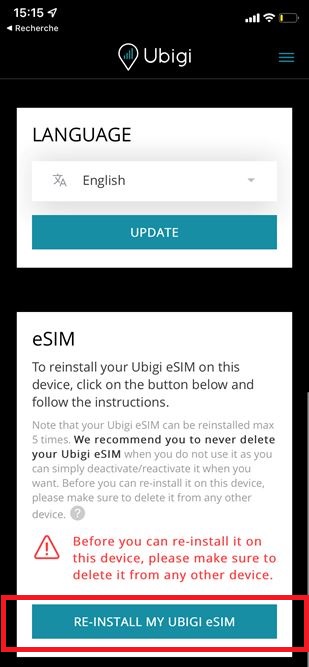
4 – 연결되면 설정 탭으로 이동하여 “eSIM” 섹션에서 “내 Ubigi eSIM 재설치” 버튼을 클릭합니다:
5 – 화면의 지시에 따라 설치를 완료합니다.
참고: “내 Ubigi eSIM 다시 설치” 버튼이 표시되지 않으면 재설치할 수 없는 이전 프로필이 있을 수 있으므로 고객 서비스에 문의하여 도움을 받으시기 바랍니다. 저희 팀이 새 기기에 다시 설치하여 Ubigi 계정을 유지할 수 있는 업데이트된 프로필을 보내드릴 것입니다.
중요: 다른 기기에 다시 설치하기 전에 첫 번째 기기에서 Ubigi eSIM 프로필을 삭제해야 하며, 그렇지 않으면 재설치 및 교체가 작동하지 않습니다(참고: 이 작업은 Ubigi 계정을 삭제하지 않습니다).
첫 번째 디바이스가 더 이상 없는 경우(고장, 분실 등)에 이 삭제가 불가능한 경우 고객 서비스에 문의하여 도움을 받으시기 바랍니다.
It works well but sometimes even if I’m in a good data coverage area it still gives me 3G to 4G for some reason and not 5G
customer, 05 Jul 2026
검증됨
검증된 리뷰
이 사용자는 구매자로 확인되었습니다
Good for service with affordable price
Good for service with affordable price
customer, 05 Jul 2026
검증됨
검증된 리뷰
이 사용자는 구매자로 확인되었습니다
Worked excellent during our stay in…
Worked excellent during our stay in Japan
Helena Hellqvist, 05 Jul 2026
검증됨
검증된 리뷰
이 사용자는 구매자로 확인되었습니다
Easy to setup, great service
Easy to setup, even on android! Coverage was great, never had a problem with Internet connection. Competitive pricing!
Andrea Bot, 05 Jul 2026
검증됨
검증된 리뷰
이 사용자는 구매자로 확인되었습니다
Consistent and stable connectivity
The eSIM provided consistent and stable connectivity in remote locations, including hotels where the WiFi was weak.
Su, 05 Jul 2026
검증됨
검증된 리뷰
이 사용자는 구매자로 확인되었습니다
Easy to install and to see dashboard of…
Easy to install and to see dashboard of used GB. Some problem to connect to 5G in Kyoto, otherwise great.
Eva , 05 Jul 2026
검증됨
검증된 리뷰
이 사용자는 구매자로 확인되었습니다
Great customer service help
Works so well when travelling. I had one problem, of my own making, and their customer service sorted it out really quickly for me. Amazing!
Dylan, 05 Jul 2026
검증됨
검증된 리뷰
이 사용자는 구매자로 확인되었습니다
Great overall, fair pricing, 10/10!
Used the service for holidays on curacao. Very easy installation, good support, fair pricing, and I could easily top up my current sim with more days without any changes on my phone. Would definitely use again.
klant, 05 Jul 2026
검증됨
검증된 리뷰
이 사용자는 구매자로 확인되었습니다
Using Google maps became very confusing…
Using Google maps became very confusing in some areas, as own positions and directions were changing probably due to weak coverage
customer, 05 Jul 2026
검증됨
검증된 리뷰
이 사용자는 구매자로 확인되었습니다
Hard time connecting
Hard time connecting
Dean, 05 Jul 2026
검증됨
검증된 리뷰
이 사용자는 구매자로 확인되었습니다
I have been using Ubigi for over a year…
I have been using Ubigi for over a year in different continents and works like a charm. Convenient, easy, and affordable.
Ana M, 05 Jul 2026
검증됨
검증된 리뷰
이 사용자는 구매자로 확인되었습니다
I liked to much
I liked to much. Internet is working very good
ANDREA CATALINA DOUSDEBES SALGAR , 04 Jul 2026
검증됨
검증된 리뷰
이 사용자는 구매자로 확인되었습니다
Everything went well
Everything went well. It worked perfectly.
But it would be great to have an eSIM card that also allows you to make calls or receive messages.
Eimata, 04 Jul 2026
검증됨
검증된 리뷰
이 사용자는 구매자로 확인되었습니다
More guidance, please
I don’t feel I had the best understanding of which Ubigi plan I was going to need for my overseas trip. So much so, I ended up having to use my primary carrier’s plan for access to maps, websites, etc. If Ubigi could make those distinctions crystal clear, that would be a great help. The plan I did have did work well for texting & email.
Leslie, 04 Jul 2026
감사합니다
귀하의 메시지가 전송되었습니다. 곧 답변드리겠습니다.
감사합니다
귀하의 뉴스레터 구독을 고려했습니다.
eSIM 호환성 확인 방법
스마트폰 / 태블릿:
*#06# 입력. → EID 번호가 나오면 eSIM 지원 기기입니다.
Windows 10 / 11:
Windows+I 를 누르세요. “네트워크 및 인터넷”으로 이동하세요 → 셀룰러 네트워크가 보이면 PC가 eSIM을 지원합니다..
통신사 잠금 해제 여부 확인 방법
iPhone / iPad:
설정 > 일반 > 정보로 이동 통신사 잠금 항목까지 스크롤. → “SIM 제한 없음”이 표시되면 기기는 잠금 해제 상태입니다.
Android:
설정 > 네트워크 및 인터넷 > 모바일 네트워크 자동 네트워크 선택을 끄세요. → 여러 네트워크가 보이면 잠금 해제된 기기입니다.





 eSIM 호환성 확인 방법
 통신사 잠금 해제 여부 확인 방법