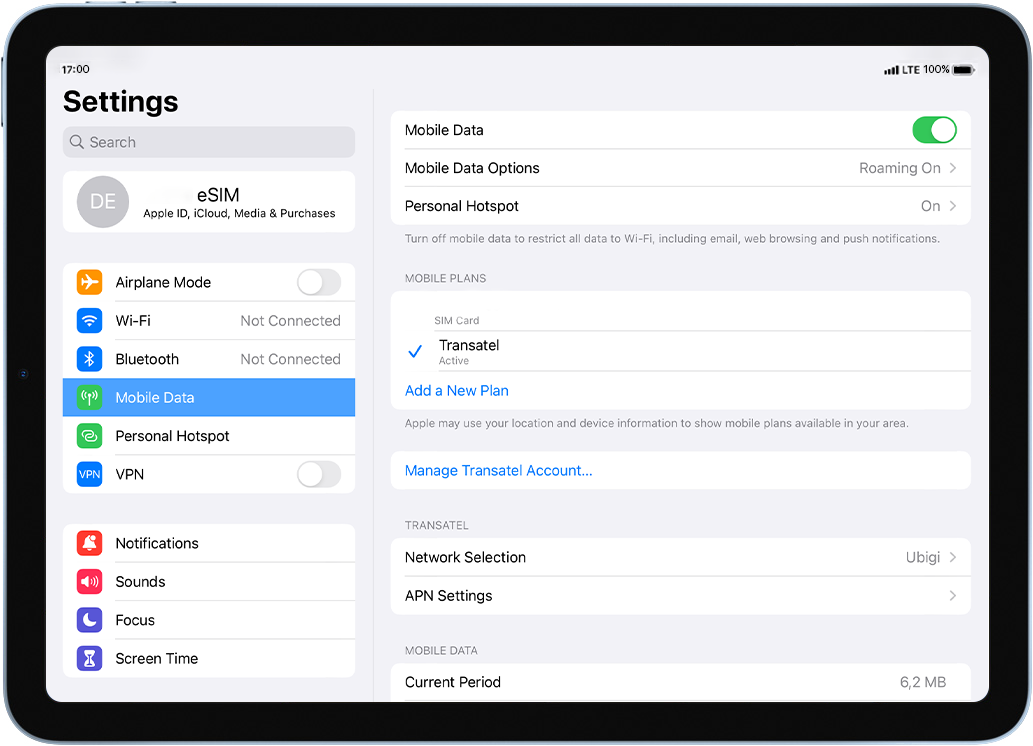
Check if your eSIM profile is installed on your device.
Check eSIM profile activation
Check if your eSIM profile is activated on your device.
Apply data to eSIM profile
Ensure data is applied to your Ubigi eSIM profile.
Check APN configuration
Ensure that the APN is correctly set for your Ubigi connectivty.
Check network display
Check the network status for your Ubigi connectivity.
Final checks!
Check account creation and Internet access.
Make sure Mobile Data is activated:
Go to: Settings > Mobile data > activate Mobile data at the top: make sure that the button is turned on (in green).
Great
Based on 44691 reviews on
Verified
Verified review
This user has been identified as a buyer
10/10
No issues at all ,worked very well on my trip to Morocco
Yasser Hussain, 31 Aug 2026
Verified
Verified review
This user has been identified as a buyer
Fine worked no problems
customer, 31 Aug 2026
Verified
Verified review
This user has been identified as a buyer
Working as soon as I arrived the signal…
Working as soon as I arrived the signal was excellent the whole time I was here.
Aftab Hussain, 30 Aug 2026
Verified
Verified review
This user has been identified as a buyer
It served very well
It served very well, though sometimes there were lapsed of service but not for a long time. It recovered quickly. The service was reliable and very useful for me.
Ivana, 30 Aug 2026
Verified
Verified review
This user has been identified as a buyer
Highly recommend Ubigi
Top! Ubigi worked like a charm. I used it to navigate using Apple Maps on my phone using Ubigi cell data (in Europe). Also used it for internet access. Super. Will use it again the next time I travel. Highly recommend!
Spaghetti Bolognese, 30 Aug 2026
Verified
Verified review
This user has been identified as a buyer
always easy and works!
customer, 30 Aug 2026
Verified
Verified review
This user has been identified as a buyer
SIM worked really well in Egypt
SIM worked really well in Egypt. I contacted customer services about an issue with my order and they responded really quickly and were very helpful. Recommended!
SV, 30 Aug 2026
Verified
Verified review
This user has been identified as a buyer
Great cellular service
Great cellular service! Works the best. Strongly recommend.
Sima , 30 Aug 2026
Verified
Verified review
This user has been identified as a buyer
Very simple to arrange and good price.
John Critchley, 30 Aug 2026
Verified
Verified review
This user has been identified as a buyer
Perfectly worked
Perfectly worked
cliente, 30 Aug 2026
Verified
Verified review
This user has been identified as a buyer
The have nice affordable restaurant…
The have nice affordable restaurant with very good food.
customer, 30 Aug 2026
Verified
Verified review
This user has been identified as a buyer
Easy
Easy, flexible
customer, 30 Aug 2026
Verified
Verified review
This user has been identified as a buyer
Everything worked
Everything worked. No issues experienced. Highly recommended and would buy again for our next international trip.
Mike, 30 Aug 2026
Verified
Verified review
This user has been identified as a buyer
So much better than other providers on…
So much better than other providers on the market. Got caught out on a recent trip to the UK. The company I use let me down so badly. Started to restrict my data usage. I then read the fine print and they are covered by it. They limit it. Read the fine print to find out.
jason, 30 Aug 2026
Verified
Verified review
This user has been identified as a buyer
Data connection is good although speed…
Data connection is good although speed is an issue. Wish voice calls (VoLTE)were included as an option
Co Jay, 30 Aug 2026
Thank you
Your message has been sent. We’ll get back to you shortly.
Thank you
We have taken into account your subscription to the newsletter
How to check eSIM compatibility
Smartphones / Tablets:
Dial *#06#. → If an EID number appears, your device is eSIM-compatible.
Windows 10 / 11:
Press Windows+I. Go to “Network & Internet” → If you see "Cellular", your PC is eSIM-compatible.
How to check carrier unlocking
iPhone / iPad:
Go to Settings > General > About. Scroll to Carrier Lock. → If you see “No SIM restrictions”, your device is unlocked.
Android:
Go to Settings > Network & Internet > Mobile network. Disable Automatic network selection. → If multiple networks appear, your device is unlocked.
You already have an eSIM in your cart.
Each order can only include one eSIM data plan.
If you choose to add a new one, the current plan will be removed. What would you like to do?