Ubigi eSIM 프로필이 iPhone/iPad에 설치되어 활성화되어 있는데 네트워크가 표시되지 않는데 어떻게 해야 하나요?
Ubigi eSIM 프로필(“보조” 요금제)에 네트워크가 연결되지 않은 경우, iPhone/iPad에 다음과 같이 표시됩니다: – 단계별 네트워크는 메인 회선의 신호 상태를 나타냅니다 – 바로 아래에 점선으로 표시된 네트워크는 Ubigi eSIM(“보조” 요금제)의 신호 상태를 나타냅니다 점이 모두 회색이면 활성 eSIM 프로필로 네트워크에 연결되어 있지 않음을 의미합니다.
네트워크를 얻으려면 수동으로 네트워크 검색을 수행해야 합니다. iPhone/iPad에서:
– 설정:
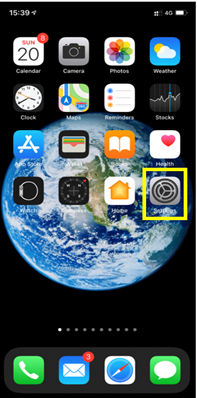
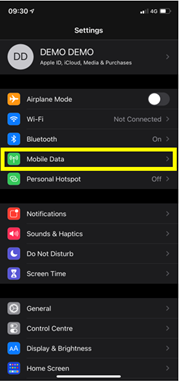
– 모바일 데이터:
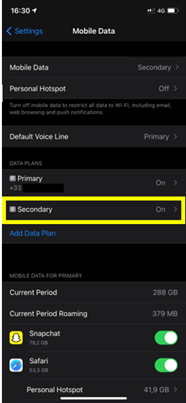
– 데이터 요금제에서 eSIM 프로필(“보조”/”유비기”):
– 네트워크 선택:
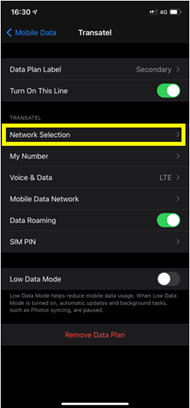
– 그 후, 수동 검색을 수행하려면 자동 모드를 비활성화하세요:
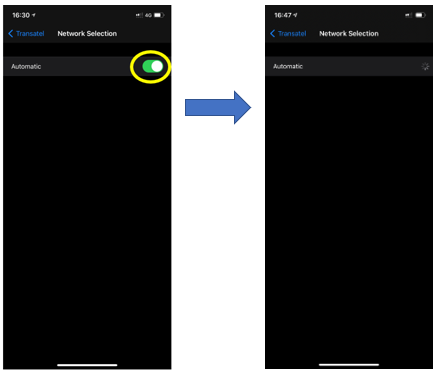
– 마지막으로 사용 가능한 네트워크 목록이 표시되면 Ubigi 네트워크를 선택합니다:
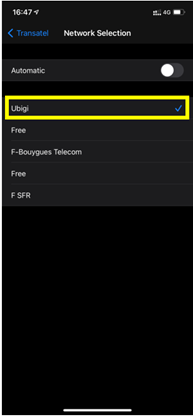
참고 : Ubigi가 표시되거나 현재 위치한 국가의 통신사 파트너 이름이 표시됩니다(올바른 네트워크를 선택하려면 국가별 통신사 파트너 목록을 참조하세요).

Easy to use, but struggled to activate it.
Did not accept my password and I needed wifi or data to reset password, which was difficult
Ethelwyn Antoinette van Nieker, 26 Oct 2026
검증됨
검증된 리뷰
이 사용자는 구매자로 확인되었습니다
Worked really well in Montreal Canada
AA, 26 Oct 2026
검증됨
검증된 리뷰
이 사용자는 구매자로 확인되었습니다
Worked great in Iceland for me.
customer, 26 Oct 2026
검증됨
검증된 리뷰
이 사용자는 구매자로 확인되었습니다
efficiency
efficiency
Pierre Lefebvre, 26 Oct 2026
검증됨
검증된 리뷰
이 사용자는 구매자로 확인되었습니다
Excellent e sim
Excellent e sim
Branko Bozinovic, 26 Oct 2026
검증됨
검증된 리뷰
이 사용자는 구매자로 확인되었습니다
It's a great place for Morocco
Dragan, 26 Oct 2026
검증됨
검증된 리뷰
이 사용자는 구매자로 확인되었습니다
Worked instantly and had great…
Worked instantly and had great connection the entire time i was in Japan. Great experience and great price for unlimited data. Unlimited comes in handy when you have to use your phone for maps and translating often and to share your trip on socials too.
Barbara R, 26 Oct 2026
검증됨
검증된 리뷰
이 사용자는 구매자로 확인되었습니다
Useful solution for travel
Useful solution for travel. Reliable, stable network connections. Needed to contact customer service regarding moving the eSIM to a new phone, and they got back to me quickly.
customer, 26 Oct 2026
검증됨
검증된 리뷰
이 사용자는 구매자로 확인되었습니다
Good eSIM card
Good eSIM card. Work very well
customer, 26 Oct 2026
검증됨
검증된 리뷰
이 사용자는 구매자로 확인되었습니다
It was firstly a problem at London to…
It was firstly a problem at London to be connected but later it it work very good.
Thanks
Gerhard, 26 Oct 2026
검증됨
검증된 리뷰
이 사용자는 구매자로 확인되었습니다
Very good connection!
Shirley, 26 Oct 2026
검증됨
검증된 리뷰
이 사용자는 구매자로 확인되었습니다
The coverage is very well till now in…
The coverage is very well till now in Nerway and Denmark
Ahmed, 26 Oct 2026
검증됨
검증된 리뷰
이 사용자는 구매자로 확인되었습니다
All good connect
All good connect
Ali Asghar, 26 Oct 2026
검증됨
검증된 리뷰
이 사용자는 구매자로 확인되었습니다
Simple activation
Simple activation
customer, 26 Oct 2026
검증됨
검증된 리뷰
이 사용자는 구매자로 확인되었습니다
Awesome service.
Awesome service.
Joshua Nava Valenzuela, 26 Oct 2026
감사합니다
귀하의 메시지가 전송되었습니다. 곧 답변드리겠습니다.
감사합니다
귀하의 뉴스레터 구독을 고려했습니다.
eSIM 호환성 확인 방법
스마트폰 / 태블릿:
*#06# 입력. → EID 번호가 나오면 eSIM 지원 기기입니다.
Windows 10 / 11:
Windows+I 를 누르세요. “네트워크 및 인터넷”으로 이동하세요 → 셀룰러 네트워크가 보이면 PC가 eSIM을 지원합니다..
통신사 잠금 해제 여부 확인 방법
iPhone / iPad:
설정 > 일반 > 정보로 이동 통신사 잠금 항목까지 스크롤. → “SIM 제한 없음”이 표시되면 기기는 잠금 해제 상태입니다.
Android:
설정 > 네트워크 및 인터넷 > 모바일 네트워크 자동 네트워크 선택을 끄세요. → 여러 네트워크가 보이면 잠금 해제된 기기입니다.

