Check if your eSIM profile is installed on your device.
Check eSIM profile activation
Check if your eSIM profile is activated on your device.
Apply data to eSIM profile
Ensure data is applied to your Ubigi eSIM profile.
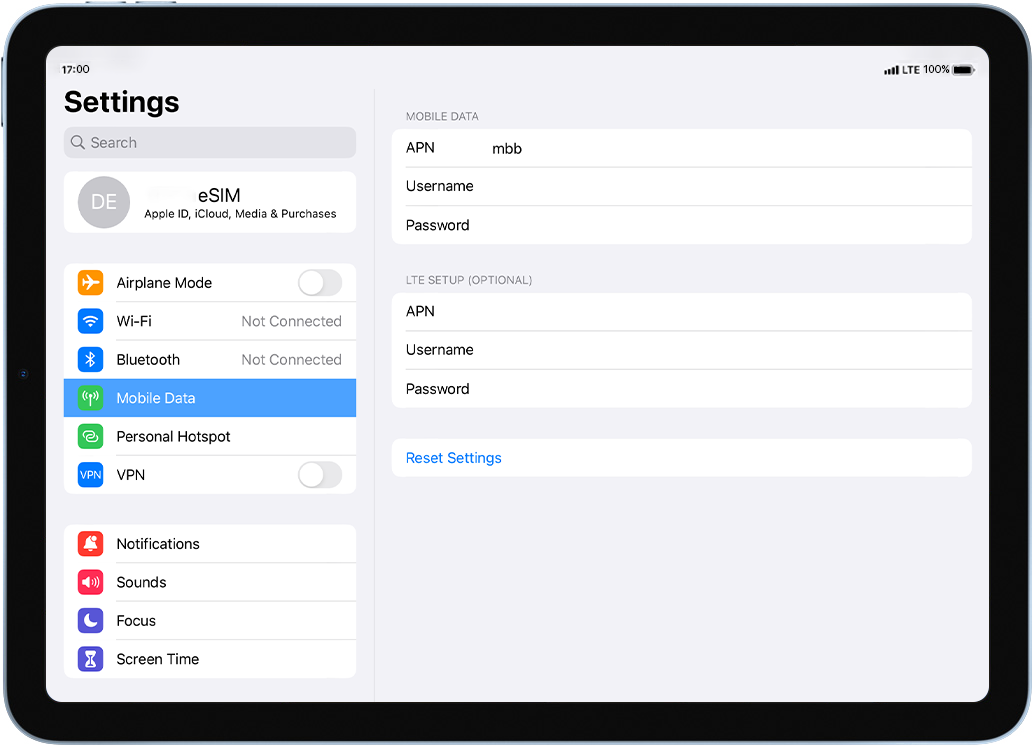
Check APN configuration
Ensure that the APN is correctly set for your Ubigi connectivty.
Check network display
Check the network status for your Ubigi connectivity.
Final checks!
Check account creation and Internet access.
In the same screen, select APN Settings in order to configure the APN (Access Point Name):
In the APN field, make sure that mbb is specified. If not, type it in the field.
Great
Based on 49348 reviews on
Verified
Verified review
This user has been identified as a buyer
Easy to purchase a cost effective e-sim…
Easy to purchase a cost effective e-sim for use abroad. Took the stress from foreign travel. Seemless transition and clear app to show data used.
Nicola Pendleton, 23 Oct 2026
Verified
Verified review
This user has been identified as a buyer
Simple
Simple, fast and up to now flawless.
customer, 23 Oct 2026
Verified
Verified review
This user has been identified as a buyer
Took a bit to get the eSIM activated on…
Took a bit to get the eSIM activated on a new phone.
Lots of "check the FAQ" but I got an overnight response and everything worked fine! It's all pretty fast in Japan and much easier to activate than the iijmio eSIM I used to get.
Hisashi T Fujinaka, 23 Oct 2026
Verified
Verified review
This user has been identified as a buyer
Quick and easy connection.
Easy purchase of an eSIM. Quick and simple installation. Automatic connection in the designated area upon arrival.
Excellent connectivity in Japan, even in areas further away from cities.
Arnaud, 23 Oct 2026
Verified
Verified review
This user has been identified as a buyer
A little tricky at first upon landing…
A little tricky at first upon landing in Tokyo, but once it connected it is a fabulous 5G experience.
Jay, 23 Oct 2026
Verified
Verified review
This user has been identified as a buyer
Relatively easy to install
Relatively easy to install. Been working great. No complaints.
Indridi Bjornsson, 23 Oct 2026
Verified
Verified review
This user has been identified as a buyer
excellent connection and no…
excellent connection and no interruptions.
customer, 23 Oct 2026
Verified
Verified review
This user has been identified as a buyer
Works as expected
Works as expected. Simple setup.
customer, 23 Oct 2026
Verified
Verified review
This user has been identified as a buyer
Very easy
Very easy to connect
Nelson, 23 Oct 2026
Verified
Verified review
This user has been identified as a buyer
Perfect smooth connexion all along my…
Perfect smooth connexion all along my trip in India from south to north. Compared to colleague who took another option my connection was much better
Nicolas, 23 Oct 2026
Verified
Verified review
This user has been identified as a buyer
Connection…
Connected right away and worked well throughout the time in Japan.
ACCurtis, 23 Oct 2026
Verified
Verified review
This user has been identified as a buyer
Very easy to setup and provided good…
Very easy to setup and provided good coverage throughout Italy.
customer, 23 Oct 2026
Verified
Verified review
This user has been identified as a buyer
more than perfect
it is by far more than perfect !
customer, 23 Oct 2026
Verified
Verified review
This user has been identified as a buyer
Simple easy good value
Simple easy good value wish id discovered it sooner
Matt, 23 Oct 2026
Verified
Verified review
This user has been identified as a buyer
Ubigi eSIM provided a flawless data…
Ubigi eSIM provided a flawless data connection during my 11-day trip to Japan, with the 10 GB plan proving to be the perfect amount - I had 2.5 GB remaining. I experienced zero connectivity issues or coverage drops as I traveled through Tokyo, Mt. Fuji, Kyoto, Osaka, and Hiroshima. Setting it up was incredibly easy, and fast, reliable network made navigating every city completely seamless.
Marie McGuire, 23 Oct 2026
Thank you
Your message has been sent. We’ll get back to you shortly.
Thank you
We have taken into account your subscription to the newsletter
How to check eSIM compatibility
Smartphones / Tablets:
Dial *#06#. → If an EID number appears, your device is eSIM-compatible.
Windows 10 / 11:
Press Windows+I. Go to “Network & Internet” → If you see "Cellular", your PC is eSIM-compatible.
How to check carrier unlocking
iPhone / iPad:
Go to Settings > General > About. Scroll to Carrier Lock. → If you see “No SIM restrictions”, your device is unlocked.
Android:
Go to Settings > Network & Internet > Mobile network. Disable Automatic network selection. → If multiple networks appear, your device is unlocked.
You already have an eSIM in your cart.
Each order can only include one eSIM data plan.
If you choose to add a new one, the current plan will be removed. What would you like to do?