Check if your eSIM profile is installed on your device.
Check eSIM profile activation
Check if your eSIM profile is activated on your device.
Apply data to eSIM profile
Ensure data is applied to your Ubigi eSIM profile.
Check APN configuration
Ensure that the APN is correctly set for your Ubigi connectivty.
Check network display
Check the network status for your Ubigi connectivity.
Final checks!
Check account creation and Internet access.
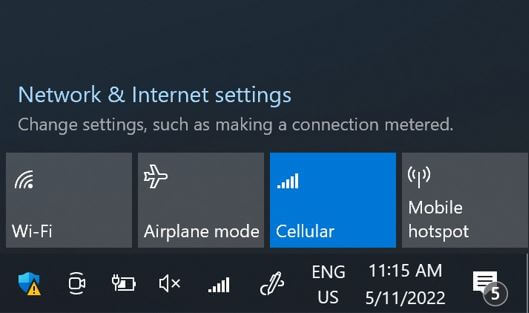
On the network flyout, ensure that:
Cellular (or Mobile) is activated. Wi-Fi is deactivated.
Great
Based on 35000 reviews on
Verified
Verified review
This user has been identified as a buyer
Great connectivity
Great connectivity, fast speeds, easy to initiate when I arrived.
Vic, 15 Apr 2026
Verified
Verified review
This user has been identified as a buyer
Fast Support & Reliable eSIM in Japan
Really impressed with Ubigi’s support. I accidentally bought the wrong plan, and they helped me to find a way to fix it. They replied super fast and resolved everything quickly and professionally, which was especially helpful since I had just started my trip.
My whole family used their eSIM during our trip to Japan, and the connection was stable, fast, and reliable throughout.
Would definitely recommend.
Natalia, 15 Apr 2026
Verified
Verified review
This user has been identified as a buyer
Easy to set up
Easy to set up, easy to use. Will do again if I need extra data outside of my regular plan.
customer, 15 Apr 2026
Verified
Verified review
This user has been identified as a buyer
Great working very good
customer, 15 Apr 2026
Verified
Verified review
This user has been identified as a buyer
Easy to use and great customer service
They were relatively easy to use and instructions were relatively easy to follow. I reached out to customer service and they got back to me immediately and solved my issue.
DH, 15 Apr 2026
Verified
Verified review
This user has been identified as a buyer
This eSim is affordable and easy to…
This eSim is affordable and easy to use. Highly recommend.
CustomerCC, 15 Apr 2026
Verified
Verified review
This user has been identified as a buyer
It made it so easy to travel
It made it so easy to travel! Cheap and useful. Thanks Ubigi.
Dave- USA, 15 Apr 2026
Verified
Verified review
This user has been identified as a buyer
ubigi
Instantly got connection and lasted throughout my whole trip in Japan with no issues, having full service everywhere.
customer, 15 Apr 2026
Verified
Verified review
This user has been identified as a buyer
Easy
Easy! Worked immediately
L MacRae, 15 Apr 2026
Verified
Verified review
This user has been identified as a buyer
Signal is good
Signal is good
customer, 15 Apr 2026
Verified
Verified review
This user has been identified as a buyer
Great service
Great service. Easy to use
customer, 15 Apr 2026
Verified
Verified review
This user has been identified as a buyer
I have really enjoyed using Ubigi
I have really enjoyed using Ubigi. I forgot how to switch everything over after a 17 hour flight but after one night of sleep it was easy to figure out the steps.
Cynthia Riddle, 15 Apr 2026
Verified
Verified review
This user has been identified as a buyer
Simplicity in purchasing
Simplicity in purchasing, installing and activating. As soon as I reached Japan quick activation done within a few seconds. Always uninterrupted service till validity. What’s more we expect?
SK NAZRUL ISLAM, 15 Apr 2026
Verified
Verified review
This user has been identified as a buyer
Made my life lot easier as soon as i…
Made my life lot easier as soon as i got of the plane I activated and started working straight away and always working no issue with network at all what so ever full network coverage everywhere i went didn’t lose a signal once
Imy, 15 Apr 2026
Verified
Verified review
This user has been identified as a buyer
Very easy to use
Very easy to use. Shows how much you have left. Only begins when you enter the country and log on.
Shannon, 15 Apr 2026
Thank you
Your message has been sent. We’ll get back to you shortly.
Thank you
We have taken into account your subscription to the newsletter
How to check eSIM compatibility
Smartphones / Tablets:
Dial *#06#. → If an EID number appears, your device is eSIM-compatible.
Windows 10 / 11:
Press Windows+I. Go to “Network & Internet” → If you see "Cellular", your PC is eSIM-compatible.
How to check carrier unlocking
iPhone / iPad:
Go to Settings > General > About. Scroll to Carrier Lock. → If you see “No SIM restrictions”, your device is unlocked.
Android:
Go to Settings > Network & Internet > Mobile network. Disable Automatic network selection. → If multiple networks appear, your device is unlocked.
You already have an eSIM in your cart.
Each order can only include one eSIM data plan.
If you choose to add a new one, the current plan will be removed. What would you like to do?