Check if your eSIM profile is installed on your device.
Check eSIM profile activation
Check if your eSIM profile is activated on your device.
Apply data to eSIM profile
Ensure data is applied to your Ubigi eSIM profile.
Check APN configuration
Ensure that the APN is correctly set for your Ubigi connectivty.
Check network display
Check the network status for your Ubigi connectivity.
Final checks!
Check account creation and Internet access.
Check if your eSIM profile is activated on your iPhone.
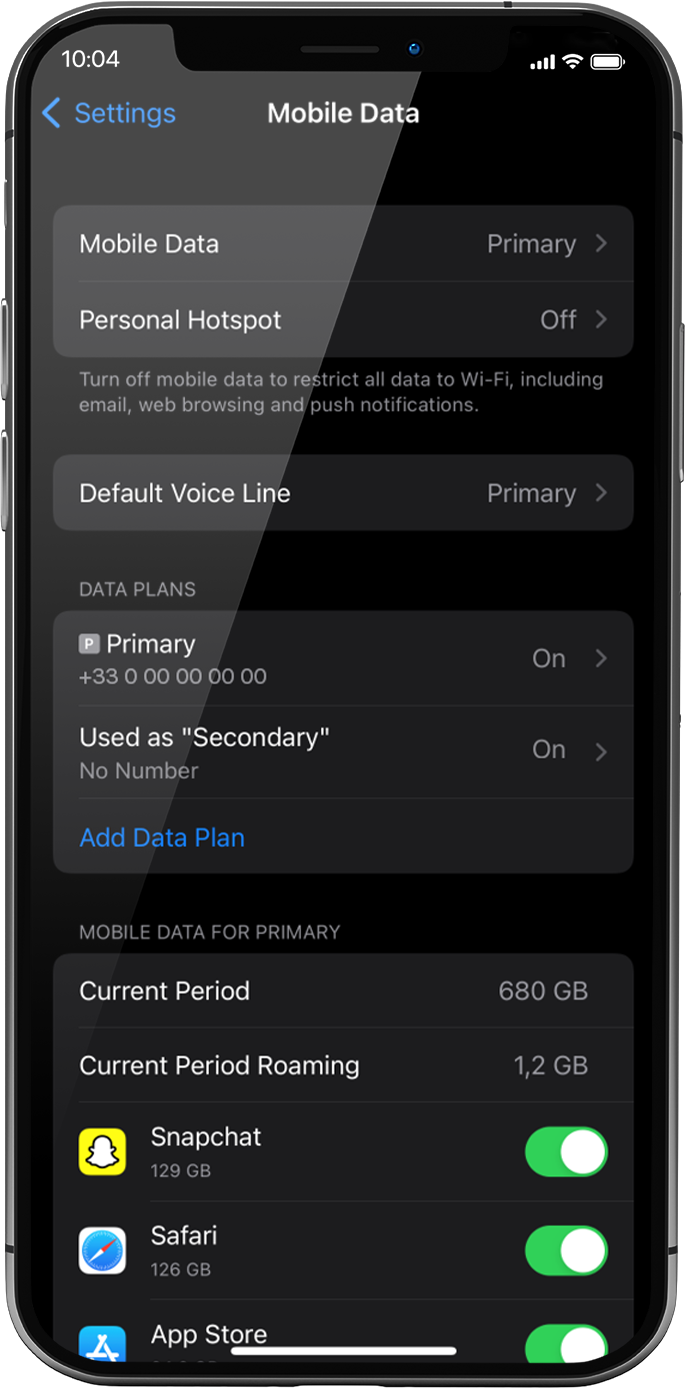
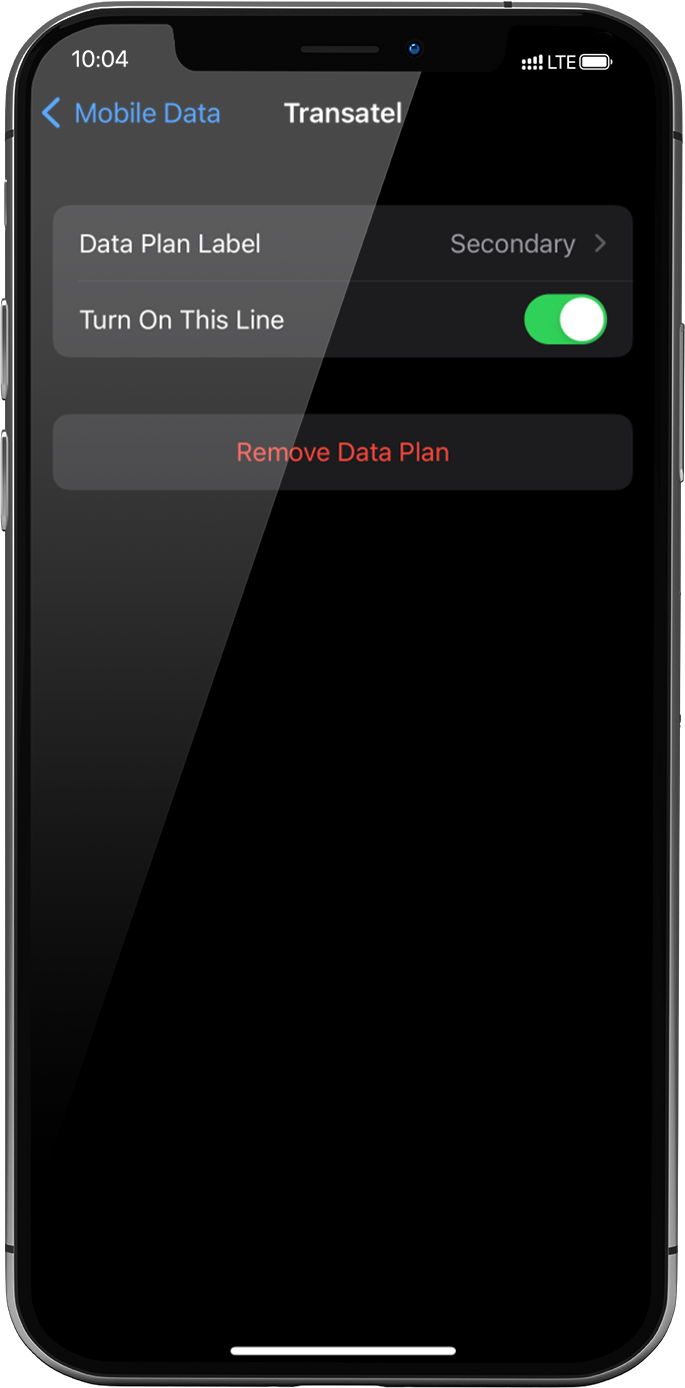
Go to: settings > mobile data > under data plans, select the installed eSIM profile (or “secondary” or the name you renamed it)
Activate the profile by pressing the button Turn On This Line on the right.
As soon as your profile is activated, a double network signal will appear at the top of your screen.
NB: the double network only appears if you have also a physical SIM card/eSIM profile for voice & SMS installed on your device. If there is no physical SIM card installed, only the stepped bars network will be displayed.
Great
Based on 28618 reviews on
Verified
Verified review
This user has been identified as a buyer
Excellent
Excellent.
But on some places signal disappeared.
On Tokyo Disneyland, for example.
customer, 16 Nov 2025
Verified
Verified review
This user has been identified as a buyer
Ubigi was great!
The app tells you how much you've used and can easily top it up if nearing max. It seamlessly switched from Japan to Korea when I landed at ICN airport from Japan.
Alexandra, 16 Nov 2025
Verified
Verified review
This user has been identified as a buyer
A little data from my iPad
I like it the right amount of data for I need the app. Plan works great.
David, 16 Nov 2025
Verified
Verified review
This user has been identified as a buyer
Easy to download and use
Easy to download and use. Good value for money
Margaret Ford, 16 Nov 2025
Verified
Verified review
This user has been identified as a buyer
Installation before the trip abroad was…
Installation before the trip abroad was easy and took just a few minutes. Upon arrival in Argentina the eSim was operative right away.
Burkhard, 16 Nov 2025
Verified
Verified review
This user has been identified as a buyer
Its really good internet e sim
Its really good internet e sim
Dinusha Ileperuma, 16 Nov 2025
Verified
Verified review
This user has been identified as a buyer
Easy to use
It is very efficient and user friendly
Set up was easy
No probs so far in Japan
Fulya Ozer, 16 Nov 2025
Verified
Verified review
This user has been identified as a buyer
Reasonable price and convenience
Reasonable price and convenience.
Easy to use
Bill, 16 Nov 2025
Verified
Verified review
This user has been identified as a buyer
Ubigi Review
Ubigi Review: I was able to communicate with everyone back home while away.
customer, 16 Nov 2025
Verified
Verified review
This user has been identified as a buyer
it worked fine thanks
it worked fine thanks
Jonathan Bell, 16 Nov 2025
Verified
Verified review
This user has been identified as a buyer
definitely recommend
definitely recommend.
The whole process was very easy.
Worked as soon as I landed in USA.
Made communication so easy .
Much better & cheaper than using an add on package from my uk network
BJ, 16 Nov 2025
Verified
Verified review
This user has been identified as a buyer
You put the esim in its work
You put the esim in its work, but first you have to download the app.
Gradus Bosman , 16 Nov 2025
Verified
Verified review
This user has been identified as a buyer
Instructions are easy to follow
Instructions are easy to follow
Chona, 16 Nov 2025
Verified
Verified review
This user has been identified as a buyer
eSIM for Europe (data only)
eSIM for Europe (data only). First time experience. Clear explanation. No surprises.
customer, 16 Nov 2025
Verified
Verified review
This user has been identified as a buyer
Fantastic customer service!
Fantastic customer service!
Allie B., 16 Nov 2025
Thank you
Your message has been sent. We’ll get back to you shortly.
Thank you
We have taken into account your subscription to the newsletter
How to check if a device is ready for eSIM?
Check eSIM compatibility
Smartphones & Cellular Tablets:
Dial (*#06#). If an EID number shows, your device supports eSIM!
Laptops (Windows 10/11):
Open your flyout (bottom-right corner). If Cellular settings are visible, your laptop supports eSIM!
Check Carrier Unlock
On iOS:
Go to Settings > General > About, scroll to Carrier Lock. If it says "No SIM restrictions", your device is unlocked!
On Android:
Go to Settings > Network & Internet > Mobile Network, turn off Auto network selection. If you see multiple available networks, your device is unlocked! If only one appears, or you get an error, it may be locked.
You already have an eSIM in your cart.
Each order can only include one eSIM data plan.
Current plan: •
If you choose to add a new one, the current plan will be removed. What would you like to do?








 Check eSIM compatibility
 Check Carrier Unlock