Check if your eSIM profile is installed on your device.
Check eSIM profile activation
Check if your eSIM profile is activated on your device.
Apply data to eSIM profile
Ensure data is applied to your Ubigi eSIM profile.
Check APN configuration
Ensure that the APN is correctly set for your Ubigi connectivty.
Check network display
Check the network status for your Ubigi connectivity.
Final checks!
Check account creation and Internet access.
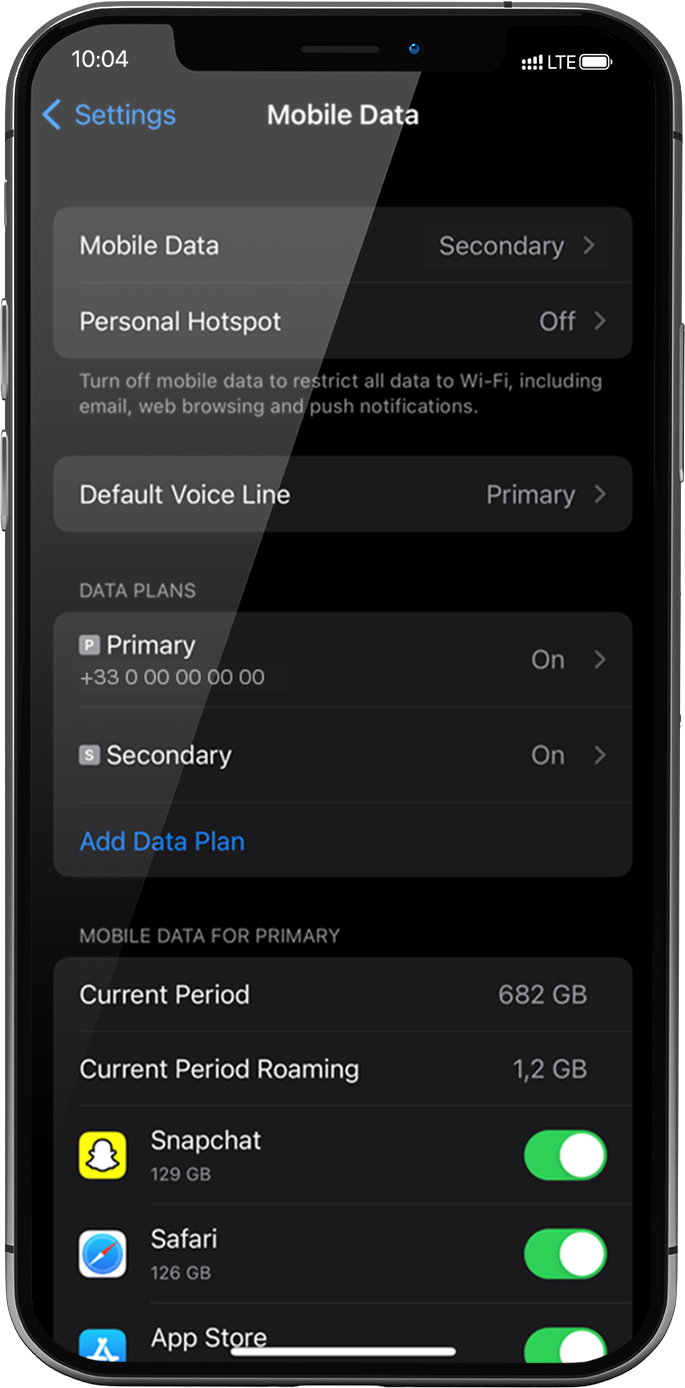
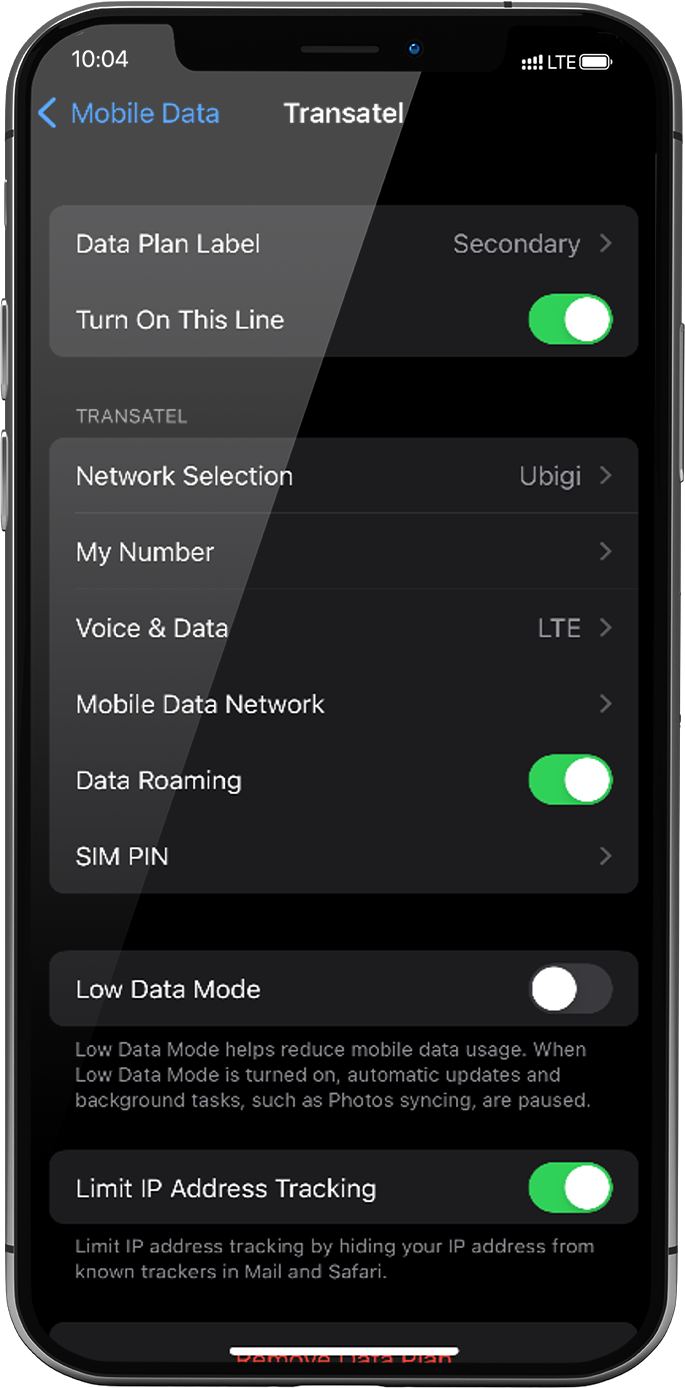
Now ensure that the Data roaming option to this line is activated.
Go to: Settings > Mobile Data > under Data plans, select the installed eSIM profile* > Activate Data roaming.
*it will appear as “secondary” or under the name you renamed it.
NB: The Data roaming option is now activated only for your Ubigi eSIM profile. This means that you won’t have extra roaming costs as only Ubigi rates will be applied while using the Ubigi cellular connectivity.
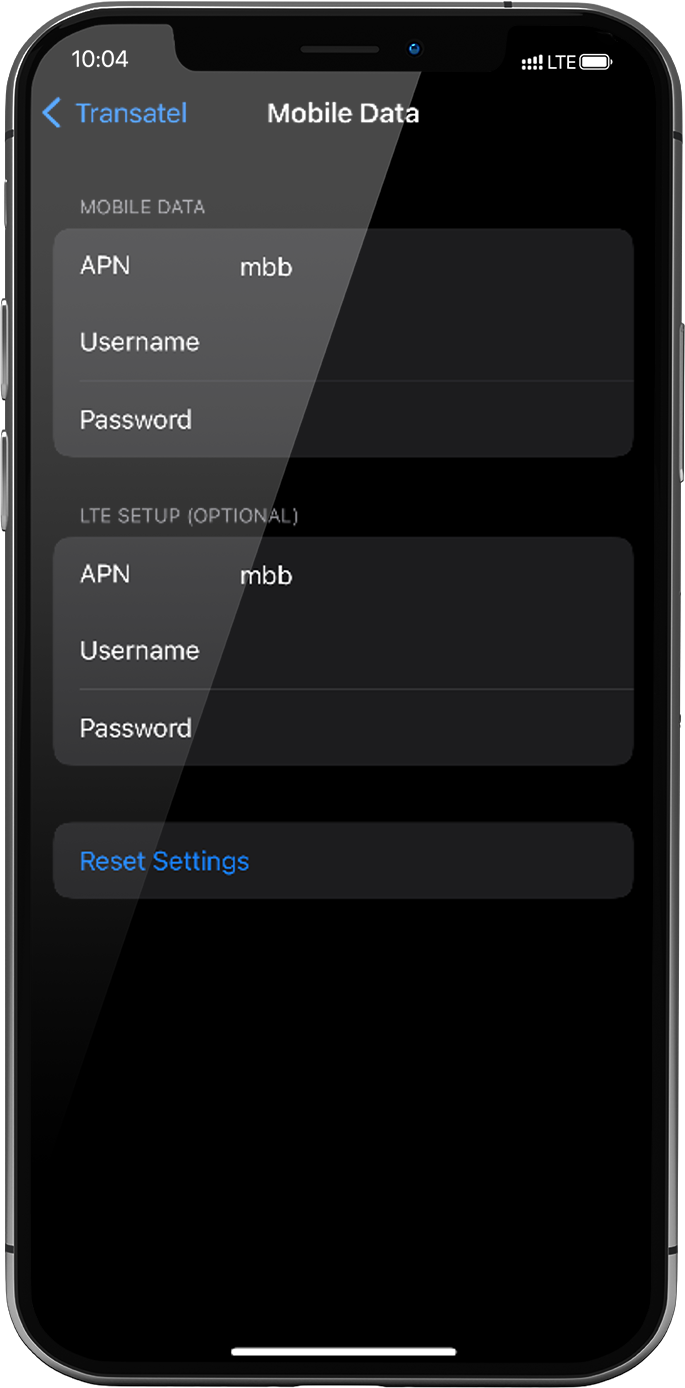
In the same screen, select Mobile data network in order to configure the APN (Access Point Name). In the APN field, make sure that mbb is specified. If not, type it in the field.
Great
Based on 32692 reviews on
Verified
Verified review
This user has been identified as a buyer
Straight up rel
Straight up reliable, fast and connected quickly to network. Price was decent too
customer, 13 Mar 2026
Verified
Verified review
This user has been identified as a buyer
Very good service
Had great service everywhere I went, I highly recommended using this type of cell services!
customer, 13 Mar 2026
Verified
Verified review
This user has been identified as a buyer
Glad that I was able to use service…
Glad that I was able to use service whenever needed.
customer, 13 Mar 2026
Verified
Verified review
This user has been identified as a buyer
Amazing coverage within Japan
Amazing coverage within Japan
customer, 13 Mar 2026
Verified
Verified review
This user has been identified as a buyer
I usually use my mobile off-line
I usually use my mobile off-line. the experience I had this time in Spain was great. I could use translator anywhere, communicate with family any time.
Yasu, 13 Mar 2026
Verified
Verified review
This user has been identified as a buyer
This service was excellent from…
This service was excellent from beginning to end. I would definitely recommend them and will use them again in the future.
Paul Ashton, 13 Mar 2026
Verified
Verified review
This user has been identified as a buyer
Very good
Very good, but in Tohoku sometimes it did not work.
customer, 13 Mar 2026
Verified
Verified review
This user has been identified as a buyer
It just works
It just works, it's nice to be able to import the SIM from the application, no need to scan a QR code from a second phone.
Daniel, 13 Mar 2026
Verified
Verified review
This user has been identified as a buyer
Configuration instructions need a…
Configuration instructions need a little improvement for clarification.
Linda Wilson, 13 Mar 2026
Verified
Verified review
This user has been identified as a buyer
Necessity of switching off primary SIM
First, I cannot connect internet. I can connect internet after when I switch off primary SIM. It is more comfortable if there is instruction about necessity of switching off.
Shunsei, 13 Mar 2026
Verified
Verified review
This user has been identified as a buyer
Worked great in Japan
Worked great in Japan. Not one issue experienced.
Jeff B, 13 Mar 2026
Verified
Verified review
This user has been identified as a buyer
Ubigi works perfectly in South Africa
Ubigi works perfectly in South Africa. I have no issues at all, would definately reccommend to anyone.
Natasha Luiters, 13 Mar 2026
Verified
Verified review
This user has been identified as a buyer
Works everywhere
Works everywhere, even in the backcountry!
customer, 13 Mar 2026
Verified
Verified review
This user has been identified as a buyer
We chose Ubigi because we read that it…
We chose Ubigi because we read that it had great connectivity in more rural areas of Japan and it didn't fail us. It was easy to upload and use and had no issues at all. I would highly recommend them for anyone wanting a reliable E-sim.
NM, 13 Mar 2026
Verified
Verified review
This user has been identified as a buyer
Great connectivity
Very easy to install, very easy to use+ great network connectivity
Joseph Jammal, 13 Mar 2026
Thank you
Your message has been sent. We’ll get back to you shortly.
Thank you
We have taken into account your subscription to the newsletter
How to check eSIM compatibility
Smartphones / Tablets:
Dial *#06#. → If an EID number appears, your device is eSIM-compatible.
Windows 10 / 11:
Press Windows+I. Go to “Network & Internet” → If you see "Cellular", your PC is eSIM-compatible.
How to check carrier unlocking
iPhone / iPad:
Go to Settings > General > About. Scroll to Carrier Lock. → If you see “No SIM restrictions”, your device is unlocked.
Android:
Go to Settings > Network & Internet > Mobile network. Disable Automatic network selection. → If multiple networks appear, your device is unlocked.
You already have an eSIM in your cart.
Each order can only include one eSIM data plan.
If you choose to add a new one, the current plan will be removed. What would you like to do?








 How to check eSIM compatibility
 How to check carrier unlocking