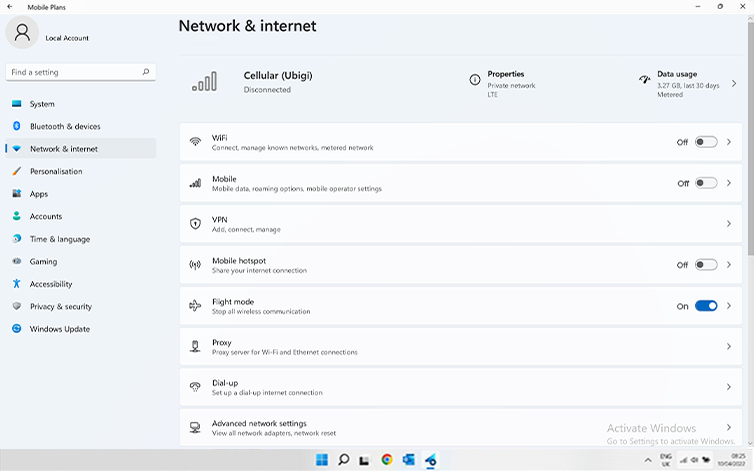
Check if your eSIM profile is installed on your device.
Check eSIM profile activation
Check if your eSIM profile is activated on your device.
Apply data to eSIM profile
Ensure data is applied to your Ubigi eSIM profile.
Check APN configuration
Ensure that the APN is correctly set for your Ubigi connectivty.
Check network display
Check the network status for your Ubigi connectivity.
Final checks!
Check account creation and Internet access.
At this step, turn ON “flight mode” for 5 secondes and turn it OFF. This action will refresh the network connection from your device.
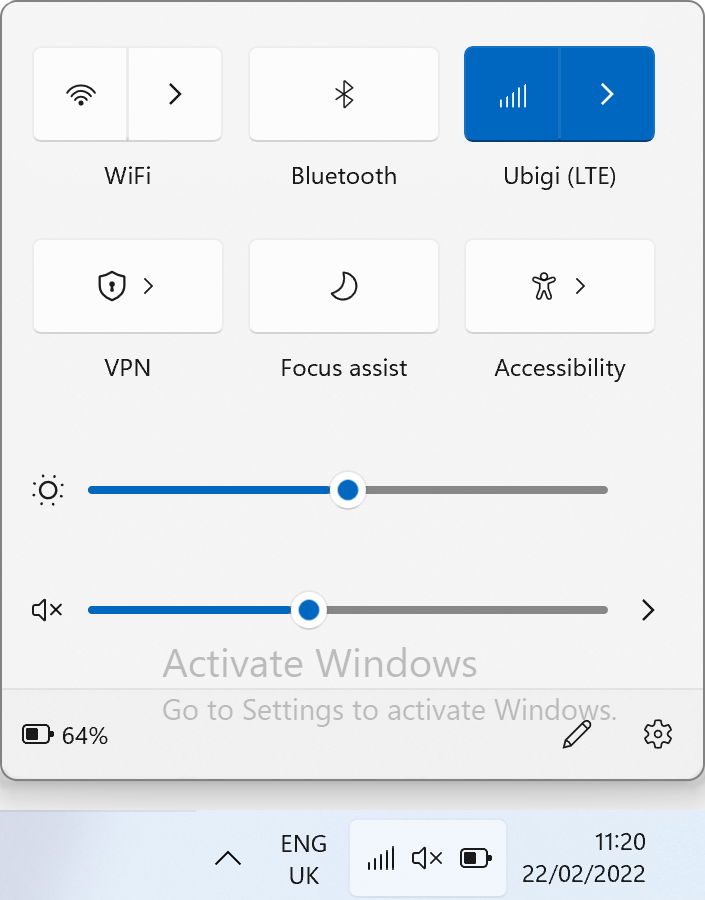
Once you are connected to the network, you will see a network icon appear on the bottom line.
– If you see a network icon with 1 to full bars, go to the next step.
– If the network does not appear (or it displays a sphere) please follow instructions here to select a network manually. Once the network is displayed, go to the next step.
NB: In case you still have no network bars displayed even after the manual selection, please contact our Customer Support for further help and provide the ICCID.

Great
Based on 32523 reviews on
Verified
Verified review
This user has been identified as a buyer
very easy to use
very easy to use
customer, 09 Mar 2026
Verified
Verified review
This user has been identified as a buyer
Overall really great
Once I understood how to get everything set up it was great, I only had a handful of times where the reception wasn't amazing.
Wy, 09 Mar 2026
Verified
Verified review
This user has been identified as a buyer
Easy to connect esim work perfectly …
Easy to connect esim work perfectly in japan I will always use from now when I travel overseas , HIGHLY RECOMMENDED.
Robert Dehghani, 09 Mar 2026
Verified
Verified review
This user has been identified as a buyer
I never had any problems while using…
I never had any problems while using Ubigi during my Athens Trip.
customer, 09 Mar 2026
Verified
Verified review
This user has been identified as a buyer
Easy & functional
Easy & functional
Helle Mathiesen, 09 Mar 2026
Verified
Verified review
This user has been identified as a buyer
Great signal, no connection issues
Easy to install in your phone and no connection issues in any place of the city
customer, 09 Mar 2026
Verified
Verified review
This user has been identified as a buyer
I have had zero issues using my phone…
I have had zero issues using my phone since I arrived in thailand. Setup was easy, and it works as advertised
customer, 09 Mar 2026
Verified
Verified review
This user has been identified as a buyer
There are better eSims
Easy installation of the eSIM. The app was slow, never reported the correct usage, the iPhone widget never worked. Had issues with it not finding a network to connect too when I was in the middle of Bangkok, many times after phone was put into airplane mode then back to normal. Received a message that I was out of data on the second day when I knew was that was wrong. I used others eSIM providers and this is not one of the better ones.
Gene Kempf, 09 Mar 2026
Verified
Verified review
This user has been identified as a buyer
Easy to use
Good price and easy to use
bill, 09 Mar 2026
Verified
Verified review
This user has been identified as a buyer
Works perfectly
Worked perfectly as soon as I touched down in Albania and worked seamlessly until I left, will definitely use again
Graham Carlton, 09 Mar 2026
Verified
Verified review
This user has been identified as a buyer
Customer service customer service…
Customer service customer service customer service. I had a slight problem on entry to Japan and their response through email was impeccable. Though my problem took 2 emails to fix the fact was I didn’t have to wait a week in fact sorted in at most a few hours but was probably quicker
Les, 09 Mar 2026
Verified
Verified review
This user has been identified as a buyer
Perfect and gast internet in Japan
Perfect and fast internet in Japan
Bram , 09 Mar 2026
Verified
Verified review
This user has been identified as a buyer
Easy all round and gray coverage across Japan
Easy to purchase, set up, use and top up if required. Second time we have used Ubigi on our holidays and we have travelled to cities, remote areas and smaller places without any issues.
DisappointedShopper, 09 Mar 2026
Verified
Verified review
This user has been identified as a buyer
Good service
Used a 3gig data plan in Costa Rica and had service whenever we needed it. Of course you’re not going to have service in the middle of the jungle etc but while driving on most roads and in towns it was all as you would expect especially for such a competitive price.
customer, 09 Mar 2026
Verified
Verified review
This user has been identified as a buyer
quick to set up and completely reliable.
Ubigi works exactly as you need it to: it's quick to set up and completely reliable.
Jo Schwertner, 09 Mar 2026
Thank you
Your message has been sent. We’ll get back to you shortly.
Thank you
We have taken into account your subscription to the newsletter
How to check eSIM compatibility
Smartphones / Tablets:
Dial *#06#. → If an EID number appears, your device is eSIM-compatible.
Windows 10 / 11:
Press Windows+I. Go to “Network & Internet” → If you see "Cellular", your PC is eSIM-compatible.
How to check carrier unlocking
iPhone / iPad:
Go to Settings > General > About. Scroll to Carrier Lock. → If you see “No SIM restrictions”, your device is unlocked.
Android:
Go to Settings > Network & Internet > Mobile network. Disable Automatic network selection. → If multiple networks appear, your device is unlocked.
You already have an eSIM in your cart.
Each order can only include one eSIM data plan.
If you choose to add a new one, the current plan will be removed. What would you like to do?

