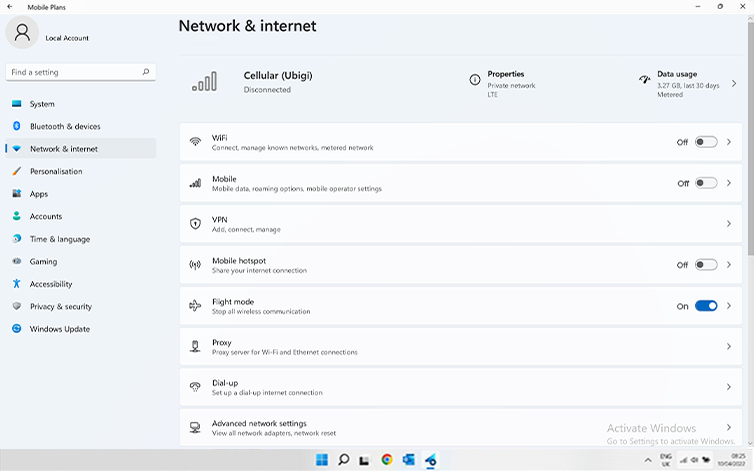
Check if your eSIM profile is installed on your device.
Check eSIM profile activation
Check if your eSIM profile is activated on your device.
Apply data to eSIM profile
Ensure data is applied to your Ubigi eSIM profile.
Check APN configuration
Ensure that the APN is correctly set for your Ubigi connectivty.
Check network display
Check the network status for your Ubigi connectivity.
Final checks!
Check account creation and Internet access.
At this step, turn ON “flight mode” for 5 secondes and turn it OFF. This action will refresh the network connection from your device.
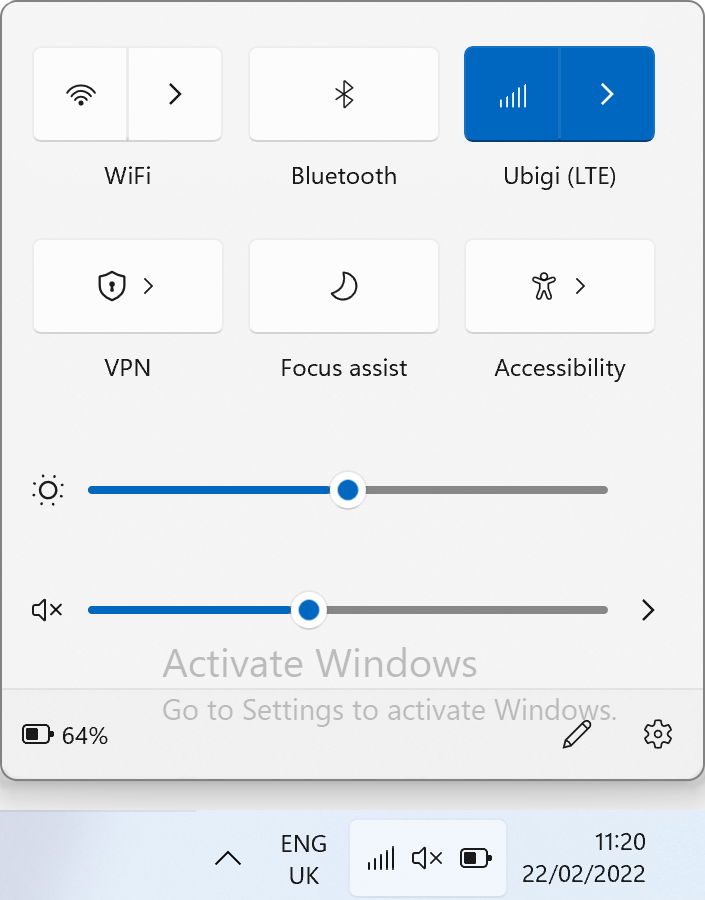
Once you are connected to the network, you will see a network icon appear on the bottom line.
– If you see a network icon with 1 to full bars, go to the next step.
– If the network does not appear (or it displays a sphere) please follow instructions here to select a network manually. Once the network is displayed, go to the next step.
NB: In case you still have no network bars displayed even after the manual selection, please contact our Customer Support for further help and provide the ICCID.
Great
Based on 49660 reviews on
Verified
Verified review
This user has been identified as a buyer
Awesome service.
Awesome service.
Joshua Nava Valenzuela, 26 Oct 2026
Verified
Verified review
This user has been identified as a buyer
Excellent service
Excellent service, I activated the line as soon as I got off at the airport and it started working. Thank you very much.
customer, 26 Oct 2026
Verified
Verified review
This user has been identified as a buyer
easy to install unlike the other…
easy to install unlike the other company where It was complicated even with assistance.
Karen Mac, 26 Oct 2026
Verified
Verified review
This user has been identified as a buyer
Very reliable.
Very reliable.
Christine, 26 Oct 2026
Verified
Verified review
This user has been identified as a buyer
Good coverage
Good coverage. Sometimes got cut but after putting the airplane mode off and on it works again
customer, 26 Oct 2026
Verified
Verified review
This user has been identified as a buyer
Very good network
Very good network. Clear and reliable.
Rohit Anand Ji, 26 Oct 2026
Verified
Verified review
This user has been identified as a buyer
I travelled to morrocco on a weeks…
I travelled to morrocco on a weeks holiday from the UK and I purchased a global pass from my current mobile provider which didnt work !!! Even after an hour with customer support , so I used the hotel WiFi and found ubigi within 5 minutes id purchased a 7 day esim for only £5 and was up and running again . Brilliant 5 stars from me 👊🏻👍🏻
Andy of Skegness , 26 Oct 2026
Verified
Verified review
This user has been identified as a buyer
It’s thrustworthy
Very reliable and fast to set up
customer, 26 Oct 2026
Verified
Verified review
This user has been identified as a buyer
During our journey to Japan
During our journey to Japan, we relied on Ubigi eSIM unlimited data and experienced consistently strong reception throughout, making it highly recommended.
Erick Gonzalez, 26 Oct 2026
Verified
Verified review
This user has been identified as a buyer
Never lost reception
Never lost reception. Reliable and fast from Tokyo, Kyoto, and Osaka. Would recommend 100%.
Kaylen Richardson, 26 Oct 2026
Verified
Verified review
This user has been identified as a buyer
Easy to install and is working great…
Easy to install and is working great upon my arrival in Japan
Jon Ellks, 26 Oct 2026
Verified
Verified review
This user has been identified as a buyer
It started automatically when I arrived
It started automatically when I arrived in Italy and has worked very well .
Nina Zeleney, 26 Oct 2026
Verified
Verified review
This user has been identified as a buyer
Excellent experience with Ubigi while…
Excellent experience with Ubigi while travelling in Greece
Hilary Rogers, 26 Oct 2026
Verified
Verified review
This user has been identified as a buyer
Very Great
Very Great, no problem and good connexion
customer, 26 Oct 2026
Verified
Verified review
This user has been identified as a buyer
Very convenient and easy to use
Very convenient and easy to use
Ken, 26 Oct 2026
Thank you
Your message has been sent. We’ll get back to you shortly.
Thank you
We have taken into account your subscription to the newsletter
How to check eSIM compatibility
Smartphones / Tablets:
Dial *#06#. → If an EID number appears, your device is eSIM-compatible.
Windows 10 / 11:
Press Windows+I. Go to “Network & Internet” → If you see "Cellular", your PC is eSIM-compatible.
How to check carrier unlocking
iPhone / iPad:
Go to Settings > General > About. Scroll to Carrier Lock. → If you see “No SIM restrictions”, your device is unlocked.
Android:
Go to Settings > Network & Internet > Mobile network. Disable Automatic network selection. → If multiple networks appear, your device is unlocked.
You already have an eSIM in your cart.
Each order can only include one eSIM data plan.
If you choose to add a new one, the current plan will be removed. What would you like to do?







 How to check eSIM compatibility
 How to check carrier unlocking