Check if your eSIM profile is installed on your device.
Check eSIM profile activation
Check if your eSIM profile is activated on your device.
Apply data to eSIM profile
Ensure data is applied to your Ubigi eSIM profile.
Check APN configuration
Ensure that the APN is correctly set for your Ubigi connectivty.
Check network display
Check the network status for your Ubigi connectivity.
Final checks!
Check account creation and Internet access.
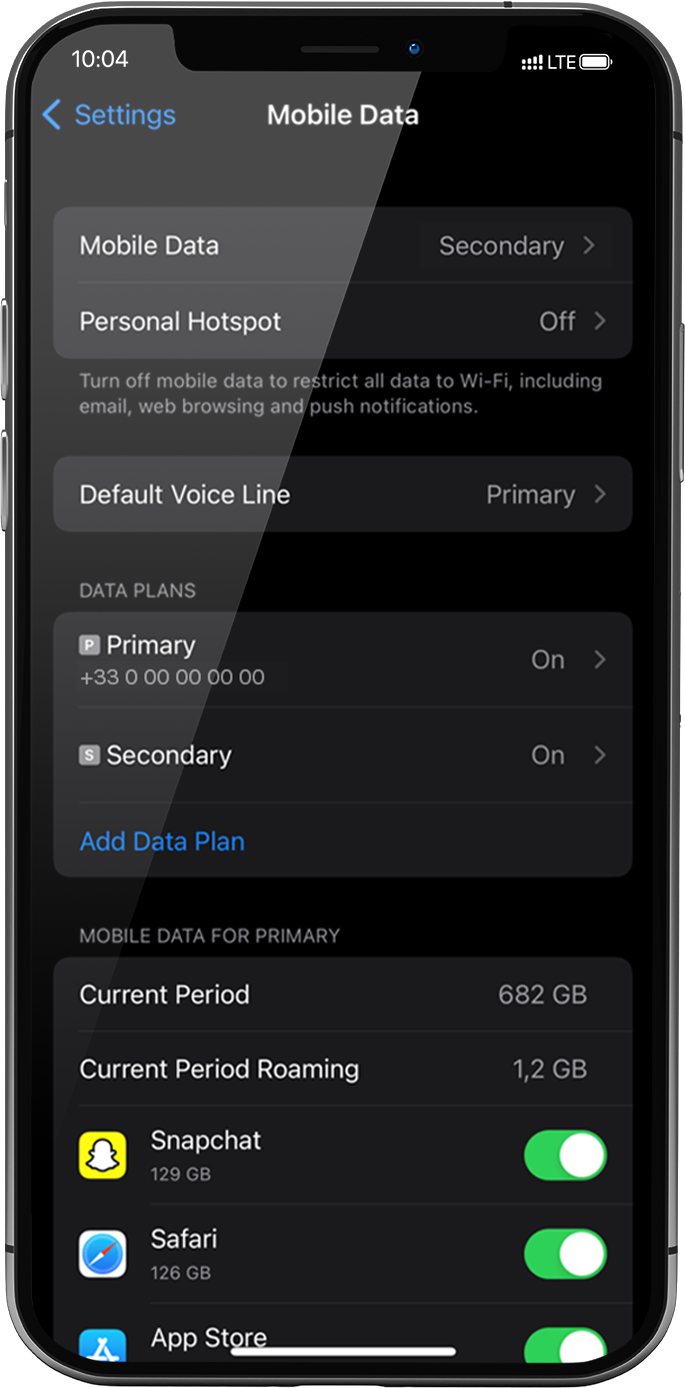
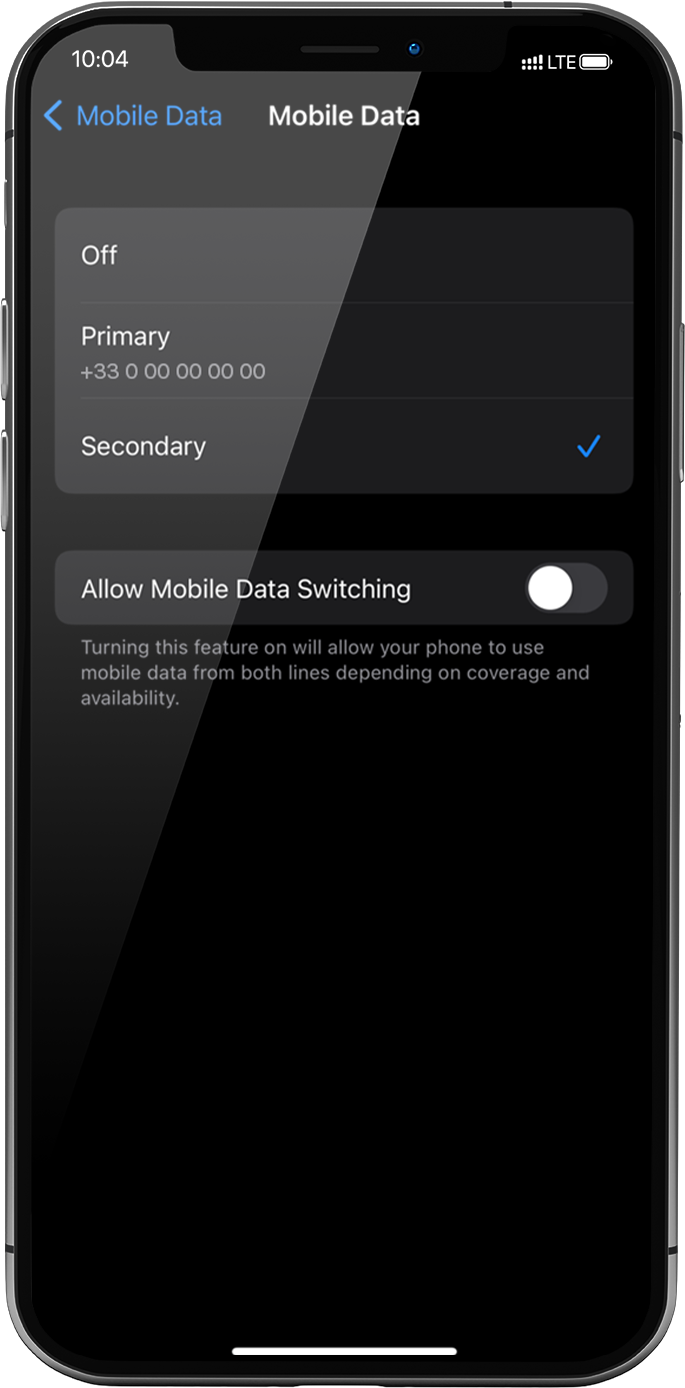
Cellular Data must be applied to the Ubigi eSIM profile to access the Internet.
To do that, go to: settings > Mobile Data > Mobile Data again, select Secondary: the tick will appear in front of it when it is selected .
Important: When you have multiple SIM cards/eSIM profiles on your iPhone, it is not possible to activate cellular data on two data plans at the same time. You can only apply it to one at a time.
Great
Based on 50911 reviews on
Verified
Verified review
This user has been identified as a buyer
Worked like a charm
Worked like a charm. Flight landed, Mobile phone on, eSim activated and bum I was registered and connected. Easy and quick.
Perfect
Andre, 06 Nov 2026
Verified
Verified review
This user has been identified as a buyer
Dependable connectivity
Dependable connectivity, even in the mountains around Tokyo!
Niels Matthijs, 06 Nov 2026
Verified
Verified review
This user has been identified as a buyer
Easy to access and purchase
Easy to access and purchase
Easy to activate
Repeated user already
Pearl, 06 Nov 2026
Verified
Verified review
This user has been identified as a buyer
Reliable
Reliable, easy to use, predictable, correct price.
Dan Iliescu, 06 Nov 2026
Verified
Verified review
This user has been identified as a buyer
Solution
Solution, easy, cover of signal, great price,
customer, 06 Nov 2026
Verified
Verified review
This user has been identified as a buyer
Easy to setup
Easy to setup, no issues while traveling throughout Japan.
Michael, 06 Nov 2026
Verified
Verified review
This user has been identified as a buyer
Good explanation and really easy to set…
Good explanation and really easy to set up and use.
customer, 06 Nov 2026
Verified
Verified review
This user has been identified as a buyer
No difficult connecting anywhere i went.
No difficult connecting anywhere i went.
ROBERT BARCELON/ALCANTARA, 06 Nov 2026
Verified
Verified review
This user has been identified as a buyer
Works perfectly but pricy
Works perfectly, easy to handle, a little pricy
Pascal W., 06 Nov 2026
Verified
Verified review
This user has been identified as a buyer
No issues and Reliable
No issues and Reliable
customer, 06 Nov 2026
Verified
Verified review
This user has been identified as a buyer
Super easy to set up
Super easy to set up, data has worked really well
Reenie, 06 Nov 2026
Verified
Verified review
This user has been identified as a buyer
Super fast and super connection
Super fast and super connection
Francesc, 06 Nov 2026
Verified
Verified review
This user has been identified as a buyer
Easy to connect. Excellent value for money
Easy to connect, and worked great without any problems. Excellent value for money
David Farquharson, 06 Nov 2026
Verified
Verified review
This user has been identified as a buyer
Excellent customer experience
Excellent customer experience, great product. More information on how to temporarily disable existing service would be appreciated (still charged the international roaming fee)...
nicola, 06 Nov 2026
Verified
Verified review
This user has been identified as a buyer
Ubigi worked seamlessly from the moment…
Ubigi worked seamlessly from the moment I landed in Japan, with reliable connectivity even after getting my local SIM. Highly recommended!
customer, 06 Nov 2026
Thank you
Your message has been sent. We’ll get back to you shortly.
Thank you
We have taken into account your subscription to the newsletter
How to check eSIM compatibility
Smartphones / Tablets:
Dial *#06#. → If an EID number appears, your device is eSIM-compatible.
Windows 10 / 11:
Press Windows+I. Go to “Network & Internet” → If you see "Cellular", your PC is eSIM-compatible.
How to check carrier unlocking
iPhone / iPad:
Go to Settings > General > About. Scroll to Carrier Lock. → If you see “No SIM restrictions”, your device is unlocked.
Android:
Go to Settings > Network & Internet > Mobile network. Disable Automatic network selection. → If multiple networks appear, your device is unlocked.



 .


 How to check eSIM compatibility
 How to check carrier unlocking