Check if your eSIM profile is installed on your device.
Check eSIM profile activation
Check if your eSIM profile is activated on your device.
Apply data to eSIM profile
Ensure data is applied to your Ubigi eSIM profile.
Check APN configuration
Ensure that the APN is correctly set for your Ubigi connectivty.
Check network display
Check the network status for your Ubigi connectivity.
Final checks!
Check account creation and Internet access.
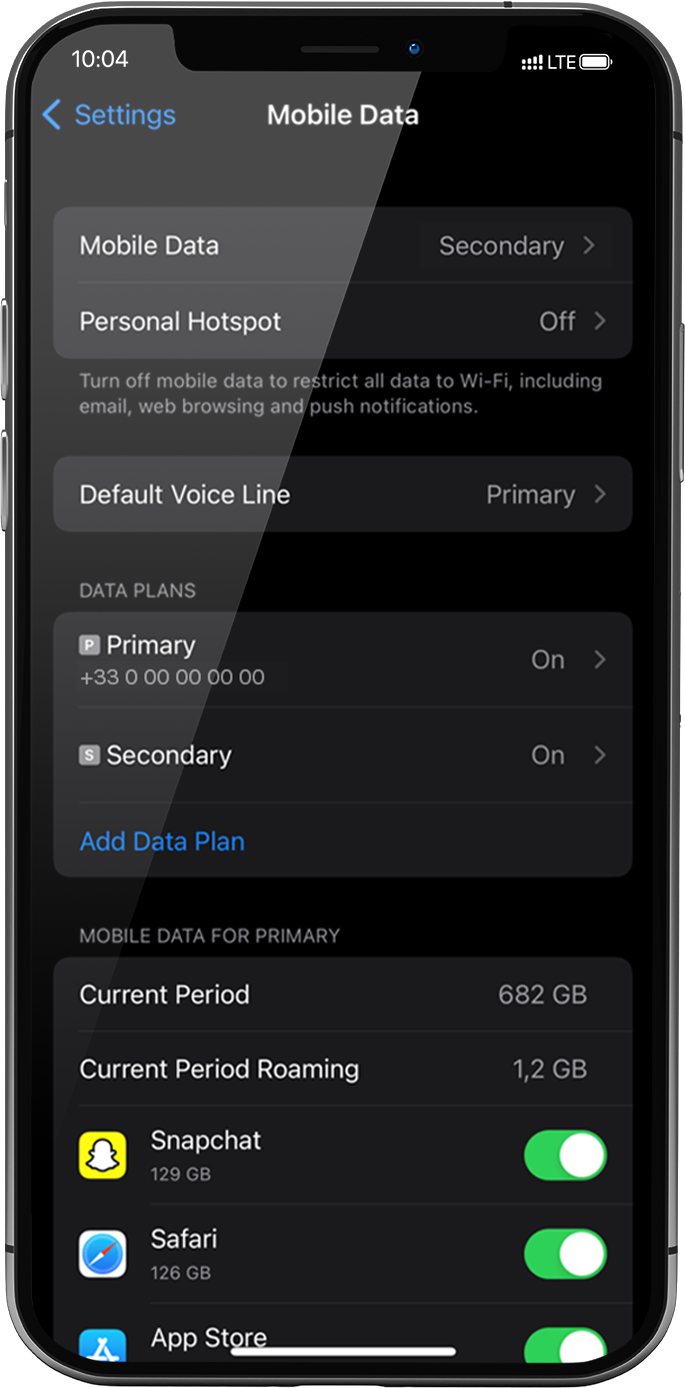
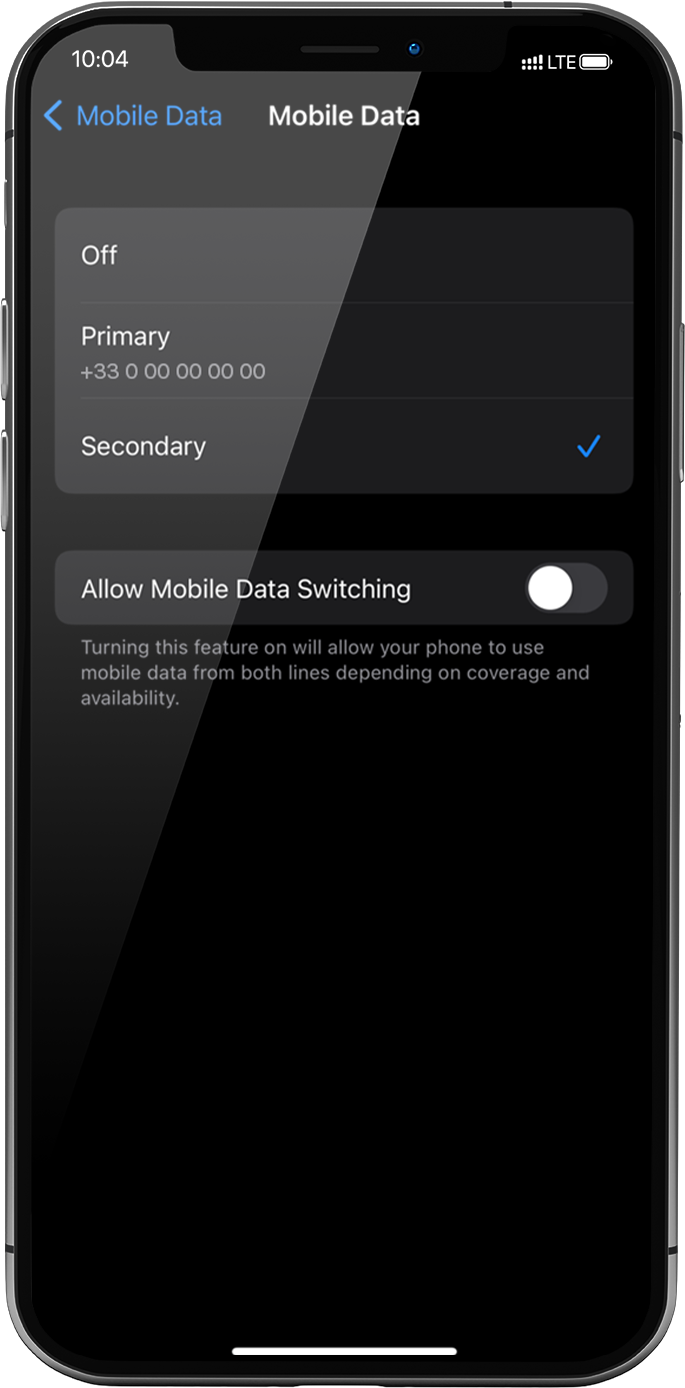
Cellular Data must be applied to the Ubigi eSIM profile to access the Internet.
To do that, go to: settings > Mobile Data > Mobile Data again, select Secondary: the tick will appear in front of it when it is selected .
Important: When you have multiple SIM cards/eSIM profiles on your iPhone, it is not possible to activate cellular data on two data plans at the same time. You can only apply it to one at a time.
Great
Based on 50994 reviews on
Verified
Verified review
This user has been identified as a buyer
Excellent
Excellent And fast
Andreas Agathangelou, 07 Nov 2026
Verified
Verified review
This user has been identified as a buyer
Great eSIM
Great eSIM. New setup screens are very useful.
Kenai Paul, 07 Nov 2026
Verified
Verified review
This user has been identified as a buyer
Recommend
Great experience
Ahmed, 07 Nov 2026
Verified
Verified review
This user has been identified as a buyer
perfect deal
perfect deal. everything went smoothly
XenY, 07 Nov 2026
Verified
Verified review
This user has been identified as a buyer
Stress free connection with fully…
Stress free connection with fully coverage of network 🙌 👌
Mrs Maenzanise, 07 Nov 2026
Verified
Verified review
This user has been identified as a buyer
Been using unlimited plan in Australia
Been using unlimited plan in Australia, really good and hasn’t let me down!
Molly, 07 Nov 2026
Verified
Verified review
This user has been identified as a buyer
So easy to load and use in Cairo now…
So easy to load and use in Cairo now enjoying the connection!
Lisa Leigh Ann, 07 Nov 2026
Verified
Verified review
This user has been identified as a buyer
Using Ubigi made getting around a lot…
Using Ubigi made getting around a lot easier.
Deb Saltern, 07 Nov 2026
Verified
Verified review
This user has been identified as a buyer
Always connected
Always connected for Navigation or Video calls. Helps a lot for travel by Bus or train
customer, 07 Nov 2026
Verified
Verified review
This user has been identified as a buyer
Great service! No issues.
Great service! No issues.
Kartik Suresh, 07 Nov 2026
Verified
Verified review
This user has been identified as a buyer
It was easy to use
It was easy to use, and the signal was great! It’s excellent—I’d definitely use it again.
customer, 07 Nov 2026
Verified
Verified review
This user has been identified as a buyer
Worked very well and was easy to setup
Worked very well and was easy to setup. I got an unlimited plan and I don’t think it was clear enough that it wasn’t exactly unlimited.
customer, 07 Nov 2026
Verified
Verified review
This user has been identified as a buyer
Stable and good internet
Stable and good internet
kiritoblackduelist kiritoblack, 07 Nov 2026
Verified
Verified review
This user has been identified as a buyer
I used ubigi in Japan and Egypt
I used ubigi in Japan and Egypt , so far it has been excellent.
Rosemary Hanna, 07 Nov 2026
Verified
Verified review
This user has been identified as a buyer
Best esim I have used.....no problems…
Best esim I have used.....no problems at.all with Ubigi
Leanne, 07 Nov 2026
Thank you
Your message has been sent. We’ll get back to you shortly.
Thank you
We have taken into account your subscription to the newsletter
How to check eSIM compatibility
Smartphones / Tablets:
Dial *#06#. → If an EID number appears, your device is eSIM-compatible.
Windows 10 / 11:
Press Windows+I. Go to “Network & Internet” → If you see "Cellular", your PC is eSIM-compatible.
How to check carrier unlocking
iPhone / iPad:
Go to Settings > General > About. Scroll to Carrier Lock. → If you see “No SIM restrictions”, your device is unlocked.
Android:
Go to Settings > Network & Internet > Mobile network. Disable Automatic network selection. → If multiple networks appear, your device is unlocked.



 .


 How to check eSIM compatibility
 How to check carrier unlocking