Check if your eSIM profile is installed on your device.
Check eSIM profile activation
Check if your eSIM profile is activated on your device.
Apply data to eSIM profile
Ensure data is applied to your Ubigi eSIM profile.
Check APN configuration
Ensure that the APN is correctly set for your Ubigi connectivty.
Check network display
Check the network status for your Ubigi connectivity.
Final checks!
Check account creation and Internet access.
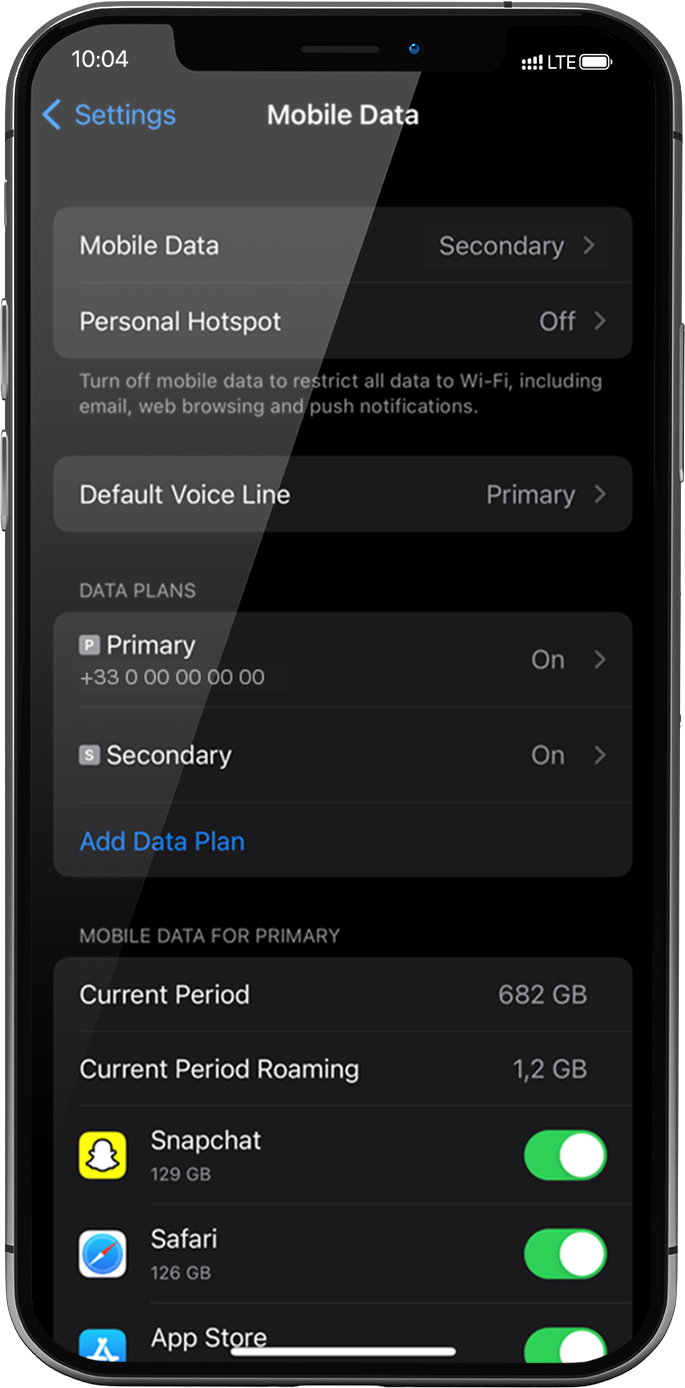
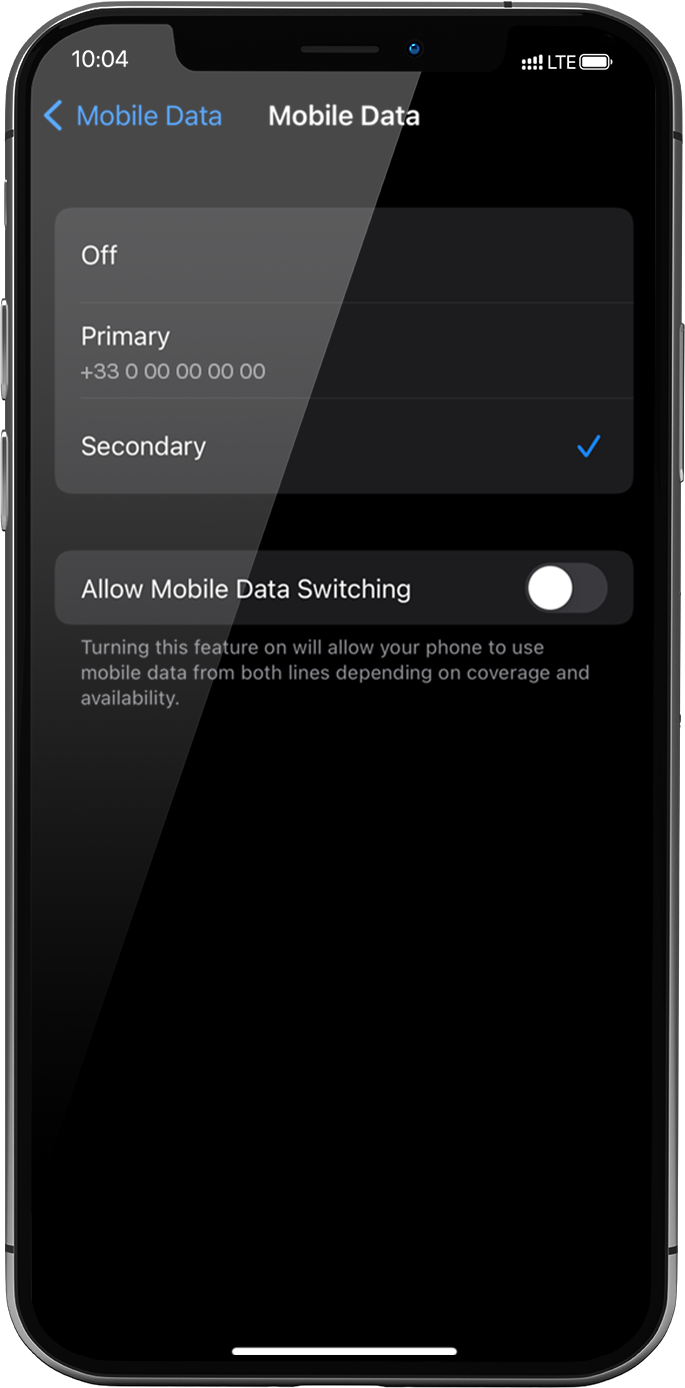
Cellular Data must be applied to the Ubigi eSIM profile to access the Internet.
To do that, go to: settings > Mobile Data > Mobile Data again, select Secondary: the tick will appear in front of it when it is selected .
Important: When you have multiple SIM cards/eSIM profiles on your iPhone, it is not possible to activate cellular data on two data plans at the same time. You can only apply it to one at a time.
Great
Based on 45567 reviews on
Verified
Verified review
This user has been identified as a buyer
Works great!
Very reliable and has worked great during our travels through multiple countries in Europe-- Denmark, Germany, France, Austria, and Italy. Great price too!
Julie, 12 Sep 2026
Verified
Verified review
This user has been identified as a buyer
No trouble having the connection on…
No trouble having the connection on time. Had connection everywhere.
customer, 12 Sep 2026
Verified
Verified review
This user has been identified as a buyer
Excellent and easy to use
Excellent and easy to use
Paola De Cicco, 12 Sep 2026
Verified
Verified review
This user has been identified as a buyer
Great deal for what you need
Easy to use and I've had network everywhere in Portugal. No issues with connectivity or finsihing service at all. It has done the job for us on a month long trip around the coast.
Jason, 12 Sep 2026
Verified
Verified review
This user has been identified as a buyer
Awesome service
Awesome service
Andre Craven Pierce, 12 Sep 2026
Verified
Verified review
This user has been identified as a buyer
Connection is not stable sometimes but…
Connection is not stable sometimes but other than that, it's good
customer in Thailand, 12 Sep 2026
Verified
Verified review
This user has been identified as a buyer
Good experience overall.
The data was good and pricing seemed fair especially for the unlimited plan. However initial setup upon arriving was a bit buggy. Where I had to restart my phone an additional time and also connect to wifi just to login to activate my eSim.
The dashboard doesn't seem to be accurate nor does it update in real-time (in my experience). But for unlimited plans this isn't an issue. Something to remember if you're using a metered plan.
Customer, 12 Sep 2026
Verified
Verified review
This user has been identified as a buyer
Cell service and covalue for the moneynnectivity were good…
Cell service and connectivity were good when needed. Not all areas were covered. It's done the job.
Mark Krueger, 12 Sep 2026
Verified
Verified review
This user has been identified as a buyer
Great experience
Affordable, easy installation, worked great.
GS, 12 Sep 2026
Verified
Verified review
This user has been identified as a buyer
Ease of use and accuracy.
Ease of use and accuracy.
Sam, 12 Sep 2026
Verified
Verified review
This user has been identified as a buyer
So easy to do got my wifi right away
So easy to do got my wifi right away . Will be using it next time I’m away , so much better than carrying them little wifi box’s about
Jacqueline, 12 Sep 2026
Verified
Verified review
This user has been identified as a buyer
Easy installation
Easy installation and good coverage (could be better in spain).
customer, 12 Sep 2026
Verified
Verified review
This user has been identified as a buyer
Very easy to use in various…
Very easy to use in various destinations and speed is good. Once I land at the airport and switch it on it activates. Relatively affordable too
Jo Anyia, 12 Sep 2026
Verified
Verified review
This user has been identified as a buyer
After set up it was easy to use.
After set up it was easy to use.
customer, 12 Sep 2026
Verified
Verified review
This user has been identified as a buyer
It was easy to purchase and to install
It was easy to purchase and to install. I am currently in Portugal and use it as needed and so far i have had great service.
Valued Customer, 12 Sep 2026
Thank you
Your message has been sent. We’ll get back to you shortly.
Thank you
We have taken into account your subscription to the newsletter
How to check eSIM compatibility
Smartphones / Tablets:
Dial *#06#. → If an EID number appears, your device is eSIM-compatible.
Windows 10 / 11:
Press Windows+I. Go to “Network & Internet” → If you see "Cellular", your PC is eSIM-compatible.
How to check carrier unlocking
iPhone / iPad:
Go to Settings > General > About. Scroll to Carrier Lock. → If you see “No SIM restrictions”, your device is unlocked.
Android:
Go to Settings > Network & Internet > Mobile network. Disable Automatic network selection. → If multiple networks appear, your device is unlocked.
You already have an eSIM in your cart.
Each order can only include one eSIM data plan.
If you choose to add a new one, the current plan will be removed. What would you like to do?




 .
.



 How to check eSIM compatibility
 How to check carrier unlocking