Check if your eSIM profile is installed on your device.
Check eSIM profile activation
Check if your eSIM profile is activated on your device.
Apply data to eSIM profile
Ensure data is applied to your Ubigi eSIM profile.
Check APN configuration
Ensure that the APN is correctly set for your Ubigi connectivty.
Check network display
Check the network status for your Ubigi connectivity.
Final checks!
Check account creation and Internet access.
First, check if the Ubigi eSIM profile is installed on your iPhone
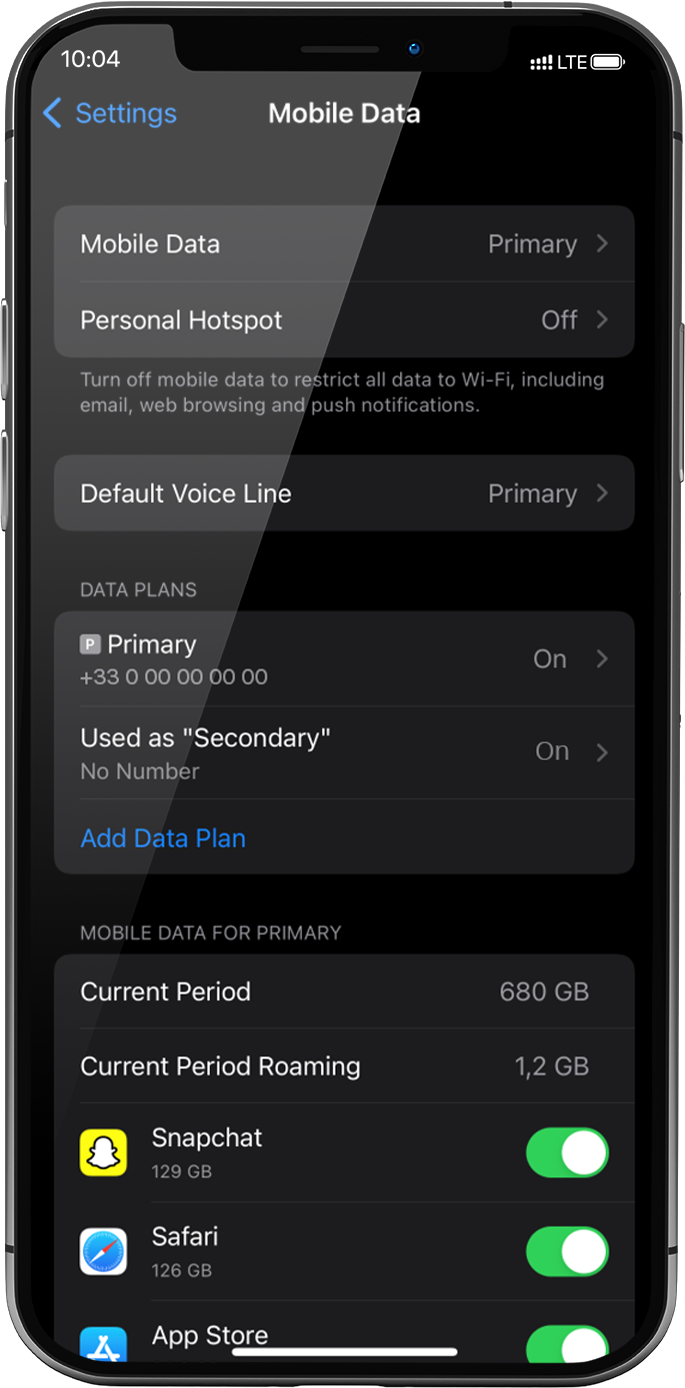
Go to: settings > mobile data > under data plans: installed eSIM profile will appear as “Secondary” (or the name you renamed it).
If your eSIM profile is already installed, go to step 2.
If no eSIM is installed yet, go to Get started and follow instructions for your device.
If you deleted your eSIM profil, please follow instructions on this link.
Great
Based on 48650 reviews on
Verified
Verified review
This user has been identified as a buyer
App very simple to use and good signal…
App very simple to use and good signal in Paris
customer, 15 Oct 2026
Verified
Verified review
This user has been identified as a buyer
Seamless service
Seamless service
Maggie B, 15 Oct 2026
Verified
Verified review
This user has been identified as a buyer
We traveled from the US to the…
We traveled from the US to the Netherlands and Spain. The eSIM started working as soon as we landed in the Netherlands. The only issue was that the internet was slow or didn’t work at all in popular tourist areas. Other than that, it was easy to install and affordable.
Mikhail B, 15 Oct 2026
Verified
Verified review
This user has been identified as a buyer
Great for navigating London, but a few things to keep in mind
As someone traveling out of the country for the very first time, Ubigi made it really easy to navigate my way around London. The signal was pretty good and reliable throughout my trip, and the overall user experience was solid.
There were just a couple of things I wish I had known beforehand as a first time user. First, my primary phone number wouldn't work on my iPhone unless I was connected to WiFi. Second, the service slowed down after reaching a certain threshold. I would have preferred to purchase a set amount of data instead.
Overall, it was a great service that kept me connected when I needed it most!
RUBEN, 15 Oct 2026
Verified
Verified review
This user has been identified as a buyer
Easy to install
Easy to install , used in turkey , great reception everywhere
sally benriassa, 15 Oct 2026
Verified
Verified review
This user has been identified as a buyer
Coverage was excellent wherever we…
Coverage was excellent wherever we traveled in Japan.
Kyle, 15 Oct 2026
Verified
Verified review
This user has been identified as a buyer
So simple
So simple, flexible and economical, what more could you ask for.
Rob Ford, 15 Oct 2026
Verified
Verified review
This user has been identified as a buyer
Easy to use and strong signal
Easy to use and strong signal
Tj, 15 Oct 2026
Verified
Verified review
This user has been identified as a buyer
So much better than buying a local sim on arrival
Easy enough to set up before leaving home, seamless to start using in destination country, rather than trying to buy a local sim on arrival. Reasonable cost. Didn’t need calls or messages as WhatsApp is used in destination country as well as calling home.
Suzi, 15 Oct 2026
Verified
Verified review
This user has been identified as a buyer
It is easy to use
It is easy to use
customer, 15 Oct 2026
Verified
Verified review
This user has been identified as a buyer
I just simply had good signal services…
I just simply had good signal services throughout my travel abroad
customer, 15 Oct 2026
Verified
Verified review
This user has been identified as a buyer
I used Ubigi for my Japan trip
I used Ubigi for my Japan trip, i can honestly say it worked good it did his job. While I was in Japan I was able to use all my apps without no problem.
Jesus V, 15 Oct 2026
Verified
Verified review
This user has been identified as a buyer
Best eSIM the signal is excellent and…
Best eSIM the signal is excellent and it’s help me a lot during my trip.
Judith, 15 Oct 2026
Verified
Verified review
This user has been identified as a buyer
Setup was easy and great 5G coverage
Setup and installing the eSIM was easy and straightforward. Also, the 5G coverage was great in Paris and on a trip to Rouen. Definitely using it on my next trip.
customer, 15 Oct 2026
Verified
Verified review
This user has been identified as a buyer
At the beginning it took some time to…
At the beginning it took some time to install the app and find local provider. After that I didn't have any problem with Internet connection in Uzbekistan.
Natasha, 15 Oct 2026
Thank you
Your message has been sent. We’ll get back to you shortly.
Thank you
We have taken into account your subscription to the newsletter
How to check eSIM compatibility
Smartphones / Tablets:
Dial *#06#. → If an EID number appears, your device is eSIM-compatible.
Windows 10 / 11:
Press Windows+I. Go to “Network & Internet” → If you see "Cellular", your PC is eSIM-compatible.
How to check carrier unlocking
iPhone / iPad:
Go to Settings > General > About. Scroll to Carrier Lock. → If you see “No SIM restrictions”, your device is unlocked.
Android:
Go to Settings > Network & Internet > Mobile network. Disable Automatic network selection. → If multiple networks appear, your device is unlocked.
You already have an eSIM in your cart.
Each order can only include one eSIM data plan.
If you choose to add a new one, the current plan will be removed. What would you like to do?






 How to check eSIM compatibility
 How to check carrier unlocking