Check if your eSIM profile is installed on your device.
Check eSIM profile activation
Check if your eSIM profile is activated on your device.
Apply data to eSIM profile
Ensure data is applied to your Ubigi eSIM profile.
Check APN configuration
Ensure that the APN is correctly set for your Ubigi connectivty.
Check network display
Check the network status for your Ubigi connectivity.
Final checks!
Check account creation and Internet access.
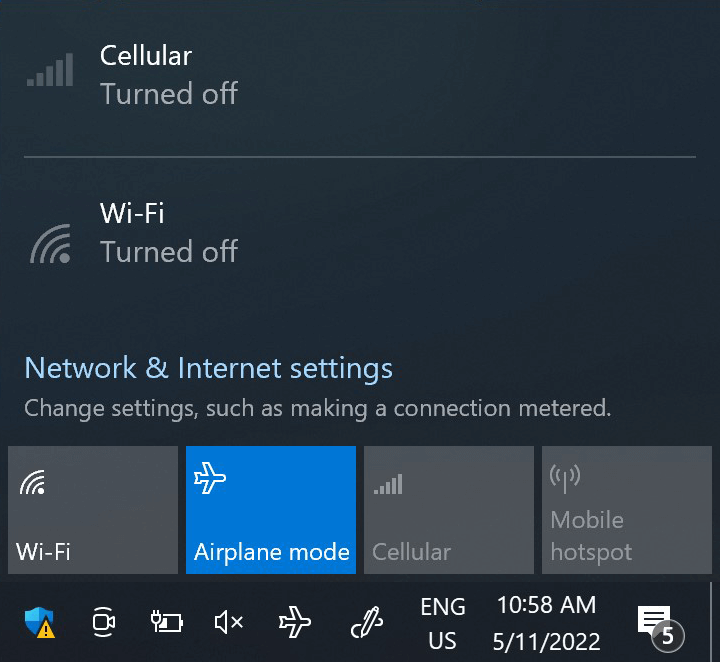
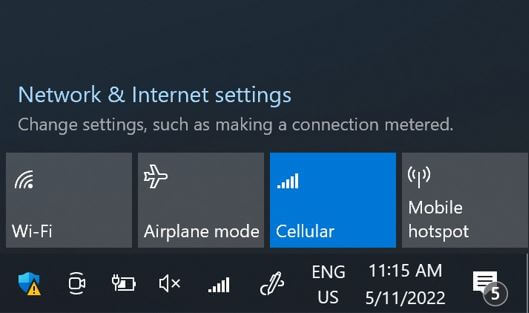
At this step, turn ON “flight mode” for 5 secondes and turn it OFF. This action will refresh the network connection from your device.
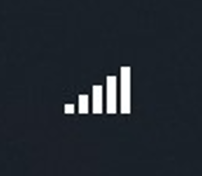
Once you are connected to the network, you will see a network icon appear on the bottom line.
If there is no network icon, please follow these steps to select a network manually. Once the network is displayed, go to the next step.
NB: In case you still have no network bars displayed (or it still displays a ) even after the manual selection, please contact our Customer Support for further help and provide the ICCID of your eSIM profile.
Great
Based on 44432 reviews on
Verified
Verified review
This user has been identified as a buyer
I recommend this service we had no…
I recommend this service we had no issues after landing in Sri Lanka until we leave
customer, 27 Aug 2026
Verified
Verified review
This user has been identified as a buyer
We used ubigi esim in Japan on a…
We used ubigi esim in Japan on a utubers recommendation and it was excellent. We have travelled to Japan over twenty years and never had such a great experience with communication. Going to new zealand in October will definately us it again
Sonya queensland, 27 Aug 2026
Verified
Verified review
This user has been identified as a buyer
Great choice for Canada
Easy to purchase and set up. Great coverage for my trip and reasonable pricing
customer, 27 Aug 2026
Verified
Verified review
This user has been identified as a buyer
Easy to install
Easy to install and it helps you to get access to network instantly when arrived in the foreign country
client(e), 27 Aug 2026
Verified
Verified review
This user has been identified as a buyer
Fast login with QR code
Fast login with QR code, cheap, signal stable
customer, 26 Aug 2026
Verified
Verified review
This user has been identified as a buyer
Good experience
Worked flawlessly and was quite fast as well in Paris France
customer, 26 Aug 2026
Verified
Verified review
This user has been identified as a buyer
My user experience has been great and…
My user experience has been great and it works well in different countries.
Vonnie, 26 Aug 2026
Verified
Verified review
This user has been identified as a buyer
Excellent coverage
Excellent coverage, transparent fees and affordable rates, easy to set up. Can even do hotspot. I use them every year when I travel. Highly recommend.
Dan M, 26 Aug 2026
Verified
Verified review
This user has been identified as a buyer
Was able to get online without…
Was able to get online without difficulty in almost all areas.
HM, 26 Aug 2026
Verified
Verified review
This user has been identified as a buyer
Overall I’ve been really happy with…
Overall I’ve been really happy with this SIM which was easy to set up and works well. Only thing I’ve marked it down on is there is a fair usage limit of 30gb so just need to be aware of this if using for streaming/tethering etc. To be fair though you don’t get cut off - it just limits speed to 2mb
Eddie Nunn, 26 Aug 2026
Verified
Verified review
This user has been identified as a buyer
Easy to
Easy to
Install, easy to use.
Worked perfectly
Geert-jan, 26 Aug 2026
Verified
Verified review
This user has been identified as a buyer
Very easy to set up Before my holiday…
Very easy to set up Before my holiday to morocco.
The connection was amazing. Even when I was out in the desert quad biking Highly Recommended.
James Russell Dewar, 26 Aug 2026
Verified
Verified review
This user has been identified as a buyer
Reliable and Easy eSIM for Travel
I only heard about Ubigi less than a day before my flight to Japan! A friend highly recommended it, so I decided to switch from the eSIM brand I was originally planning to use and I’m really glad I did.
The setup and navigation were super easy and the signal was really reliable throughout my trip. The only time I had a little trouble with the connection was at DisneySea, which was completely understandable considering there were thousands of people in the park at the same time. Even then, it still worked pretty well.
Overall, I had a great experience with Ubigi and would definitely use it again. Highly recommend it if you’re traveling to Japan!
Aya, 26 Aug 2026
Verified
Verified review
This user has been identified as a buyer
Easy to install
Easy to install, no issues with connecting at all. Used throughout Japan, thanks
Michele, 26 Aug 2026
Verified
Verified review
This user has been identified as a buyer
Easy to navigate
Easy to navigate, value for money
customer, 26 Aug 2026
Thank you
Your message has been sent. We’ll get back to you shortly.
Thank you
We have taken into account your subscription to the newsletter
How to check eSIM compatibility
Smartphones / Tablets:
Dial *#06#. → If an EID number appears, your device is eSIM-compatible.
Windows 10 / 11:
Press Windows+I. Go to “Network & Internet” → If you see "Cellular", your PC is eSIM-compatible.
How to check carrier unlocking
iPhone / iPad:
Go to Settings > General > About. Scroll to Carrier Lock. → If you see “No SIM restrictions”, your device is unlocked.
Android:
Go to Settings > Network & Internet > Mobile network. Disable Automatic network selection. → If multiple networks appear, your device is unlocked.
You already have an eSIM in your cart.
Each order can only include one eSIM data plan.
If you choose to add a new one, the current plan will be removed. What would you like to do?




 ) even after the manual selection, please contact our Customer Support for further help and provide the ICCID of your eSIM profile.


 How to check eSIM compatibility
 How to check carrier unlocking