Check if your eSIM profile is installed on your device.
Check eSIM profile activation
Check if your eSIM profile is activated on your device.
Apply data to eSIM profile
Ensure data is applied to your Ubigi eSIM profile.
Check APN configuration
Ensure that the APN is correctly set for your Ubigi connectivty.
Check network display
Check the network status for your Ubigi connectivity.
Final checks!
Check account creation and Internet access.
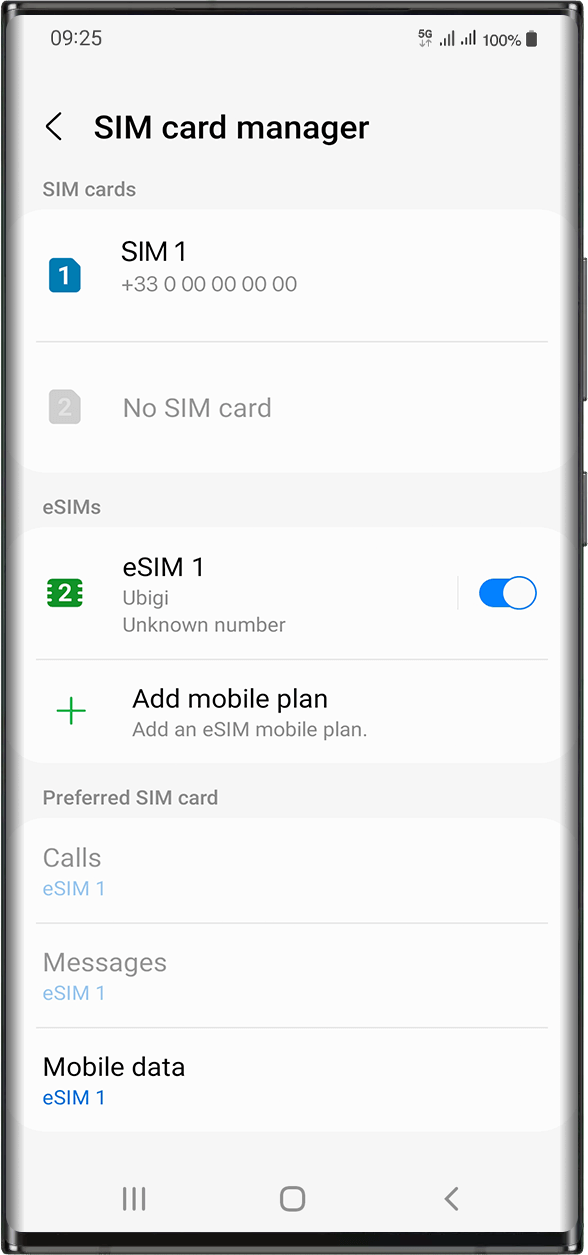
Mobile Data has to be applied to the Ubigi eSIM profile so that you can access the Internet.
To do that, go to: Settings > Connections > SIM card manager. Under “Preferred SIM cards”, tap on Mobile data and select the eSIM profile you want to apply data to. The tick will appear in front of it when it is selected.
Important: When you have multiple SIM cards/eSIMs (“plans”) on your device, it is not possible to activate cellular data on two data plans at the same time. You can only apply it to one at a time.
Great
Based on 43984 reviews on
Verified
Verified review
This user has been identified as a buyer
Malesia & Singapore
Great experience!
customer, 21 Aug 2026
Verified
Verified review
This user has been identified as a buyer
The app is easy to use and the…
The app is easy to use and the connection is good. The subscription price is reasonable, but I find the extra data a bit pricey.
customer, 21 Aug 2026
Verified
Verified review
This user has been identified as a buyer
Great impression
It was an excellent experience for my first use. I simply had some bad Network sometimes but overall it was fine. I will definetely recommend it to my colleagues.
Seyni Malan, 21 Aug 2026
Verified
Verified review
This user has been identified as a buyer
The coverage is excellent
The coverage is excellent. However I will take one star away for the speed. Overall it was good service.
Tim, 21 Aug 2026
Verified
Verified review
This user has been identified as a buyer
worked very well on my trip to osaka…
worked very well on my trip to osaka japan. good reception and fast.
Klant, 21 Aug 2026
Verified
Verified review
This user has been identified as a buyer
So easy
I’ve used e-sims before in different countries but using Ubigi e-sim in Japan has been the easiest and glitch free solution. I’ve spent several days in Tokyo and am about to travel inland but I am confident that my communication connection will remain. Big thanks
David Ritchie, 21 Aug 2026
Verified
Verified review
This user has been identified as a buyer
Good service
Good service
customer, 21 Aug 2026
Verified
Verified review
This user has been identified as a buyer
Works perfectly well out the gates
Worked perfectly fine when I got off the plane and around most major areas always had at least 3 bars. This is coming from being in LA. When I was in Japan and China using ubigi it was also equally pretty good and decent
customer, 21 Aug 2026
Verified
Verified review
This user has been identified as a buyer
Super easy
Super easy to buy a plan and apply/use it
customer, 21 Aug 2026
Verified
Verified review
This user has been identified as a buyer
It was easy to install and worked from…
It was easy to install and worked from the moment I landed in Japan. I am very satisfied.
R V, 21 Aug 2026
Verified
Verified review
This user has been identified as a buyer
Impressed first timer
This was our first time using eSIM, and we have both iPhone and Android, so it took a bit to get it right, but after that it's great.
Hai-Duc Le, 21 Aug 2026
Verified
Verified review
This user has been identified as a buyer
Easy, worked, good.
Was easy to get set up and had data immediately. Didn't miss having a local number at all.
Nick S, 20 Aug 2026
Verified
Verified review
This user has been identified as a buyer
Ease of getting eSIM and plan.
Ease of getting eSIM and plan.
Kamesh Kumar, 20 Aug 2026
Verified
Verified review
This user has been identified as a buyer
As promised
As promised, I always have reception and fast internet. Top
carolina, 20 Aug 2026
Verified
Verified review
This user has been identified as a buyer
Easy connection,while in Ireland thank…
Easy connection,while in Ireland thank you Ubigi.
Jojo Alquiza, 20 Aug 2026
Thank you
Your message has been sent. We’ll get back to you shortly.
Thank you
We have taken into account your subscription to the newsletter
How to check eSIM compatibility
Smartphones / Tablets:
Dial *#06#. → If an EID number appears, your device is eSIM-compatible.
Windows 10 / 11:
Press Windows+I. Go to “Network & Internet” → If you see "Cellular", your PC is eSIM-compatible.
How to check carrier unlocking
iPhone / iPad:
Go to Settings > General > About. Scroll to Carrier Lock. → If you see “No SIM restrictions”, your device is unlocked.
Android:
Go to Settings > Network & Internet > Mobile network. Disable Automatic network selection. → If multiple networks appear, your device is unlocked.
You already have an eSIM in your cart.
Each order can only include one eSIM data plan.
If you choose to add a new one, the current plan will be removed. What would you like to do?



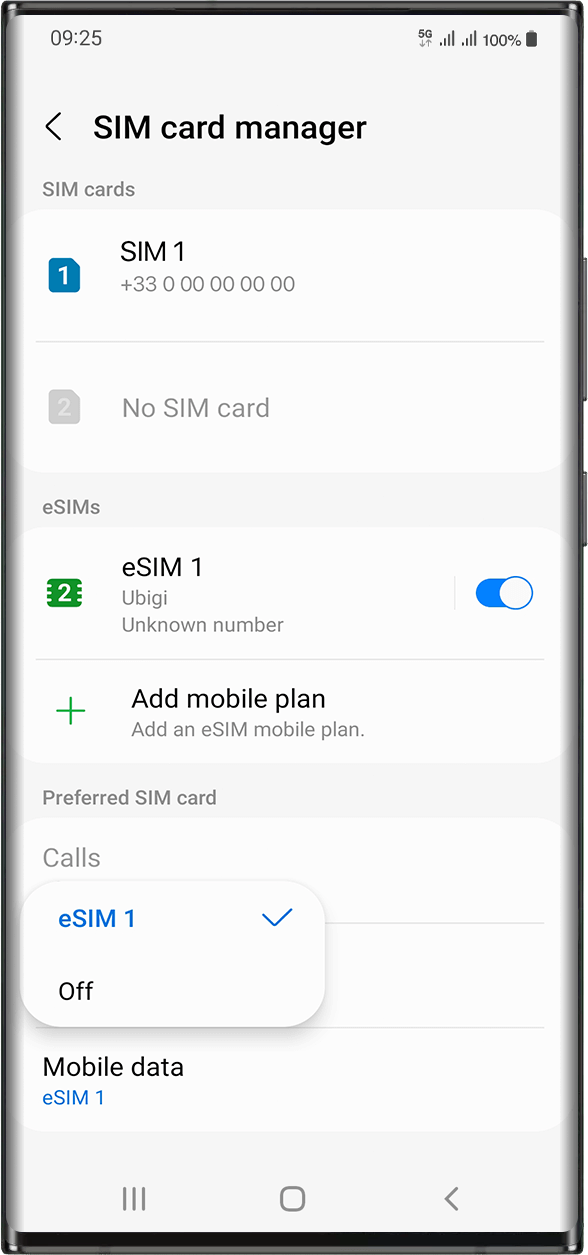

 will appear in front of it when it is selected.



 How to check eSIM compatibility
 How to check carrier unlocking