How to switch between physical SIM card and eSIM profile on my Android device?
To switch between physical SIM card and eSIM profile on your Android device, you must turn them ON both first in the Settings : – Go to Settings – Select Connections – Then SIM card Manager – Turn ON your physical SIM card at the top, and under it the eSIM profile you want to use :
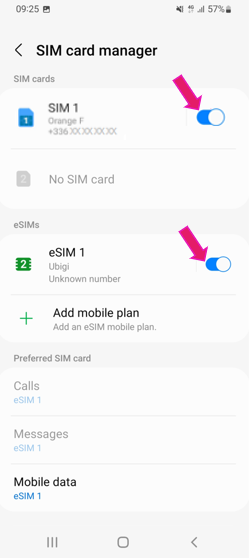
Your physical SIM card and/or your eSIM profile are now ready to be used.
You have 3 services that you can use with your physical SIM card and your eSIM profile: – Calls – SMS (“Messages”) – Data connectivity
For each service, you just need to select the SIM card or eSIM profile you want to use.
For example: if you want to use “eSIM1” for Mobile data: – Tap Mobile data – Select “eSIM1”
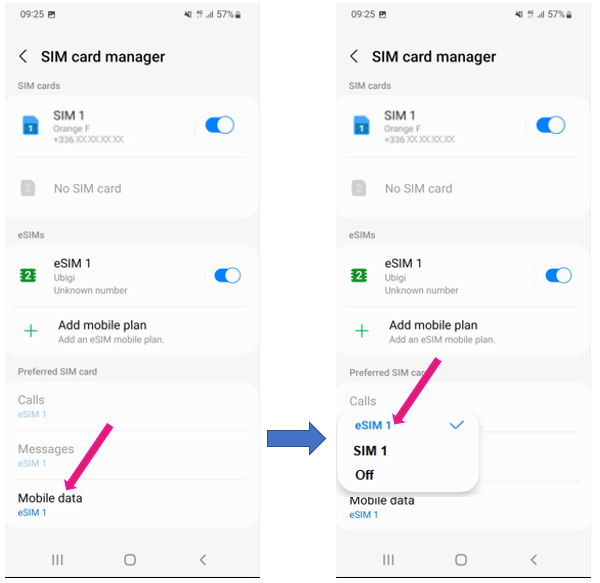
You can now do the same for Calls and SMS (messages) and select which physical SIM or eSIM profile you want to use for it.
Explore Ubigi eSIM data plans for seamless connectivity worldwide!
Install once, stay globally connected for life with a single eSIM, compatible with all eSIM-enabled devices : iOS Phone, iPad OS, Android, and Windows 10 and 11.
Are you a company with teams on the move?
Manage your employees' LTE/5G connectivity on smartphones, tablets, laptops, and hotspots while maintaining complete control over your costs.
Explore Ubigi eSIM data plans for seamless connectivity worldwide!
Install once, stay globally connected for life with a single eSIM, compatible with all eSIM-enabled devices : iOS Phone, iPad OS, Android, and Windows 10 and 11.
Are you a company with teams on the move?
Manage your employees' LTE/5G connectivity on smartphones, tablets, laptops, and hotspots while maintaining complete control over your costs.
Great
Based on 31201 reviews on
Verified
Verified review
This user has been identified as a buyer
Its very useful
Its very useful , Works without any complications
customer, 08 Feb 2026
Verified
Verified review
This user has been identified as a buyer
Fast customer help to quickly get…
Fast customer help to quickly get internet and move my esim profile.
customer, 08 Feb 2026
Verified
Verified review
This user has been identified as a buyer
Super efficient
Works perfectly!
customer, 08 Feb 2026
Verified
Verified review
This user has been identified as a buyer
Worked great on my trip to Tokyo.
Brooke, 08 Feb 2026
Verified
Verified review
This user has been identified as a buyer
Works Great
Easy to install
Works great! I'm in Japan and have had no problems at all using both email and WhatsApp.
Kathleen, 08 Feb 2026
Verified
Verified review
This user has been identified as a buyer
Good service work well
Karuna Robertson, 08 Feb 2026
Verified
Verified review
This user has been identified as a buyer
Straightforward to organise
Straightforward to organise, works well. No problems and a very reasonable price.
Jules, 08 Feb 2026
Verified
Verified review
This user has been identified as a buyer
No stress to access the internet.
customer, 08 Feb 2026
Verified
Verified review
This user has been identified as a buyer
Well priced and easy to install
Damien, 08 Feb 2026
Verified
Verified review
This user has been identified as a buyer
Fantastic gtear
Fantastic gtear
Jaisinh Patel customer, 08 Feb 2026
Verified
Verified review
This user has been identified as a buyer
I chose Ubigi mainly to try it out
I chose Ubigi mainly to try it out, and it exceeded my expectations. I bought a regional pack and it worked flawlessly. The setup was seamless, connecting was easy, and tracking data usage was straightforward. From purchasing the eSIM to using the service, the entire experience was smooth and hassle-free.
customer, 08 Feb 2026
Verified
Verified review
This user has been identified as a buyer
Connect automatically when I change…
Connect automatically when I change country they connection to Internet is always good so it’s great
Martin Chouinard, 08 Feb 2026
Verified
Verified review
This user has been identified as a buyer
Worked with zero issues
customer, 08 Feb 2026
Verified
Verified review
This user has been identified as a buyer
Easy to install and a good price
customer, 08 Feb 2026
Verified
Verified review
This user has been identified as a buyer
Quick smooth installation top service
Ben , Holland, 08 Feb 2026
Thank you
Your message has been sent. We’ll get back to you shortly.
Thank you
We have taken into account your subscription to the newsletter
How to check eSIM compatibility
Smartphones / Tablets:
Dial *#06#. → If an EID number appears, your device is eSIM-compatible.
Windows 10 / 11:
Press Windows+I. Go to “Network & Internet” → If you see "Cellular", your PC is eSIM-compatible.
How to check carrier unlocking
iPhone / iPad:
Go to Settings > General > About. Scroll to Carrier Lock. → If you see “No SIM restrictions”, your device is unlocked.
Android:
Go to Settings > Network & Internet > Mobile network. Disable Automatic network selection. → If multiple networks appear, your device is unlocked.
You already have an eSIM in your cart.
Each order can only include one eSIM data plan.
If you choose to add a new one, the current plan will be removed. What would you like to do?