Check if your eSIM profile is installed on your device.
Check eSIM profile activation
Check if your eSIM profile is activated on your device.
Apply data to eSIM profile
Ensure data is applied to your Ubigi eSIM profile.
Check APN configuration
Ensure that the APN is correctly set for your Ubigi connectivty.
Check network display
Check the network status for your Ubigi connectivity.
Final checks!
Check account creation and Internet access.
Now ensure that the Data roaming option is activated on your device.
Important: if you have carefully followed previous steps, mobile data must applied to your Ubigi eSIM profile (and NOT to your physical SIM card if you have one). This means that you won’t have extra roaming costs as only Ubigi rates will be applied while using the Ubigi cellular connectivity. In any case, always ensure that mobile data is applied to your Ubigi eSIM profile to avoid extra roaming costs while abroad.
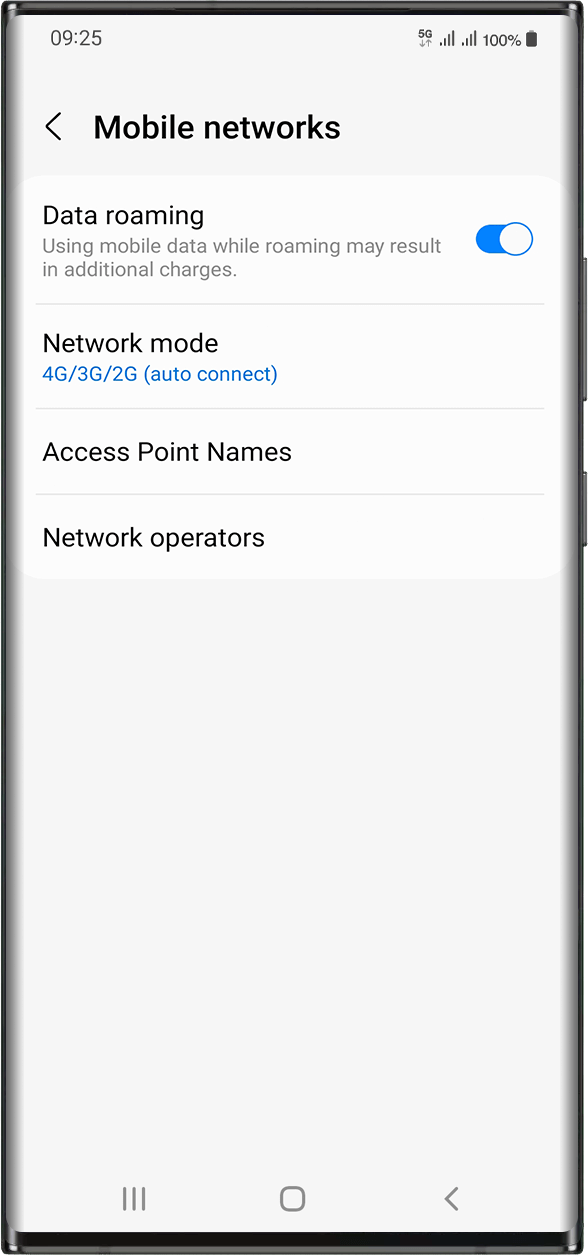
Once you made sure you have applied mobile data to your Ubigi eSIM profile, go to: Settings > Connections > Mobile Networks > Activate data roaming.
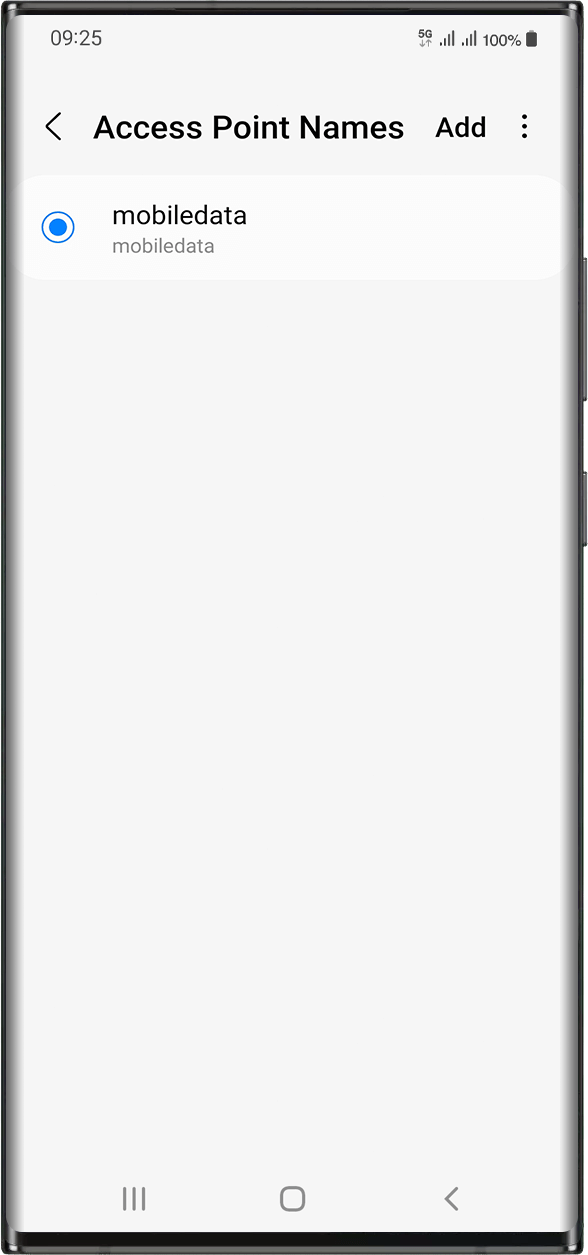
In the same screen, select Access Point Names in order to check if the APN (Access Point Name) is set:
The APN is normally set automatically: mobiledata or mbb will appear in the list. In this case, you can go to the next step.
In case you do not see mobiledata nor mbb APNs, please follow these instructions to set the APN correctly. Once you created and selected the APN, you can go to the next step.
Great
Based on 42090 reviews on
Verified
Verified review
This user has been identified as a buyer
Works really well.
Works really well.
However, on first use you do need to be online via WiFi, or other means, otherwise you can't login to activate your Ubigi package. So, if you're travelling, do this in the airport otherwise you risk getting charged roaming fees by your normal provider.
Tim Candido Barton, 25 Jul 2026
Verified
Verified review
This user has been identified as a buyer
My first travel experience with Ubigi.
My first travel experience with Ubigi was great! No problem with registration, e-sim installation and activation. Stayed connected during all my one week trip around the Cyprus.
Thanks!
Michael, 24 Jul 2026
Verified
Verified review
This user has been identified as a buyer
Spain travel
Easy to use , reliable
customer, 24 Jul 2026
Verified
Verified review
This user has been identified as a buyer
First time using Ubigi
Ubigi was very easy to download and utilize when connecting it to the country I was traveling to. The eSIM provided fast internet at all times and was very convenient and easy to access during my trip to Japan. It was my first time using Ubigi, but definitely not the last!
customer, 24 Jul 2026
Verified
Verified review
This user has been identified as a buyer
Chris
Perfekt funktioniert! Danke 🙏
Christian, 24 Jul 2026
Verified
Verified review
This user has been identified as a buyer
most of the time it worked.
most of the time it worked.
I like i didn't need to do a thing when moving from one country to another.
there were some points I had no connection.
customer, 24 Jul 2026
Verified
Verified review
This user has been identified as a buyer
Amazing how it works
Amazing how it works
Rotchel, 24 Jul 2026
Verified
Verified review
This user has been identified as a buyer
Good connection, but pricy.
The connection was overall pretty good across every country I visited, but the plan prices could be more affordable.
Jonathan, 24 Jul 2026
Verified
Verified review
This user has been identified as a buyer
East download on the go
East download on the go. Strong connectivity.
Masa, 24 Jul 2026
Verified
Verified review
This user has been identified as a buyer
Easy to install and it worked
Easy to install and it worked. Have had two failures using Airalo on my iPhone 11. So stopped using them. This one I installed sitting on Elisabeth Line going to LHR in London and worked perfectly in Italy.
Richard Scoular, 24 Jul 2026
Verified
Verified review
This user has been identified as a buyer
Works perfectly.
Strong connection, easy install.
customer, 24 Jul 2026
Verified
Verified review
This user has been identified as a buyer
Great esim with unlimited data and quick speed for a lot of travel in a short time!
Purchasing the SIM and activitaing it were super easy.
We bought the unlimited package and did not need nearly that much data in spite of travelling over 2200 KM around Morocco. The fact that Ubigi chose the best network for whatever region we were in was extremely helpful. We used google maps the whole time, chatted, uploaded pictures to chats, etc. and were not even close to using the unlimited data after 13 days. Definately would purchase again. It gave us peace of mind during our travels.
One feedback: It would be great if Ubigi would offer more tips for how to turn of your original roaming data and limit it only to Ubigi when in the country you bought the esim for. Otherwise, it was a great experience!
Kristina Musil, 24 Jul 2026
Verified
Verified review
This user has been identified as a buyer
Roaming is ok!
Roaming is ok!
Chuan-Shin, 24 Jul 2026
Verified
Verified review
This user has been identified as a buyer
Cheap and good signal
Cheap and good signal
Anar, 24 Jul 2026
Thank you
Your message has been sent. We’ll get back to you shortly.
Thank you
We have taken into account your subscription to the newsletter
How to check eSIM compatibility
Smartphones / Tablets:
Dial *#06#. → If an EID number appears, your device is eSIM-compatible.
Windows 10 / 11:
Press Windows+I. Go to “Network & Internet” → If you see "Cellular", your PC is eSIM-compatible.
How to check carrier unlocking
iPhone / iPad:
Go to Settings > General > About. Scroll to Carrier Lock. → If you see “No SIM restrictions”, your device is unlocked.
Android:
Go to Settings > Network & Internet > Mobile network. Disable Automatic network selection. → If multiple networks appear, your device is unlocked.
You already have an eSIM in your cart.
Each order can only include one eSIM data plan.
If you choose to add a new one, the current plan will be removed. What would you like to do?









 How to check eSIM compatibility
 How to check carrier unlocking