Check if your eSIM profile is installed on your device.
Check eSIM profile activation
Check if your eSIM profile is activated on your device.
Apply data to eSIM profile
Ensure data is applied to your Ubigi eSIM profile.
Check APN configuration
Ensure that the APN is correctly set for your Ubigi connectivty.
Check network display
Check the network status for your Ubigi connectivity.
Final checks!
Check account creation and Internet access.
Now ensure that the Data roaming option is activated on your device.
Important: if you have carefully followed previous steps, mobile data must applied to your Ubigi eSIM profile (and NOT to your physical SIM card if you have one). This means that you won’t have extra roaming costs as only Ubigi rates will be applied while using the Ubigi cellular connectivity. In any case, always ensure that mobile data is applied to your Ubigi eSIM profile to avoid extra roaming costs while abroad.
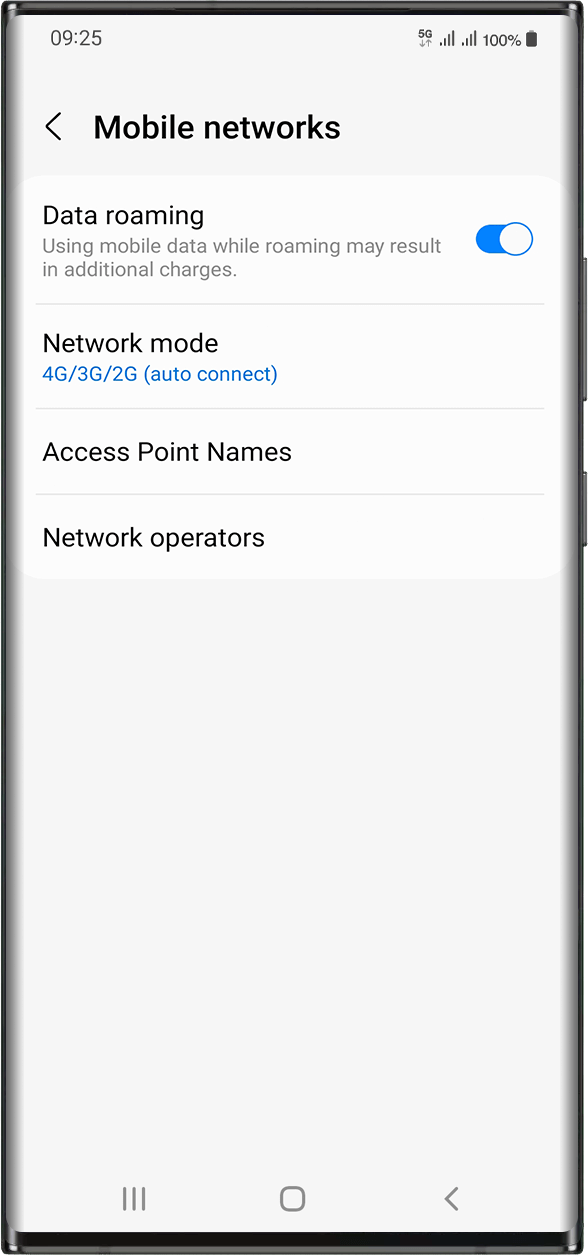
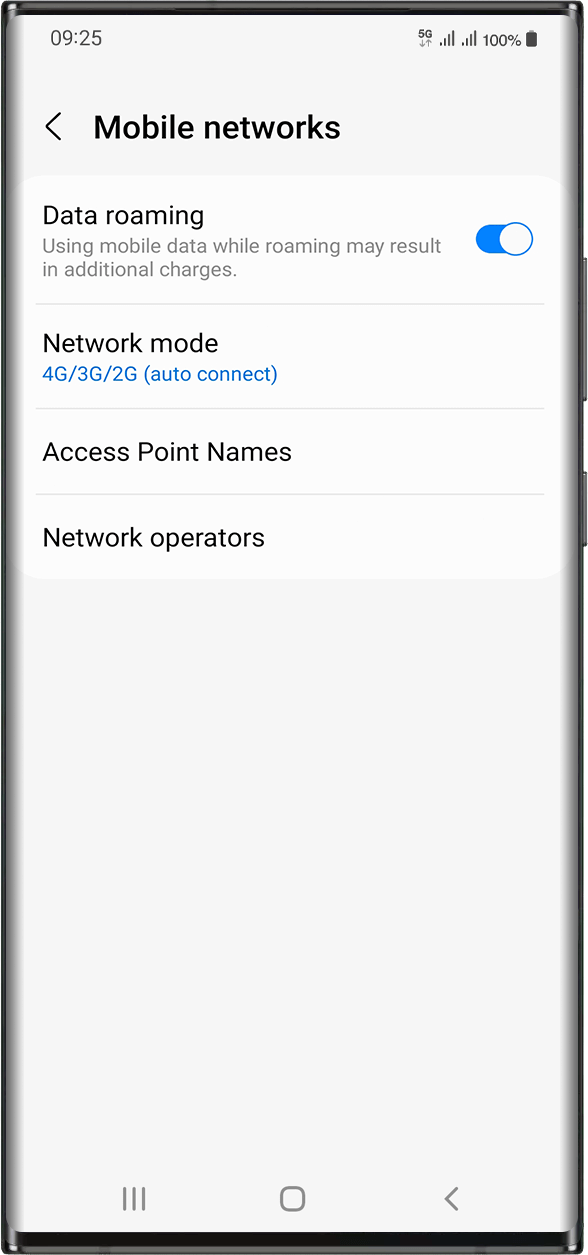
Once you made sure you have applied mobile data to your Ubigi eSIM profile, go to: Settings > Connections > Mobile Networks > Activate data roaming.
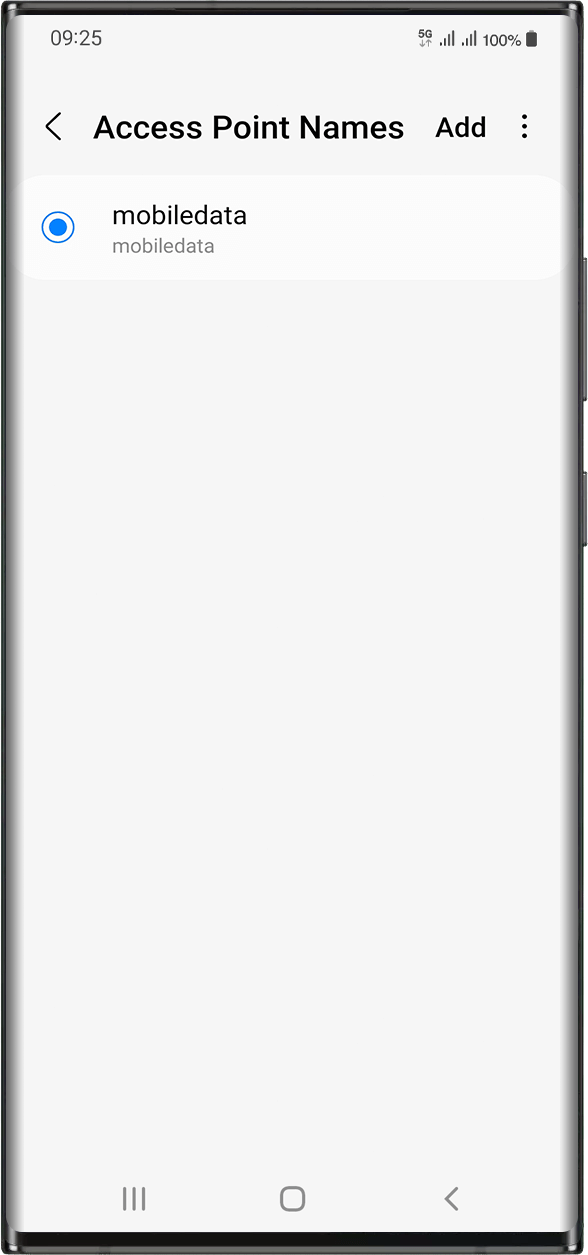
In the same screen, select Access Point Names in order to check if the APN (Access Point Name) is set:
The APN is normally set automatically: mobiledata or mbb will appear in the list. In this case, you can go to the next step.
In case you do not see mobiledata nor mbb APNs, please follow these instructions to set the APN correctly. Once you created and selected the APN, you can go to the next step.
Great
Based on 42028 reviews on
Verified
Verified review
This user has been identified as a buyer
It worked easily and made me happy
It worked easily.
The competition did not even let me get past the access Code...So badly set up.
Ubigi in contrast easy and quick.
Peter Bruck, 23 Jul 2026
Verified
Verified review
This user has been identified as a buyer
Got the Singapore Malaysia eSIM
Got the Singapore Malaysia eSIM
Singapore connected perfect and had 5g 80% of the time
Malaysia it struggled to connected, had to AI the solution, which sort of helped, then had to email Ubigi and got a solution
But I had 5g maybe 40% of the time and we never left KL
Partner went with another eSIM and had 5g 90% of time in both locations
customer, 23 Jul 2026
Verified
Verified review
This user has been identified as a buyer
In Iceland, the Ubigi eSim worked perfectly
the Ubigi eSim worked perfectly for me in Iceland. Easy to install, easy to activate. And I had service everywhere - even in the remote Highlands - at the Highland BaseCamp.
Ellen, 23 Jul 2026
Verified
Verified review
This user has been identified as a buyer
Ease of connection was simple and quick
Ease of connection was simple and quick
Daniel Desrochers, 23 Jul 2026
Verified
Verified review
This user has been identified as a buyer
Well designed app
Well designed app. Correct price.
What needs to be improved to get a 5-star rating: make sure that the APN settings are automatically set, I struggled a bit to get my data connection working. Hopefully I had a wifi connection to resolve this.
Anil S., 23 Jul 2026
Verified
Verified review
This user has been identified as a buyer
It works well and easy to install
It works well and easy to install. Just that one afternoon I couldn’t get connected for few hours in San Francisco. No idea why.
Su, 23 Jul 2026
Verified
Verified review
This user has been identified as a buyer
Download easily
Download easily, and working as soon as we landed.. 10 out of 10..
Sameer Aziz, 23 Jul 2026
Verified
Verified review
This user has been identified as a buyer
My eSIM worked great for my two week…
My eSIM worked great for my two week trip to Japan! I did the unlimited plan because I didn't want to stress about using my phone too much and it was more than enough data for frequent Google maps/restaraunt look up/etc. Easy to use.
Gabby, 23 Jul 2026
Verified
Verified review
This user has been identified as a buyer
It works mostly
It works mostly
Widad, 23 Jul 2026
Verified
Verified review
This user has been identified as a buyer
Quicke and easy to set-up.
Very easy to select the right amount of required data. Best part is when you arrived at your destination, the phone is ready to be used. Happy with the service.
Ferri, 23 Jul 2026
Verified
Verified review
This user has been identified as a buyer
Great Ontario coverage for work and play
Purchased a 50gb eSIM for Canada to cover my data needs for a two week trip to southern Ontario. Install was very simple. Used it to hotspot my laptops for the 6 days I worked: 6-8 hours each day. My personal phone data needs were the same as I would at home - all my socials, pictures, messages, navigation, videos etc. Never had an issue with coverage or speed and actually had data coverage with this eSIM when both my work and my personal phones had no service from my primary provider. Will definitely use this service again during future trips!
A Happy Customer, 23 Jul 2026
Verified
Verified review
This user has been identified as a buyer
It works and no hassles
It works and no hassles
customer, 23 Jul 2026
Verified
Verified review
This user has been identified as a buyer
Connection was great throughout Italy…
Connection was great throughout Italy even in remote places
Vishnu Jagroop, 23 Jul 2026
Verified
Verified review
This user has been identified as a buyer
Excellent product!
I actually bought 2 SIM cards, one from Ubigi and one from another supplier as I used a lot of data and wanted to compare. Ubigi's connection is much more stable and faster, and also fairly convenient to top up without having to install a new eSIM. Will use again for travelling!
Lucas, 23 Jul 2026
Verified
Verified review
This user has been identified as a buyer
Almost seem less
Almost seem less
Some simple directions would make it perfect( not everyone is a genius on a mobile phone)
Simplicity is always an easier sell
James Bottleman, 23 Jul 2026
Thank you
Your message has been sent. We’ll get back to you shortly.
Thank you
We have taken into account your subscription to the newsletter
How to check eSIM compatibility
Smartphones / Tablets:
Dial *#06#. → If an EID number appears, your device is eSIM-compatible.
Windows 10 / 11:
Press Windows+I. Go to “Network & Internet” → If you see "Cellular", your PC is eSIM-compatible.
How to check carrier unlocking
iPhone / iPad:
Go to Settings > General > About. Scroll to Carrier Lock. → If you see “No SIM restrictions”, your device is unlocked.
Android:
Go to Settings > Network & Internet > Mobile network. Disable Automatic network selection. → If multiple networks appear, your device is unlocked.
You already have an eSIM in your cart.
Each order can only include one eSIM data plan.
If you choose to add a new one, the current plan will be removed. What would you like to do?









 How to check eSIM compatibility
 How to check carrier unlocking