Check if your eSIM profile is installed on your device.
Check eSIM profile activation
Check if your eSIM profile is activated on your device.
Apply data to eSIM profile
Ensure data is applied to your Ubigi eSIM profile.
Check APN configuration
Ensure that the APN is correctly set for your Ubigi connectivty.
Check network display
Check the network status for your Ubigi connectivity.
Final checks!
Check account creation and Internet access.
Now ensure that the Data roaming option is activated on your device.
Important: if you have carefully followed previous steps, mobile data must applied to your Ubigi eSIM profile (and NOT to your physical SIM card if you have one). This means that you won’t have extra roaming costs as only Ubigi rates will be applied while using the Ubigi cellular connectivity. In any case, always ensure that mobile data is applied to your Ubigi eSIM profile to avoid extra roaming costs while abroad.
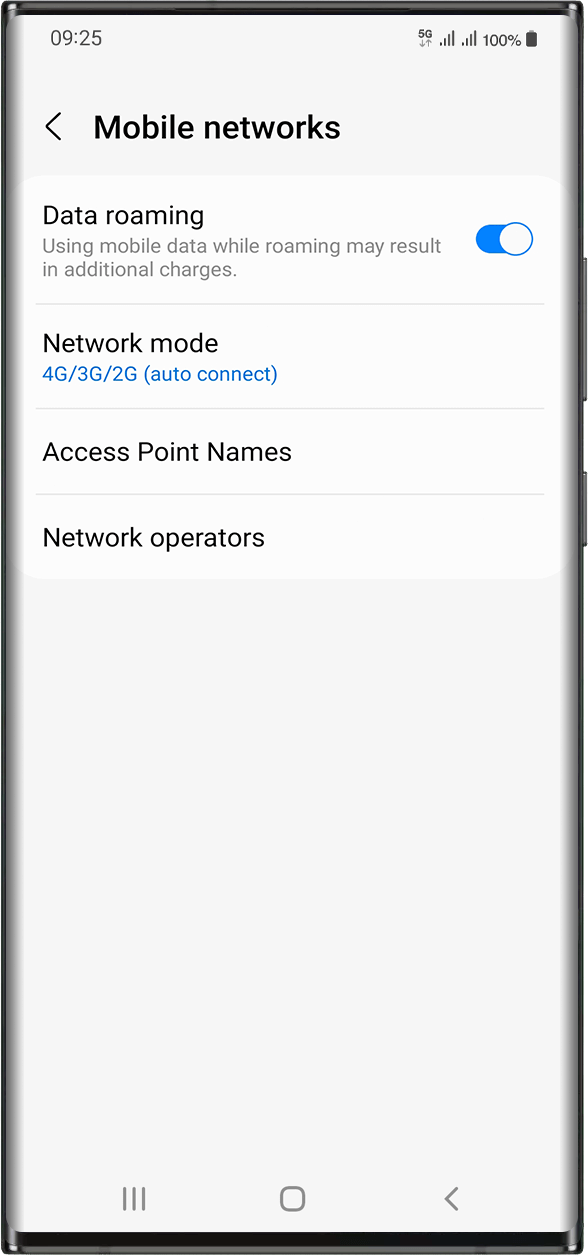
Once you made sure you have applied mobile data to your Ubigi eSIM profile, go to: Settings > Connections > Mobile Networks > Activate data roaming.
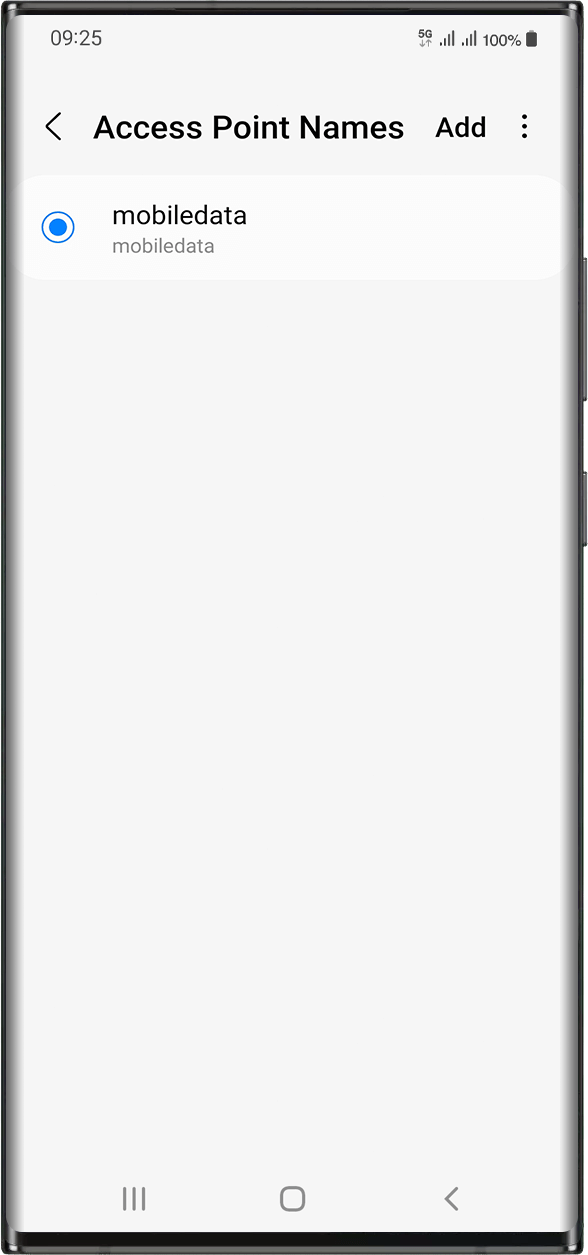
In the same screen, select Access Point Names in order to check if the APN (Access Point Name) is set:
The APN is normally set automatically: mobiledata or mbb will appear in the list. In this case, you can go to the next step.
In case you do not see mobiledata nor mbb APNs, please follow these instructions to set the APN correctly. Once you created and selected the APN, you can go to the next step.
Great
Based on 49796 reviews on
Verified
Verified review
This user has been identified as a buyer
Superb for off road motorcycle Morocco
I was off on an off road motorcycle tour to the High Atlas in Morocco and needed good coverage and unlimited data - just in case.
The eSim download, sim switch and usage was faultless and superb coverage 5* in most areas. Actually better than my Virgin sim in Cheshire.
For the money is was complete peace of mind and a vital comms link.
Mike McCulloch, 27 Oct 2026
Verified
Verified review
This user has been identified as a buyer
Easy to set up and use
Easy to set up and use. Get good coverage in Rwanda🙏🏻
Katharina, 27 Oct 2026
Verified
Verified review
This user has been identified as a buyer
Flawless
Flawless. Set it up before I arrived in Ireland. Switched over to the esim when I landed and it worked straight away.
I didn't realize it can't be used for local calls but that's not an issue for me as I just use an app instead.
Dee, 27 Oct 2026
Verified
Verified review
This user has been identified as a buyer
Easy and works great!!
Seemed easy enough since I set it up before coming to Japan and is working great no glitch! Was able to load a few more days as well I’m happy with this app was easy to get as well with set up
Shelley Gress, 27 Oct 2026
Verified
Verified review
This user has been identified as a buyer
Used the service for our our trip to…
Used the service for our our trip to Japan. The network connected as soon as we landed. I had no issues whatsoever and fingers crossed it will continue till the end of our trip.
Martha Marston, 27 Oct 2026
Verified
Verified review
This user has been identified as a buyer
Difficult to connect in Istanbul
Difficult to connect in Istanbul. Once connected it worked
ludo, 27 Oct 2026
Verified
Verified review
This user has been identified as a buyer
Connection was pretty much spotless
Connection was pretty much spotless except for the first time I activated in JFK. I had to go connect to the airport wifi to reach my airport pickup but the rest of the way was perfect. Good value compared to other providers too.
customer, 27 Oct 2026
Verified
Verified review
This user has been identified as a buyer
Worked first time
Worked first time
SpaceMovieBuff, 27 Oct 2026
Verified
Verified review
This user has been identified as a buyer
Worked out very well for my first trip…
Worked out very well for my first trip in japan would use it again was a great sim
customer, 27 Oct 2026
Verified
Verified review
This user has been identified as a buyer
Fast Connexion
Fast Connexion, would recommend to anyone
Quentin Leroy, 27 Oct 2026
Verified
Verified review
This user has been identified as a buyer
Easy to use
Easy to use, prices are reasonable and the app is very easy to use.
Laura Hyk, 27 Oct 2026
Verified
Verified review
This user has been identified as a buyer
Data has been great except when we’re…
Data has been great except when we’re in the car trying to listen to music off our phones. The data seems to drop and the music stops multiple times during one song.
customer, 27 Oct 2026
Verified
Verified review
This user has been identified as a buyer
No problems the entire trip
No problems the entire trip
customer, 27 Oct 2026
Verified
Verified review
This user has been identified as a buyer
It just simply worked...
It just simply worked.... great
Tobias Lembach, 27 Oct 2026
Verified
Verified review
This user has been identified as a buyer
Great service.
Great service.
Had great connection no matter where I was in Japan. Will use again
customer, 27 Oct 2026
Thank you
Your message has been sent. We’ll get back to you shortly.
Thank you
We have taken into account your subscription to the newsletter
How to check eSIM compatibility
Smartphones / Tablets:
Dial *#06#. → If an EID number appears, your device is eSIM-compatible.
Windows 10 / 11:
Press Windows+I. Go to “Network & Internet” → If you see "Cellular", your PC is eSIM-compatible.
How to check carrier unlocking
iPhone / iPad:
Go to Settings > General > About. Scroll to Carrier Lock. → If you see “No SIM restrictions”, your device is unlocked.
Android:
Go to Settings > Network & Internet > Mobile network. Disable Automatic network selection. → If multiple networks appear, your device is unlocked.
You already have an eSIM in your cart.
Each order can only include one eSIM data plan.
If you choose to add a new one, the current plan will be removed. What would you like to do?









 How to check eSIM compatibility
 How to check carrier unlocking