I have several credit cards saved on my Ubigi account, how can I know which one is used for my Ubigi Monthly Plan?
When you subscribe to a Ubigi Monthly Plan, you are invited to enter a new credit card or select a pre-saved credit card for the monthly payment. You will then be charged each month on that credit card you entered during the subscription process to that specific data plan.
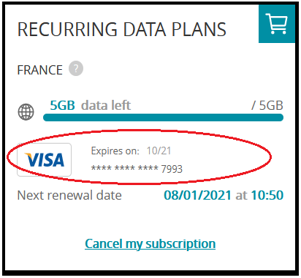
To check which credit card is registered for your Ubigi Monthly Plan, connect to your Ubigi account, and go to:
– My data plans – On the Ubigi Monthly Plan for which you want to check the credit card details, the information will show at the bottom:

Explore Ubigi eSIM data plans for seamless connectivity worldwide!
Install once, stay globally connected for life with a single eSIM, compatible with all eSIM-enabled devices : iOS Phone, iPad OS, Android, and Windows 10 and 11.
Are you a company with teams on the move?
Manage your employees' LTE/5G connectivity on smartphones, tablets, laptops, and hotspots while maintaining complete control over your costs.
Explore Ubigi eSIM data plans for seamless connectivity worldwide!
Install once, stay globally connected for life with a single eSIM, compatible with all eSIM-enabled devices : iOS Phone, iPad OS, Android, and Windows 10 and 11.
Are you a company with teams on the move?
Manage your employees' LTE/5G connectivity on smartphones, tablets, laptops, and hotspots while maintaining complete control over your costs.
⚽
WORLD CUP 2026
FOOTBALL FEVER
Traveling to the biggest football event of 2026? Stay connected with our unlimited USA & Canada data plans.
Verified review
This user has been identified as a buyer
It’s a must-have when travelling…
It’s a must-have when travelling abroad. The eSIM was easy to install and came with clear instructions on how to change the mobile settings upon arrival.
I experienced some downtime for a few hours, but the follow-up service was excellent.
I would recommend Ubigi to all travellers!
Erling, 06 Jun 2026
Verified
Verified review
This user has been identified as a buyer
The eSIM was great
The eSIM was great. Worked As soon as I landed. It did take a bit of time following instructions to load the eSIM as QR code did not automatically work from email.
Would definitely use again,
customer, 06 Jun 2026
Verified
Verified review
This user has been identified as a buyer
I couldn’t get connectivity for…
At the I couldn’t get connectivity for a while. I thought it was to connect as soon as I landed in Japan but I couldn’t . I waited about half a day before it worked. Today I read an email saying there was a service interruption .
Averil Rayward, 06 Jun 2026
Verified
Verified review
This user has been identified as a buyer
Effortless to arrange
Effortless to arrange. Good mobile internet coverage.
Bob, 06 Jun 2026
Verified
Verified review
This user has been identified as a buyer
Worked fine…but
Worked fine in Osaka, Kyoto and Hiroshima but in Tokyo lost connection alot during the Day even let me without network or mobile signal a full Day
- Tiago Maia, 06 Jun 2026
Verified
Verified review
This user has been identified as a buyer
Works pretty good
Working pretty well had just few times that it had some issues. But altogether so far have been quite smooth sailing with this internet service. Funny that it works so well when we stayed in Okinawa but the connection issues what I have experienced have been in Tokyo. Just short issue not anything major. So altogether great service.
Heli, 05 Jun 2026
Verified
Verified review
This user has been identified as a buyer
Japan from Australia
Arrived in Japan from Australia and had no issues with internet connection for the 8 days. I visited Kyoto, Osaka and some outer regions ~2 hours from the cities. Thank you
Rosanne Freak-Poli, 05 Jun 2026
Verified
Verified review
This user has been identified as a buyer
Smart Purchase for Overseas Travel
I had a great internet connection while on my vacation overseas. Using Ubigi eSIM was a smart purchase!
PBurwell, 05 Jun 2026
Verified
Verified review
This user has been identified as a buyer
Work well
Work well. Very satisfied!
Brian St-Pierre, 05 Jun 2026
Verified
Verified review
This user has been identified as a buyer
Excellent !
Excellent !
customer, 05 Jun 2026
Verified
Verified review
This user has been identified as a buyer
It’s very easy to use.
Amazing signal.
Susan, 05 Jun 2026
Verified
Verified review
This user has been identified as a buyer
Easy to use
Easy to use. Can buy for different countries.
Fred Ho, 05 Jun 2026
Verified
Verified review
This user has been identified as a buyer
I love Ubigi and would strongly recommend
I love Ubigi and would strongly recommend to anyone who want ease of getting connected and seamless service at very affordable cost. Used it throughout the UK and service was top notch.
customerDr. Khan, 05 Jun 2026
Verified
Verified review
This user has been identified as a buyer
Data never failed
Data never failed
Chalam, 05 Jun 2026
Verified
Verified review
This user has been identified as a buyer
Amazing service
Amazing service, easy to use. Highly recommended!
Daniela , 05 Jun 2026
Thank you
Your message has been sent. We’ll get back to you shortly.
Thank you
We have taken into account your subscription to the newsletter
How to check eSIM compatibility
Smartphones / Tablets:
Dial *#06#. → If an EID number appears, your device is eSIM-compatible.
Windows 10 / 11:
Press Windows+I. Go to “Network & Internet” → If you see "Cellular", your PC is eSIM-compatible.
How to check carrier unlocking
iPhone / iPad:
Go to Settings > General > About. Scroll to Carrier Lock. → If you see “No SIM restrictions”, your device is unlocked.
Android:
Go to Settings > Network & Internet > Mobile network. Disable Automatic network selection. → If multiple networks appear, your device is unlocked.
You already have an eSIM in your cart.
Each order can only include one eSIM data plan.
If you choose to add a new one, the current plan will be removed. What would you like to do?

