To cancel your Ubigi Monthly Plan, connect to your Ubigi account and go to:
– My data plans – On the Ubigi Monthly Plan you want to cancel, click on “Cancel my subscription” and “Confirm”: Your Ubigi Monthly Plan will appear as cancelled.
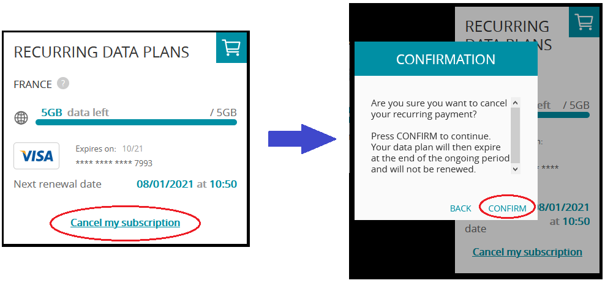
Note: If you cancelled this data plan in the middle of the validity period, you will be able to use the remaining data until the last day of your current renewal. After that, it will disappear from your Ubigi account.

Explore Ubigi eSIM data plans for seamless connectivity worldwide!
Install once, stay globally connected for life with a single eSIM, compatible with all eSIM-enabled devices : iOS Phone, iPad OS, Android, and Windows 10 and 11.
Are you a company with teams on the move?
Manage your employees' LTE/5G connectivity on smartphones, tablets, laptops, and hotspots while maintaining complete control over your costs.
Explore Ubigi eSIM data plans for seamless connectivity worldwide!
Install once, stay globally connected for life with a single eSIM, compatible with all eSIM-enabled devices : iOS Phone, iPad OS, Android, and Windows 10 and 11.
Are you a company with teams on the move?
Manage your employees' LTE/5G connectivity on smartphones, tablets, laptops, and hotspots while maintaining complete control over your costs.
Great
Based on 33759 reviews on
Verified
Verified review
This user has been identified as a buyer
Excellent eSIM!!
We are in Japan and it was so easy to switch over to the eSIM as soon as we landed. I also love the peace of mind of havinf unlimited data. Especially because we are relying on Google Maps and Translate a lot!
Kath T, 05 Apr 2026
Verified
Verified review
This user has been identified as a buyer
Everything worked just fine.
customer, 05 Apr 2026
Verified
Verified review
This user has been identified as a buyer
Easy set up and easy to understand
Kevin L, 05 Apr 2026
Verified
Verified review
This user has been identified as a buyer
Started fine once I realised where on…
Started fine once I realised where on settings I had to turn on.
Ian, 05 Apr 2026
Verified
Verified review
This user has been identified as a buyer
Perfect e-sim for Holland
Perfect e-sim for Holland. I didn't use hotel's free wifi. Ubigi was better. It was easy to download and activate the e-sim.
customer, 05 Apr 2026
Verified
Verified review
This user has been identified as a buyer
Worked everywhere so far ie Tokyo and…
Worked everywhere so far ie Tokyo and Kyoto
Gord, 05 Apr 2026
Verified
Verified review
This user has been identified as a buyer
Ability to use unlimited data
Paladin, 05 Apr 2026
Verified
Verified review
This user has been identified as a buyer
Gooddddddd
Gooddddddd
Mighty Hobby, 05 Apr 2026
Verified
Verified review
This user has been identified as a buyer
Flawless internet
Flawless internet, initiated easily. eSIM installation was very easy. Will certainly use again.
Sean, 05 Apr 2026
Verified
Verified review
This user has been identified as a buyer
Everything just worked seamlessly and…
Everything just worked seamlessly and straight away without any fiddling around. This was for a 30 day Japan esim.
Punny, 05 Apr 2026
Verified
Verified review
This user has been identified as a buyer
Superb from landing 20 seconds and was…
Superb from landing 20 seconds and was connected.
Vincent G-A, 05 Apr 2026
Verified
Verified review
This user has been identified as a buyer
i wish i had known about this sooner!
Krystina Kimberley Fish, 05 Apr 2026
Verified
Verified review
This user has been identified as a buyer
Booked an "Asia package" - Top!
Booked an "Asia package" before travelling to 4 countries. Very good solution to skip removing/changing SIMs. After allowing Ubigi the use of mobile data everything worked perfectly with fast connections.
Michael P., 05 Apr 2026
Verified
Verified review
This user has been identified as a buyer
easy vto connect.
easy vto connect.
Ry, 05 Apr 2026
Verified
Verified review
This user has been identified as a buyer
Reliable internet connection
Reliable internet connection when traveling overseas. I’ve used them twice already (Philippines and Korea) and never encountered any issues.
Edgar E, 05 Apr 2026
Thank you
Your message has been sent. We’ll get back to you shortly.
Thank you
We have taken into account your subscription to the newsletter
How to check eSIM compatibility
Smartphones / Tablets:
Dial *#06#. → If an EID number appears, your device is eSIM-compatible.
Windows 10 / 11:
Press Windows+I. Go to “Network & Internet” → If you see "Cellular", your PC is eSIM-compatible.
How to check carrier unlocking
iPhone / iPad:
Go to Settings > General > About. Scroll to Carrier Lock. → If you see “No SIM restrictions”, your device is unlocked.
Android:
Go to Settings > Network & Internet > Mobile network. Disable Automatic network selection. → If multiple networks appear, your device is unlocked.
You already have an eSIM in your cart.
Each order can only include one eSIM data plan.
If you choose to add a new one, the current plan will be removed. What would you like to do?

