I have several credit cards saved on my Ubigi account, how can I know which one is used for my Ubigi Monthly Plan?
When you subscribe to a Ubigi Monthly Plan, you are invited to enter a new credit card or select a pre-saved credit card for the monthly payment. You will then be charged each month on that credit card you entered during the subscription process to that specific data plan.
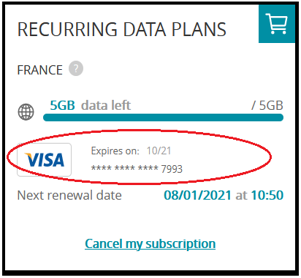
To check which credit card is registered for your Ubigi Monthly Plan, connect to your Ubigi account, and go to:
– My data plans – On the Ubigi Monthly Plan for which you want to check the credit card details, the information will show at the bottom:

Explore Ubigi eSIM data plans for seamless connectivity worldwide!
Install once, stay globally connected for life with a single eSIM, compatible with all eSIM-enabled devices : iOS Phone, iPad OS, Android, and Windows 10 and 11.
Are you a company with teams on the move?
Manage your employees' LTE/5G connectivity on smartphones, tablets, laptops, and hotspots while maintaining complete control over your costs.
Explore Ubigi eSIM data plans for seamless connectivity worldwide!
Install once, stay globally connected for life with a single eSIM, compatible with all eSIM-enabled devices : iOS Phone, iPad OS, Android, and Windows 10 and 11.
Are you a company with teams on the move?
Manage your employees' LTE/5G connectivity on smartphones, tablets, laptops, and hotspots while maintaining complete control over your costs.
GET 20% OFF
⚽
FOOTBALL FEVER PLANS
Heading to the World Cup? Stay connected with our unlimited USA+Canada data plans. Use code FEVER20.
Verified review
This user has been identified as a buyer
I recommend
I recommend
customer, 15 Jul 2026
Verified
Verified review
This user has been identified as a buyer
Great and fantastic idea !
Wal, 15 Jul 2026
Verified
Verified review
This user has been identified as a buyer
Easy to use
Easy to use….
customer, 15 Jul 2026
Verified
Verified review
This user has been identified as a buyer
Everything is working great so far,
Alan Greenberg, 15 Jul 2026
Verified
Verified review
This user has been identified as a buyer
Worked directly from landing to leaving
Jeroen, 15 Jul 2026
Verified
Verified review
This user has been identified as a buyer
Ease of Use
Ease of Use, as soon as i arrived it automatically activated itself and Data worked Flawlessly!!!!
Amazing product and service
Tyler Johnson, 15 Jul 2026
Verified
Verified review
This user has been identified as a buyer
Data service is readily available once…
Data service is readily available once the plane landed Toronto international airport. Easy to enable. Good 5G coverage within the GTA
customer, 15 Jul 2026
Verified
Verified review
This user has been identified as a buyer
It was very good esim
Kevin Q, 15 Jul 2026
Verified
Verified review
This user has been identified as a buyer
Worked as expected throughout most of…
Worked as expected throughout most of Tokyo. Setup was easy, following their instructions. Good value as well.
customer, 15 Jul 2026
Verified
Verified review
This user has been identified as a buyer
Very easy to install!
Urban, 15 Jul 2026
Verified
Verified review
This user has been identified as a buyer
Easy to get connections.
Bay girl, 15 Jul 2026
Verified
Verified review
This user has been identified as a buyer
Very good network everywhere in istanbul
Wasfi, 15 Jul 2026
Verified
Verified review
This user has been identified as a buyer
Very good service and price perfect use…
Very good service and price perfect use with being type1 diabetic 👍🏻
Shaun Edwards, 15 Jul 2026
Verified
Verified review
This user has been identified as a buyer
Really easy to set up and use
Really easy to set up and use. Very happy with the performance throughout the various prefectures in Tokyo. I would definitely use this again to travel.
JDogg, 15 Jul 2026
Verified
Verified review
This user has been identified as a buyer
So much cheaper than paying my…
So much cheaper than paying my cellphone carrier for service abroad.
customer, 15 Jul 2026
Thank you
Your message has been sent. We’ll get back to you shortly.
Thank you
We have taken into account your subscription to the newsletter
How to check eSIM compatibility
Smartphones / Tablets:
Dial *#06#. → If an EID number appears, your device is eSIM-compatible.
Windows 10 / 11:
Press Windows+I. Go to “Network & Internet” → If you see "Cellular", your PC is eSIM-compatible.
How to check carrier unlocking
iPhone / iPad:
Go to Settings > General > About. Scroll to Carrier Lock. → If you see “No SIM restrictions”, your device is unlocked.
Android:
Go to Settings > Network & Internet > Mobile network. Disable Automatic network selection. → If multiple networks appear, your device is unlocked.
You already have an eSIM in your cart.
Each order can only include one eSIM data plan.
If you choose to add a new one, the current plan will be removed. What would you like to do?

