To check your Ubigi purchase history (with confirmed payment only):
1 – First, connect to your account on ubigi.me or use the Ubigi application on your smartphone
2 – Then, go to the « Orders » tab to see the list of all purchases done:
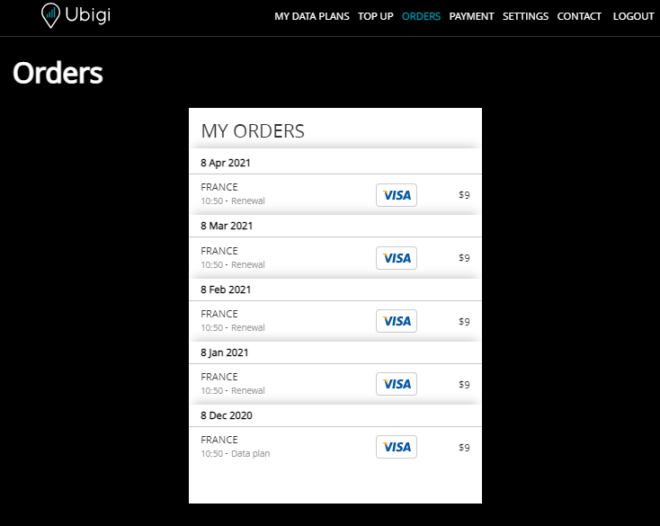
All One-Off purchases and renewals (for monthly and annual plans) will be listed on that tab.
In case you need an invoice, you can send your request to our Customer Service by precising: – which recharge (type of recharge, date, amount) you want an invoice for – your name, or company name – a complete billing address
Your request will be processed under 1-2 working days and you will receive your invoice by email.
Explore Ubigi eSIM data plans for seamless connectivity worldwide!
Install once, stay globally connected for life with a single eSIM, compatible with all eSIM-enabled devices : iOS Phone, iPad OS, Android, and Windows 10 and 11.
Are you a company with teams on the move?
Manage your employees' LTE/5G connectivity on smartphones, tablets, laptops, and hotspots while maintaining complete control over your costs.
Explore Ubigi eSIM data plans for seamless connectivity worldwide!
Install once, stay globally connected for life with a single eSIM, compatible with all eSIM-enabled devices : iOS Phone, iPad OS, Android, and Windows 10 and 11.
Are you a company with teams on the move?
Manage your employees' LTE/5G connectivity on smartphones, tablets, laptops, and hotspots while maintaining complete control over your costs.
Great
Based on 29316 reviews on
Verified
Verified review
This user has been identified as a buyer
Great Service Providers
Ended up going with Ubigi based on the cellular service they use in Japan. We wanted to be ready upon landing with new eSIMs for our iPhones. The networks they use locally are among the best in the nation. Similar to Verizon or AT&T in the US. This process was so unbelievably simple, the App basically took care of the entire experience automatically.
Rey Perez, 03 Dec 2025
Verified
Verified review
This user has been identified as a buyer
Good E-Sim while in Japan
Good E-Sim while in Japan. Kind of bummed the speed lowered after 30 gb while paying for an unlimited plan.
jcustomer, 03 Dec 2025
Verified
Verified review
This user has been identified as a buyer
The experience was great
The experience was great! The moment I landed at my destination, the esim worked right away and I was always on 5g.
Leon Vo, 02 Dec 2025
Verified
Verified review
This user has been identified as a buyer
Good for Canadians in US!
It was really great wifi to have!
Ikram S, 02 Dec 2025
Verified
Verified review
This user has been identified as a buyer
Super!!!
Super!!!! Merci beaucoup!!!
Fabien Ferrero, 02 Dec 2025
Verified
Verified review
This user has been identified as a buyer
Great Experience in Japan
Data was easy to track, and I always had good, reliable service.
Natalie, 02 Dec 2025
Verified
Verified review
This user has been identified as a buyer
Great and easy to use
Kyle Bailey, 02 Dec 2025
Verified
Verified review
This user has been identified as a buyer
Facile d’installation
Facile d’installation, bon débit internet. Suivi de la consommation possible .
Tiedou, 02 Dec 2025
Verified
Verified review
This user has been identified as a buyer
Very satisfied with the service every…
Very satisfied with the service every time I travel. Super easy to install!
Gaby, 02 Dec 2025
Verified
Verified review
This user has been identified as a buyer
It was a good experience
It was a good experience.
The only issue is 1 GB for 7 days isn't enough for a working freelance content creator/SMM.
Nevertheless, I will certainly use the service on my travels!!
JaneneJ, 02 Dec 2025
Verified
Verified review
This user has been identified as a buyer
Very good ,Excellent coverage
Rajesh, 02 Dec 2025
Verified
Verified review
This user has been identified as a buyer
Good reception
Good reception
Monica L., 02 Dec 2025
Verified
Verified review
This user has been identified as a buyer
Really easy to use and excellent value
Really easy to use and excellent value! I highly recommend this service. I used it for my personal trip to Japan. The plans saved me money and also when i refered my fellow travellers I earned a discount.
Mandy Swan-Brown, 02 Dec 2025
Verified
Verified review
This user has been identified as a buyer
Worked perfectly for us in America
Kim, 02 Dec 2025
Verified
Verified review
This user has been identified as a buyer
This is our 4th time using it
This is our 4th time using it. Very easy to setup and start. Love the various options when purchasing.
Peter, 02 Dec 2025
Thank you
Your message has been sent. We’ll get back to you shortly.
Thank you
We have taken into account your subscription to the newsletter
How to check if a device is ready for eSIM?
Check eSIM compatibility
Smartphones & Cellular Tablets:
Dial (*#06#). If an EID number shows, your device supports eSIM!
Laptops (Windows 10/11):
Open your flyout (bottom-right corner). If Cellular settings are visible, your laptop supports eSIM!
Check Carrier Unlock
On iOS:
Go to Settings > General > About, scroll to Carrier Lock. If it says "No SIM restrictions", your device is unlocked!
On Android:
Go to Settings > Network & Internet > Mobile Network, turn off Auto network selection. If you see multiple available networks, your device is unlocked! If only one appears, or you get an error, it may be locked.
You already have an eSIM in your cart.
Each order can only include one eSIM data plan.
If you choose to add a new one, the current plan will be removed. What would you like to do?


