The website Ubigi.me does not display on my iPad even though my internet connection is working. Why and what to do?
If the Ubigi.me page does not display on your browser while your internet connection is working, it may be because of the iCloud Private Relay service activated on your iPad.
Indeed, numerous websites, networks or services may appear as incompatible and therefore not accessible when the iCloud Private Relay service is activated.
Accessing Ubigi.me actually requires automatic recognition of your eSIM and this is not possible when the iCloud Private Relay service is activated. That is why this website does not display on your browser.
In order to access Ubigi.me, you can temporarily deactivate the iCloud Private Relay service by going to: – Settings – Then select [your name] – Select iCloud – Then Private Relay – On the displayed pop-up, choose “Turn Off Private Relay“
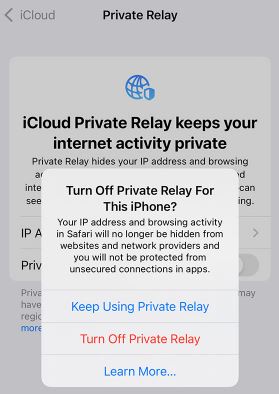
You can deactivate this service specifically for a website, network or service when necessary: more information on the Apple page here.
If you do not use the iCloud Private Relay service or if it is already disabled on your iPad, we invite you to test another browser to try to access Ubigi.me. If the situation persists, please contact our Customer Service for further assistance.

Explore Ubigi eSIM data plans for seamless connectivity worldwide!
Install once, stay globally connected for life with a single eSIM, compatible with all eSIM-enabled devices : iOS Phone, iPad OS, Android, and Windows 10 and 11.
Are you a company with teams on the move?
Manage your employees' LTE/5G connectivity on smartphones, tablets, laptops, and hotspots while maintaining complete control over your costs.
Explore Ubigi eSIM data plans for seamless connectivity worldwide!
Install once, stay globally connected for life with a single eSIM, compatible with all eSIM-enabled devices : iOS Phone, iPad OS, Android, and Windows 10 and 11.
Are you a company with teams on the move?
Manage your employees' LTE/5G connectivity on smartphones, tablets, laptops, and hotspots while maintaining complete control over your costs.
GET 20% OFF
⚽
FOOTBALL FEVER PLANS
Heading to the World Cup? Stay connected with our unlimited USA+Canada data plans. Use code FEVER20.
Verified review
This user has been identified as a buyer
great ..easy
great ..easy
sonal, 08 Jul 2026
Verified
Verified review
This user has been identified as a buyer
Incredibly easy to use and faultless
Incredibly easy to use and faultless. Used for my trips in Japan and the UK.
PMV, 08 Jul 2026
Verified
Verified review
This user has been identified as a buyer
Great mobile date to have while in Japan
customer, 08 Jul 2026
Verified
Verified review
This user has been identified as a buyer
Works well as expected everywhere in Japan
The eSIM works well everywhere in Japan. No connection lost
Jean, 08 Jul 2026
Verified
Verified review
This user has been identified as a buyer
It just worked!
It just worked!
Michael, 08 Jul 2026
Verified
Verified review
This user has been identified as a buyer
Good value for money
Good value for money. Great coverage through most areas.
customer, 08 Jul 2026
Verified
Verified review
This user has been identified as a buyer
Great coverage and easy to use service.
Amir Amiri, 08 Jul 2026
Verified
Verified review
This user has been identified as a buyer
Problems Reading QR Code on E-mail
I purchased this eSIM to test out my new Netgear Nighthawk M7 hotspot. The purchasing experience went well and was straight forward. When I scanned to QR code on your e-mail, I kept on getting an error message on the Netgear App that read: "eSIM setup failed. Something went wrong while setting up the eSIM on your hotspot Error Code: 1." I then proceeded to create my Ubigi account. Once in the account, there was confirmation of my purchase with a QR code. When I scanned this other QR code, it processed successfully. The rest of the process went smoothly and I experienced no problems with the service. Based on what happened, it seems to me this Error Code 1 was a generic provisioning failure rather than a problem with the hotspot itself. In other words, the hotspot was able to read the QR code and contact the provisioning server, but the server could not complete the download of the eSIM profile for whatever reason. Other than this I liked your product and will use it again. I plan on using Ubigi as I travel to Italy later this year.
A. De Mello, 08 Jul 2026
Verified
Verified review
This user has been identified as a buyer
Worked great for my trip to Korea
Worked great for my trip to Korea. Pricing was very reasonable and the connection was great
customer, 08 Jul 2026
Verified
Verified review
This user has been identified as a buyer
Great
Great! barely ever lost service. 5 gigs of data lasted my whole 2 wee trip. Occasionally I had slow connection though.
customer, 08 Jul 2026
Verified
Verified review
This user has been identified as a buyer
There are some area that the wifi…
There are some area that the wifi signal is very weak.
customer, 07 Jul 2026
Verified
Verified review
This user has been identified as a buyer
Easy to use
Easy to use, easy to install, app is helpful to manage. Great experience!
Michael Stout, 07 Jul 2026
Verified
Verified review
This user has been identified as a buyer
New User Traveling in Chile
As a new user, this has been amazing in Chile!
customer, 07 Jul 2026
Verified
Verified review
This user has been identified as a buyer
Cheap prices and good service
Cheap prices and good service. Very useful
Neno De Jesus, 07 Jul 2026
Verified
Verified review
This user has been identified as a buyer
I used Ubigi in Morocco with Maroc…
I used Ubigi in Morocco with Maroc Telecom and Orange and everything was perfect everywhere. I suggest it.
LOMBARDO EUGENIO, 07 Jul 2026
Thank you
Your message has been sent. We’ll get back to you shortly.
Thank you
We have taken into account your subscription to the newsletter
How to check eSIM compatibility
Smartphones / Tablets:
Dial *#06#. → If an EID number appears, your device is eSIM-compatible.
Windows 10 / 11:
Press Windows+I. Go to “Network & Internet” → If you see "Cellular", your PC is eSIM-compatible.
How to check carrier unlocking
iPhone / iPad:
Go to Settings > General > About. Scroll to Carrier Lock. → If you see “No SIM restrictions”, your device is unlocked.
Android:
Go to Settings > Network & Internet > Mobile network. Disable Automatic network selection. → If multiple networks appear, your device is unlocked.
You already have an eSIM in your cart.
Each order can only include one eSIM data plan.
If you choose to add a new one, the current plan will be removed. What would you like to do?

