I have a new iPhone/iPad. How to transfer my current Ubigi eSIM profile to it to keep my Ubigi account?
To transfer or switch your Ubigi eSIM profile to a new or another iPhone/iPad:
1 – First, delete the Ubigi eSIM profile from your first/old iPhone/iPad. Please ensure you are connected to a Wi-Fi or 4G/5G connection when deleting your eSIM profile.
2 – Then, download the Ubigi app on your new/other iPhone/iPad and connect to your Ubigi account by using your login and password
3 – Once connected, the button “Install your eSIM” will be displayed – click on it then follow the instructions on screen to complete the installation:
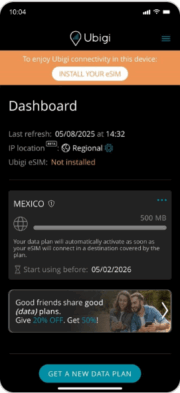
IMPORTANT: your Ubigi eSIM profile must be deleted on the first (old) device before the re-installation on another device, otherwise the “Install your eSIM” button won’t be displayed and the re-installation and swap will not work on the new device (NB: this action won’t delete your Ubigi account). If this deletion is not possible in case you don’t have your first (old) device anymore (broken, lost, etc.), we invite you to contact our Customer Service for more help.
Explore Ubigi eSIM data plans for seamless connectivity worldwide!
Install once, stay globally connected for life with a single eSIM, compatible with all eSIM-enabled devices : iOS Phone, iPad OS, Android, and Windows 10 and 11.
Are you a company with teams on the move?
Manage your employees' LTE/5G connectivity on smartphones, tablets, laptops, and hotspots while maintaining complete control over your costs.
Explore Ubigi eSIM data plans for seamless connectivity worldwide!
Install once, stay globally connected for life with a single eSIM, compatible with all eSIM-enabled devices : iOS Phone, iPad OS, Android, and Windows 10 and 11.
Are you a company with teams on the move?
Manage your employees' LTE/5G connectivity on smartphones, tablets, laptops, and hotspots while maintaining complete control over your costs.
Great
Based on 41622 reviews on
Verified
Verified review
This user has been identified as a buyer
Very easy and reliable connection…
Very easy and reliable connection during my stay in Tokyo.
Iwan, 18 Jul 2026
Verified
Verified review
This user has been identified as a buyer
First connection was a bit difficult
First connection was a bit difficult. The app really doesn't work without internet.
Philippe, 18 Jul 2026
Verified
Verified review
This user has been identified as a buyer
Since activating my eSIM before going…
Since activating my eSIM before going into the UK, I haven’t had any problems with connection. Smooth and easy transition. Would thoroughly recommend Ubigi as a trusted provider.
Shelly B, 18 Jul 2026
Verified
Verified review
This user has been identified as a buyer
The app was easy to install and use
The app was easy to install and use. Had no connectivity issues whilst visiting family in the UK.
Camilla, 18 Jul 2026
Verified
Verified review
This user has been identified as a buyer
I used it in Germany and France without…
I used it in Germany and France without any problem. It was convenient, easy to use and much cheaper than wifi rooter!
customer, 18 Jul 2026
Verified
Verified review
This user has been identified as a buyer
Easy to set up
Easy to set up, reliable Internet with high Speed.
Lutz, 18 Jul 2026
Verified
Verified review
This user has been identified as a buyer
Worked perfectly in Marocco
Worked perfectly in Marocco. No issues.
Åsa, 18 Jul 2026
Verified
Verified review
This user has been identified as a buyer
4/5 - Good service, but confusing set up.
4/5. The services is good, but setting up the connection can be confusing. It says to turn on data roaming, but I've heard from various people NOT to do that. My friends also had Ubigi and they did not turn on roaming and had service. I had to turn on roaming to get Ubigi's service, which made me kind of nervous. I wanted to connect with costumer service to clarify but it's hard to reach anyone.
In short, not sure if data roaming is required or not.
Ty Lao, 18 Jul 2026
Verified
Verified review
This user has been identified as a buyer
It was aweful in India but fantastic in…
It was aweful in India but fantastic in Japan
Shida Peseschkian, 18 Jul 2026
Verified
Verified review
This user has been identified as a buyer
HASSLE-FREE UBIGI
When I used my eSIM of Ubigi.com in my recent 3-day trip to Canada, I had no problem accessing the Internet. I am happy with its accessibility. And I will use it again in my future trips.
Joseph Lariosa, 18 Jul 2026
Verified
Verified review
This user has been identified as a buyer
Sometimes there is times that I don't…
Sometimes there is times that I don't have internet in the Kansai region on Japan
Augusto Santos, 18 Jul 2026
Verified
Verified review
This user has been identified as a buyer
the easiest to use and activate of all…
the easiest to use and activate of all the esims i tried
monina, 18 Jul 2026
Verified
Verified review
This user has been identified as a buyer
Instruction how to set up was sent by…
Instruction how to set up was sent by email were very easy to follow . The sim worked straight away upon arrival
Jane, 18 Jul 2026
Verified
Verified review
This user has been identified as a buyer
Worked great
Worked great. Easy to setup. Good price!
Jonathan Brauer, 18 Jul 2026
Verified
Verified review
This user has been identified as a buyer
Setup was easy and the connections arr…
Setup was easy and the connections arr perfect so far. I highly recommend.
customer, 18 Jul 2026
Thank you
Your message has been sent. We’ll get back to you shortly.
Thank you
We have taken into account your subscription to the newsletter
How to check eSIM compatibility
Smartphones / Tablets:
Dial *#06#. → If an EID number appears, your device is eSIM-compatible.
Windows 10 / 11:
Press Windows+I. Go to “Network & Internet” → If you see "Cellular", your PC is eSIM-compatible.
How to check carrier unlocking
iPhone / iPad:
Go to Settings > General > About. Scroll to Carrier Lock. → If you see “No SIM restrictions”, your device is unlocked.
Android:
Go to Settings > Network & Internet > Mobile network. Disable Automatic network selection. → If multiple networks appear, your device is unlocked.
You already have an eSIM in your cart.
Each order can only include one eSIM data plan.
If you choose to add a new one, the current plan will be removed. What would you like to do?


