How to disable 5G connectivity ? – Apple & Android
5G is included in covered destinations in our standard data plans at no extra costs. 5G makes it possible to benefit from an unsaturated network, faster internet connection and downloads, increased responsiveness of applications and online services, and better streaming quality.
5G is x10 faster than what you can get with 4G — It takes less time to transmit the same amount of data. However, with such a speed, your data plan may run out faster.
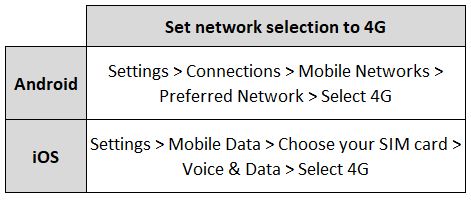
You can also activate the 4G option instead of 5G and still enjoy a good connection speed wherever you are. To do this, please follow the instructions below:
You can re-enable 5G at any time in your Settings.
— For Google Pixel users: While 5G access may not be supported due to device-specific settings, you can still enjoy connectivity in 3G/4G. For full compatibility details, we recommend checking with your device manufacturer.
Explore Ubigi eSIM data plans for seamless connectivity worldwide!
Install once, stay globally connected for life with a single eSIM, compatible with all eSIM-enabled devices : iOS Phone, iPad OS, Android, and Windows 10 and 11.
Are you a company with teams on the move?
Manage your employees' LTE/5G connectivity on smartphones, tablets, laptops, and hotspots while maintaining complete control over your costs.
Explore Ubigi eSIM data plans for seamless connectivity worldwide!
Install once, stay globally connected for life with a single eSIM, compatible with all eSIM-enabled devices : iOS Phone, iPad OS, Android, and Windows 10 and 11.
Are you a company with teams on the move?
Manage your employees' LTE/5G connectivity on smartphones, tablets, laptops, and hotspots while maintaining complete control over your costs.
Great
Based on 46579 reviews on
Verified
Verified review
This user has been identified as a buyer
No problems with connection from…
No problems with connection from country to country in Europe. Awesome
Auds, 24 Sep 2026
Verified
Verified review
This user has been identified as a buyer
no problems with ubigi in thailand
no problems - whatsoever.
activating the e-sim on arrival worked fine.
quality of connection was fine.
i had a package for thailand.
even recharging during the stay made no difficulties at all.
will use it again, when i am outside "my hemisphere"
old Folkie, 24 Sep 2026
Verified
Verified review
This user has been identified as a buyer
Nice data plan
Data activated automatically and works as intended.
MasterixG, 24 Sep 2026
Verified
Verified review
This user has been identified as a buyer
The car was better than expected
The car was better than expected.
Great service.
Maria Paz, 24 Sep 2026
Verified
Verified review
This user has been identified as a buyer
Easy install
Easy install. Everything worked perfectly first time. Thanks
customer, 24 Sep 2026
Verified
Verified review
This user has been identified as a buyer
The service was better than my local…
The service was better than my local provider in the US. It didn’t disappoint. Fast 5G speed. Will use again.
customer, 24 Sep 2026
Verified
Verified review
This user has been identified as a buyer
Easy to use
Easy to use, good value for money and works perfectly 👍
Sue Renforth, 24 Sep 2026
Verified
Verified review
This user has been identified as a buyer
First time user loved it…
I have never used a eSIM before and was expecting issues as is often true of first time users. However as soon as I switched on my phone when I landed in Casablanca, it worked perfectly well until I left on the ferry to Spain.
Guy, 24 Sep 2026
Verified
Verified review
This user has been identified as a buyer
I tried Ubigi after faithfully using…
I tried Ubigi after faithfully using Airalo. Ubigi was easier to use, even when I had to top-off during my trip. The price point can’t be beat. Will use again!
Ncampy, 24 Sep 2026
Verified
Verified review
This user has been identified as a buyer
easy to used work all over Italy
easy to used work all over Italy. The only problem, was that there were areas that internet didn't work.
GERVASI BRUNO, 24 Sep 2026
Verified
Verified review
This user has been identified as a buyer
Easy!!!
Easy to purchase, easy to install, easy to use. The easiest eSim I’ve tried for travel.
NordVPN Customer, 24 Sep 2026
Verified
Verified review
This user has been identified as a buyer
Easy to install and chat help is great
Easy to install and chat help is great
customer, 24 Sep 2026
Verified
Verified review
This user has been identified as a buyer
Thanks Ubigi
After activating the eSim Ubigi, everything was ok in Japan from Osaka to Tokyo, even in the mountains near Nagano. Thanks
customer, 24 Sep 2026
Verified
Verified review
This user has been identified as a buyer
Really easy setup and connection
Really easy setup and connection. Fantastic.
customer, 24 Sep 2026
Thank you
Your message has been sent. We’ll get back to you shortly.
Thank you
We have taken into account your subscription to the newsletter
How to check eSIM compatibility
Smartphones / Tablets:
Dial *#06#. → If an EID number appears, your device is eSIM-compatible.
Windows 10 / 11:
Press Windows+I. Go to “Network & Internet” → If you see "Cellular", your PC is eSIM-compatible.
How to check carrier unlocking
iPhone / iPad:
Go to Settings > General > About. Scroll to Carrier Lock. → If you see “No SIM restrictions”, your device is unlocked.
Android:
Go to Settings > Network & Internet > Mobile network. Disable Automatic network selection. → If multiple networks appear, your device is unlocked.
You already have an eSIM in your cart.
Each order can only include one eSIM data plan.
If you choose to add a new one, the current plan will be removed. What would you like to do?




 How to check eSIM compatibility
 How to check carrier unlocking