Skip to content
← Back to questions
How to install my current Ubigi eSIM profile in a new/another Android device to keep my Ubigi account?

To transfer or switch your Ubigi eSIM profile to a new or another Android device:

1 – first, make sure that you remember your login+password. If not, you must check them directly on your Ubigi account under the Settings tab while connected through your Ubigi connectivity on your first Android device on which the eSIM profile is still installed (you can modify your password at that moment if you do not remember it)

2 – once you are sure to remember your login+password, delete the Ubigi eSIM profile from your first device (if you do not have that device anymore, please contact our Customer Service for more help).

3 – download the Ubigi app from the PlayStore on your new/other Android device and connect to your Ubigi account by using your login and password

4 – once connected, go to the Settings tab and in the “eSIM” section, click on the “Re-install my Ubigi eSIM” button:
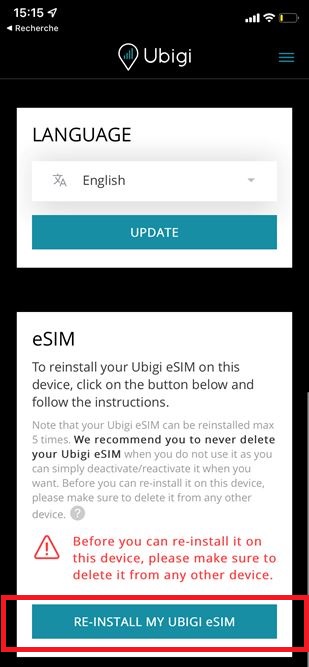

5 – then follow the instructions on screen to complete the installation.

NB: if the “re-install my Ubigi eSIM” button is not displayed, please contact our Customer Service for more help as you may have an old profile that cannot be reinstalled. Our team will send you an updated profile that you can reinstall on your new device to keep your Ubigi account.

IMPORTANT: your Ubigi eSIM profile must be deleted on the first device before the re-installation on another device, otherwise the re-installation and swap will not work (NB: this action won’t delete your Ubigi account).
If this deletion is not possible in case you don’t have your first device anymore (broken, lost, etc.), we invite you to contact our Customer Service for more help.

The re-installation of a Ubigi eSIM profile is limited to 5 times max after deletion. In case you get an error message during a re-installation, please see the following section:
I get an error message when I use the QR code on my Ubigi account to re-install my Ubigi eSIM profile, why?

Looking for something specific?

Other frequently asked questions:

How to install Ubigi eSIM onFind X9 / X9 Pro?

How to install Ubigi eSIM on Oppo Reno13 Pro?

How to install Ubigi eSIM on Xiaomi 15T Pro?

How to install Ubigi eSIM on Samsung Galaxy Z Flip 7 / Z Flip 7 FE?

Installing an eSIM on iPhone 17, iPhone 17 Pro, iPhone17 Pro Max and iPhone Air

Service Update for Travelers in Turkey

UAE Service Update For UAE Residents

How to install Ubigi eSIM on the Xiaomi 15, 15 Pro and 15 Ultra?

How to install Ubigi eSIM on Sony Xperia 1 VI and Xperia 10 VI?

How to install Ubigi eSIM on the Vivo X200 and X200 Pro?

How to install an eSIM profile on Google Pixel 9?

How to install Ubigi eSIM on Samsung Galaxy S25 / S25+ / S25 Edge / S25 Ultra?

How to install Ubigi eSIM on Oppo Find X8/ X8 Pro ?

How can I buy a Ubigi data plan on iPad?

Where to attend a traditional wine and Champagne tasting in Paris?

Are there special events or festivals in Paris?

How to stay in touch with family and friends when visiting Paris?

Will my phone work abroad, or do I need international roaming?

What are the best options for mobile Internet in Paris?

What is the best way to get around Paris?

What are the best day trips I can take from Paris?

What are the best museums to visit besides the Louvre? 

What are the must-see attractions in Paris?

Should I enable the "Data switching" option on my iPhone when using Ubigi?

How to get and use Ubigi?

Can I add additional eSIM profiles to use it/them along with Ubigi eSIM?

Can I install several Ubigi eSIM profiles on the same device?

How to join the Ubigi referral program?

How to transfer my eSIM profile from an Android device to an iPhone?

How to transfer my eSIM profile from an iPhone to an Android device?

How to use a promo code with Ubigi ?

How to use the Ubigi WELCOME10 welcome promo code?

Why isn’t my Student Beans promo code working on the Ubigi website?

Can I redeem my Student Beans discount directly on the Ubigi site?

What is the Ubigi App?

Can I use the coupon code both on the Ubigi website and in the app?

What is Ubigi eSIM?

What is a Ubigi account?

Is 5G available on Ubigi ?

How to get 5G with Ubigi? - Apple & Android

Will I receive a QR code each time I recharge my Ubigi account with an eSIM data plan?

How much does a Ubigi eSIM cost?

When does the validity of my Ubigi data plan start?

How to disable 5G connectivity ? - Apple & Android

How to install Ubigi eSIM on Samsung Galaxy S22 series (including S22, S22+ and S22 Ultra)?

How to install Ubigi eSIM on your iPhone 14 models?

How to install Ubigi eSIM on your iPhone 12 models?

How to install Ubigi eSIM on your iPhone 13 models?

The website Ubigi.me does not display on my iPhone even though my internet connection is working. Why and what to do?

The website Ubigi.me does not display on my iPad even though my internet connection is working. Why and what to do?

How to install an eSIM profile on Google Pixel 6 or Google Pixel 7?

How to install an eSIM profile on Google Pixel Fold?

How to install Ubigi eSIM on my Android device with a QR Code?

How to temporary deactivate your Ubigi eSIM?

How to switch on or switch off an eSIM profile on iOS iPhone

How to reactivate or deactivate an eSIM profile on iPhone?

How to switch on or switch off an eSIM profile on Android devices

I have a new iPhone/iPad. How to transfer my current Ubigi eSIM profile to it to keep my Ubigi account?

How to reinstall the Ubigi eSIM profile I deleted on my iPhone/iPad?

I get an error message when I use the QR code on my Ubigi account to re-install my Ubigi eSIM profile, why?

How to reinstall the Ubigi eSIM profile I deleted on my Android device?

How to manually install an eSIM profile using an activation code on Android?

Where can I find my Ubigi purchase history?

Can I tether my Ubigi connection to share data with other devices?

How to install Ubigi eSIM on the Xiaomi 12T Pro?

How to install Ubigi eSIM on Fairphone 4 ?

Which currency is applied for my Ubigi purchases?

How to install Ubigi eSIM on Sony Xperia 1 IV, Xperia 5 IV and Xperia 10 IV?

How to install Ubigi eSIM on your iPhone 11, iPhone 11 Pro, iPhone 11 Pro Max?

How to install Ubigi eSIM on your Android phones or tablets?

How to install Ubigi eSIM on Samsung Galaxy S21 5G / S21+ 5G / S21 Ultra 5G?

How to install Ubigi eSIM on Samsung Galaxy S20 / S20+ / S20 Ultra?

How to install Ubigi eSIM on Samsung Galaxy S23 / S23+ / S23 Ultra?

How to install Ubigi eSIM on Samsung Galaxy Fold and Z Fold models ( Z Fold 2/ Z Fold 3/ Z Fold 4) ?

How to install Ubigi eSIM on Samsung Galaxy Z Flip / Z Flip 3/ Z Flip 3 5G Fold / Z Flip 4?

How to install an eSIM on Huawei P40 and P40 Pro?

How to install an eSIM on Huawei Mate 40 Pro?

How to install Ubigi eSIM on Google Pixel 7a ?

How to install Ubigi eSIM on your Google Pixel 4 phone?

How to install Ubigi eSIM on Oppo Find N2 Flip?

How to install Ubigi eSIM on Oppo Find X5/ X5 Pro ?

How to install Ubigi eSIM on your Surface Go 2 ?

How to install Ubigi eSIM on the Motorola Razr?

How to install Ubigi eSIM on your Surface Pro 9?

How to install Ubigi eSIM on your Surface Pro X?

How to install Ubigi eSIM on your laptop?

How do I setup eSIM on Google Pixel phones?

What will be my Ubigi mobile phone number?

How to install Ubigi eSIM on your ThinkPad X12 Detachable (12", Intel) Tablet?

How to install Ubigi eSIM on your Surface Pro 7+?

How to install Ubigi eSIM on your ThinkPad X1 Nano (13”, Intel) Laptop?

How to install Ubigi eSIM on your ThinkPad X1 Fold (13”) PC?

How to install Ubigi eSIM on your Surface Duo?

How to install Ubigi eSIM on your ThinkPad X1 Carbon Gen 9 (14", Intel) Laptop?

How do you use Ubigi?

How to install Ubigi eSIM on your ThinkPad X1 Titanium Yoga (13.5”, Intel) 2 in 1 Laptop?

How to get a free Ubigi eSIM for your laptop?

How to get a free Ubigi eSIM for your iPhone or iPad?

How to manually set-up Ubigi's APN for iPhone and iPad?

Which countries are covered by Ubigi?

How to manually set-up Ubigi's APN for Windows 10 or Windows 11?

What APN (Access Point Name) is used for Ubigi?

Does Ubigi eSIM cover Asia?

What is the APN Settings for Ubigi for Android?

Does Ubigi eSIM cover Europe?

Does Ubigi eSIM cover the USA?

Which local operators does Ubigi use around the world?

Does the Ubigi eSIM work in Russia?

Does the Ubigi eSIM work in Caribbean?

Does the Ubigi eSIM work in UK (United Kingdom)?

Does the Ubigi eSIM work in Italy?

Does the Ubigi eSIM work in Germany?

Does the Ubigi eSIM work in Spain?

Does the Ubigi eSIM work in Switzerland?

Can you make phone calls with Ubigi?

Does the Ubigi eSIM work in Japan?

Does the Ubigi eSIM work in France?

Does the Ubigi eSIM work in USA?

What eSIM data plan can I use for Caribbean?

What eSIM data plan can I use for Germany?

What eSIM data plan can I use for Russia?

What eSIM data plan can I use for USA?

What eSIM data plan can I use for Spain?

What eSIM data plan can I use for UK (United Kingdom)?

What eSIM data plan can I use for Switzerland?

What eSIM data plan can I use for Italy?

How to manually install an eSIM profile using an activation code on iOs?

Why did I not receive my verification code by email?

Should you buy your Ubigi eSIM data plan before traveling, or when you arrive?

What are the available payment methods to buy Ubigi eSIM data plans?

How to get a free Ubigi eSIM for your Android phone?

How to create your Ubigi eSIM account?

What eSIM data plan can I use for Japan?

How to buy a Ubigi eSIM data plan?

Can I share my Ubigi connection to other devices?

Where can I buy a physical Ubigi SIM Card?

UBIGI vs AIRALO?

How to install Ubigi eSIM on your iPhone or iPad?

How to install Ubigi eSIM on your iPhone?

What eSIM data plan can I use for France?

How to get Internet access at marinas, yacht clubs, and moorings?

How to install Ubigi eSIM on my iPhone with a QR Code?

How to install Ubigi eSIM on your iPad equipped with an eSIM?

How to install Ubigi eSIM on your iPhone XR?

How to install Ubigi eSIM on your iPhone XS?

How to install Ubigi eSIM on your iPhone SE?

How do I stay connected on my Nile cruise in Egypt?

Great Trustpilot stars Trustpilot
Trustpilot stars
Based on 32514 reviews on Trustpilot
4 stars Verified
Verified review
This user has been identified as a buyer
There are better eSims
Easy installation of the eSIM. The app was slow, never reported the correct usage, the iPhone widget never worked. Had issues with it not finding a network to connect too when I was in the middle of Bangkok, many times after phone was put into airplane mode then back to normal. Received a message that I was out of data on the second day when I knew was that was wrong. I used others eSIM providers and this is not one of the better ones.
Gene Kempf, 09 Mar 2026
5 stars Verified
Verified review
This user has been identified as a buyer
Easy to use
Good price and easy to use
bill, 09 Mar 2026
5 stars Verified
Verified review
This user has been identified as a buyer
Works perfectly
Worked perfectly as soon as I touched down in Albania and worked seamlessly until I left, will definitely use again
Graham Carlton, 09 Mar 2026
5 stars Verified
Verified review
This user has been identified as a buyer
Customer service customer service…
Customer service customer service customer service. I had a slight problem on entry to Japan and their response through email was impeccable. Though my problem took 2 emails to fix the fact was I didn’t have to wait a week in fact sorted in at most a few hours but was probably quicker
Les, 09 Mar 2026
5 stars Verified
Verified review
This user has been identified as a buyer
Perfect and gast internet in Japan
Perfect and fast internet in Japan
Bram , 09 Mar 2026
5 stars Verified
Verified review
This user has been identified as a buyer
Easy all round and gray coverage across Japan
Easy to purchase, set up, use and top up if required. Second time we have used Ubigi on our holidays and we have travelled to cities, remote areas and smaller places without any issues.
DisappointedShopper, 09 Mar 2026
5 stars Verified
Verified review
This user has been identified as a buyer
Good service
Used a 3gig data plan in Costa Rica and had service whenever we needed it. Of course you’re not going to have service in the middle of the jungle etc but while driving on most roads and in towns it was all as you would expect especially for such a competitive price.
customer, 09 Mar 2026
5 stars Verified
Verified review
This user has been identified as a buyer
quick to set up and completely reliable.
Ubigi works exactly as you need it to: it's quick to set up and completely reliable.
Jo Schwertner, 09 Mar 2026
5 stars Verified
Verified review
This user has been identified as a buyer
Very easy to use and install
Very easy to use and install, i can check my usage anytime by logging into the app.
Richard, 09 Mar 2026
5 stars Verified
Verified review
This user has been identified as a buyer
Even though it does not offer the best…
Even though it does not offer the best price, it’s the only one that has never given me any connectivity/compatibility issue. Very happy!
customer, 09 Mar 2026
5 stars Verified
Verified review
This user has been identified as a buyer
Worked exactly as said it would
Worked exactly as said it would. No issues at all.
Jean, 09 Mar 2026
5 stars Verified
Verified review
This user has been identified as a buyer
It is a really good conection
It worked from the moment that we landed on the airport so round of applause
customer, 09 Mar 2026
5 stars Verified
Verified review
This user has been identified as a buyer
Great value and super easy to use
Great value and super easy to use. Very happy with this service,
Aaron, 09 Mar 2026
5 stars Verified
Verified review
This user has been identified as a buyer
So easy to use
After the first trip, getting a now plan on the same sim is easy, and it connects automatically on arrival in the region the plan is purchased for. Seamless!
Anne, 09 Mar 2026
4 stars Verified
Verified review
This user has been identified as a buyer
Worked well
Worked well. LTE in some snow fields.
Andrew Longfellow, 09 Mar 2026

Your message has been sent.
We’ll get back to you shortly.

We have taken into account your subscription to the newsletter


