To redeem your Ubigi voucher code/ promo code on the Ubigi App, please follow the steps below:
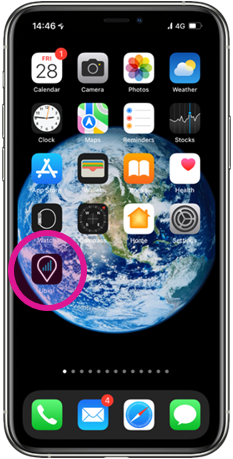
1. Open your Ubigi app on your smartphone or tablet If you don’t have the Ubigi app, download now or you can also access your Ubigi account using our web portal ubigi.me
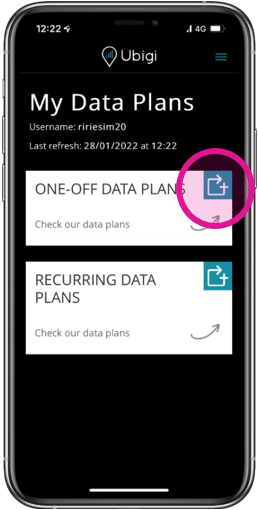
2. Go to Top up Tap on the Top Up symbol to see our wide range of one-off and recurring eSIM data plans available in 200+ destinations:
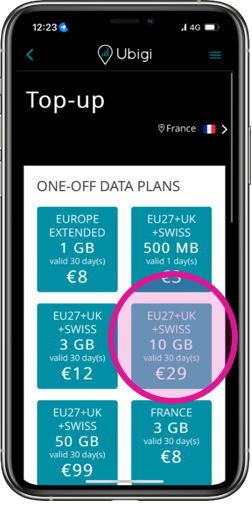
3.Choose the data plan you want to purchase:
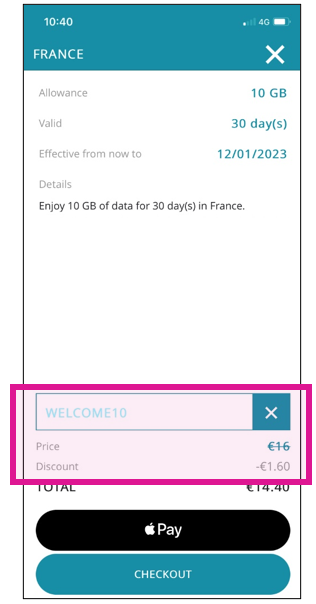
4. Type in your promo code in the dedicated coupon code field before selecting your payment option to apply the discount on the total amount:
5. Proceed to payment and enjoy your Ubigi connectivity at even more affordable price instantly!
Explore Ubigi eSIM data plans for seamless connectivity worldwide!
Install once, stay globally connected for life with a single eSIM, compatible with all eSIM-enabled devices : iOS Phone, iPad OS, Android, and Windows 10 and 11.
Are you a company with teams on the move?
Manage your employees' LTE/5G connectivity on smartphones, tablets, laptops, and hotspots while maintaining complete control over your costs.
Explore Ubigi eSIM data plans for seamless connectivity worldwide!
Install once, stay globally connected for life with a single eSIM, compatible with all eSIM-enabled devices : iOS Phone, iPad OS, Android, and Windows 10 and 11.
Are you a company with teams on the move?
Manage your employees' LTE/5G connectivity on smartphones, tablets, laptops, and hotspots while maintaining complete control over your costs.
Great
Based on 35753 reviews on
Verified
Verified review
This user has been identified as a buyer
Ubigi is a fantastic way to save money…
Ubigi is a fantastic way to save money when traveling. Quick customer service, and their esims always work well.
ajg, 27 Apr 2026
Verified
Verified review
This user has been identified as a buyer
Simple introductions
Simple introductions, I would use again for sure.
Meme P, 27 Apr 2026
Verified
Verified review
This user has been identified as a buyer
works perfectly
works perfectly
Mevan Kaluarachchi, 27 Apr 2026
Verified
Verified review
This user has been identified as a buyer
Very easy to use
Very easy to use and to install, even for me.
A. Hulsbosch , 27 Apr 2026
Verified
Verified review
This user has been identified as a buyer
It works as you say it will!
It works as you say it will!
It has been perfect in Japan and now I'm crossing over to S. Korea and expect a smooth transition.
Paul, 27 Apr 2026
Verified
Verified review
This user has been identified as a buyer
Worked excellent all across Japan.
Worked excellent all across Japan.
customer, 27 Apr 2026
Verified
Verified review
This user has been identified as a buyer
It’s been brilliant
It’s been brilliant, I had to eSIMS’ and my UBIGI one work best by far, signal all over nearly literally only a few places it didn’t work so well but 90% of the time it worked fantastically for me.. My only downside is not having a number to receive texts on because you needed to receive texts for Bike Hire, Power bank hire etc… but all in all brilliant
Thomas Oneill & Jacqui Oneill, 27 Apr 2026
Verified
Verified review
This user has been identified as a buyer
OK so far
I have only tried Ubigi for a couple of days in a couple of countries, and worked well.
It appears that Ubigi uses only second-tier phone networks and not the major network in each country (so far). I will be interested to see how it goes in remote and busy area.
The most annoying thing about Ubigi is the constant series of requests to review
Rhys, 27 Apr 2026
Verified
Verified review
This user has been identified as a buyer
Easy to use
Very easy to use in Japan and South Korea. Switching from one country to another was a breeze. 10g for 6 days in each country was perfect for us.
Ct, 26 Apr 2026
Verified
Verified review
This user has been identified as a buyer
Ubigi experience was the best very easy…
Ubigi experience was the best very easy to use and reasonably priced.
Jimmy, 26 Apr 2026
Verified
Verified review
This user has been identified as a buyer
The eSim worked really well in South…
The eSim worked really well in South Africa. There were no issues at all.S
SG, 26 Apr 2026
Verified
Verified review
This user has been identified as a buyer
Traveling co workers highly recommend…
Traveling co workers highly recommend this App. It was just what I needed,and at the right price.
Julie N Fujiki, 26 Apr 2026
Verified
Verified review
This user has been identified as a buyer
Immediately activated once arrived in…
Immediately activated once arrived in Japan and worked well during my trip
Abdelmoughite Abdelmoumen, 26 Apr 2026
Verified
Verified review
This user has been identified as a buyer
Works well and worth the money
Works well and worth the money
customer, 26 Apr 2026
Verified
Verified review
This user has been identified as a buyer
Cool 😎
All perfect - easy installation 😁😁😁
customer, 26 Apr 2026
Thank you
Your message has been sent. We’ll get back to you shortly.
Thank you
We have taken into account your subscription to the newsletter
How to check eSIM compatibility
Smartphones / Tablets:
Dial *#06#. → If an EID number appears, your device is eSIM-compatible.
Windows 10 / 11:
Press Windows+I. Go to “Network & Internet” → If you see "Cellular", your PC is eSIM-compatible.
How to check carrier unlocking
iPhone / iPad:
Go to Settings > General > About. Scroll to Carrier Lock. → If you see “No SIM restrictions”, your device is unlocked.
Android:
Go to Settings > Network & Internet > Mobile network. Disable Automatic network selection. → If multiple networks appear, your device is unlocked.
You already have an eSIM in your cart.
Each order can only include one eSIM data plan.
If you choose to add a new one, the current plan will be removed. What would you like to do?





 How to check eSIM compatibility
 How to check carrier unlocking