I have a new iPhone/iPad. How to transfer my current Ubigi eSIM profile to it to keep my Ubigi account?
To transfer or switch your Ubigi eSIM profile to a new or another iPhone/iPad:
1 – First, delete the Ubigi eSIM profile from your first/old iPhone/iPad. Please ensure you are connected to a Wi-Fi or 4G/5G connection when deleting your eSIM profile.
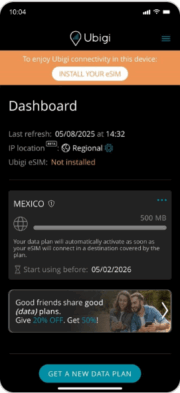
2 – Then, download the Ubigi app on your new/other iPhone/iPad and connect to your Ubigi account by using your login and password
3 – Once connected, the button “Install your eSIM” will be displayed – click on it then follow the instructions on screen to complete the installation:
IMPORTANT: your Ubigi eSIM profile must be deleted on the first (old) device before the re-installation on another device, otherwise the “Install your eSIM” button won’t be displayed and the re-installation and swap will not work on the new device (NB: this action won’t delete your Ubigi account). If this deletion is not possible in case you don’t have your first (old) device anymore (broken, lost, etc.), we invite you to contact our Customer Service for more help.
Explore Ubigi eSIM data plans for seamless connectivity worldwide!
Install once, stay globally connected for life with a single eSIM, compatible with all eSIM-enabled devices : iOS Phone, iPad OS, Android, and Windows 10 and 11.
Are you a company with teams on the move?
Manage your employees' LTE/5G connectivity on smartphones, tablets, laptops, and hotspots while maintaining complete control over your costs.
Explore Ubigi eSIM data plans for seamless connectivity worldwide!
Install once, stay globally connected for life with a single eSIM, compatible with all eSIM-enabled devices : iOS Phone, iPad OS, Android, and Windows 10 and 11.
Are you a company with teams on the move?
Manage your employees' LTE/5G connectivity on smartphones, tablets, laptops, and hotspots while maintaining complete control over your costs.
GET 20% OFF
⚽
FOOTBALL FEVER PLANS
Heading to the World Cup? Stay connected with our unlimited USA+Canada data plans. Use code FEVER20.
Verified review
This user has been identified as a buyer
It was very easy to use the service.
It was very easy to use the service.
Bronca, 08 Jul 2026
Verified
Verified review
This user has been identified as a buyer
Excellent
Excellent! I’m connected all the time.
Pablo, 08 Jul 2026
Verified
Verified review
This user has been identified as a buyer
Works smoothly
Works smoothly, good download speed
CPFS Dublin, 08 Jul 2026
Verified
Verified review
This user has been identified as a buyer
Reliable connection .
Reliable connection .
Few dropouts when traveling on the shin train as expected.
5 bars 5g at all times while in metro areas.
5g and mostly 5 bars in the rural areas.
Excellent value for unlimited 15 days trip.
customer, 08 Jul 2026
Verified
Verified review
This user has been identified as a buyer
Great signal
Great signal
customer, 08 Jul 2026
Verified
Verified review
This user has been identified as a buyer
Worked perfectly
Worked perfectly
Gary Powell, 08 Jul 2026
Verified
Verified review
This user has been identified as a buyer
Easy connection and working everywhere in Nagoya!
Easy connection and working everywhere!
Turkiye, 08 Jul 2026
Verified
Verified review
This user has been identified as a buyer
Unigi Super
All settings are automatic.
Data usage is quite good. Although there are occasional connection issues, I’ll be using Ubigi for all my eSIM needs from now on.
Tuncer Altıkulaç/ Türkiye, 08 Jul 2026
Verified
Verified review
This user has been identified as a buyer
Excellent eSIM for travelling in Japan
After spending quite a bit of time comparing different eSIM providers and reading reviews on various platforms, I decided to try Ubigi for our trip to Japan—and it turned out to be a great choice.
My daughter and I purchased different plans (25GB for me and Unlimited for her), and we were both very satisfied with the service.
The only minor issues we noticed were a few brief signal drops while the Shinkansen passed through tunnels, and no signal in some parts of the Tokyo subway. Aside from that, the connection was consistently fast and reliable everywhere we traveled in Japan.
The installation and activation process was simple and straightforward. As soon as we arrived in Tokyo, the eSIM connected automatically and was ready to use.
Overall, Ubigi provided excellent coverage and performance throughout our trip. Based on our experience, I would definitely recommend it to anyone traveling to Japan.
Rong, 08 Jul 2026
Verified
Verified review
This user has been identified as a buyer
Easy to use
Easy to use. Smooth connection and quick to add more menu.
Highly recommended.
customer, 08 Jul 2026
Verified
Verified review
This user has been identified as a buyer
First time traveling internationally…
First time traveling internationally and was worried about being able to stay in contact with home. Cell carrier did not offer a reasonable travel package like some of the other carriers. I did some searching and was inundated with eSIM options, but something just stood out with Ubigi for me. The set up was simple and the eSIM worked as described. As soon as I enabled the eSIM and was in the target area, it just worked. No issues during my stay and the price was reasonable. I would definitely use again.
J. Senior, 08 Jul 2026
Verified
Verified review
This user has been identified as a buyer
Easy and consistent
Easy, consistent and reasonably priced.
ADalyan, 08 Jul 2026
Verified
Verified review
This user has been identified as a buyer
Used it many times
Used it many times. Highly recommend! Speed is very fast and everything always went really smooth
customer, 08 Jul 2026
Verified
Verified review
This user has been identified as a buyer
Network speed is under my expectation
Network speed is under my expectation. But not bad.
customer, 08 Jul 2026
Verified
Verified review
This user has been identified as a buyer
Promises what it offers
Promises what it offers
customer, 08 Jul 2026
Thank you
Your message has been sent. We’ll get back to you shortly.
Thank you
We have taken into account your subscription to the newsletter
How to check eSIM compatibility
Smartphones / Tablets:
Dial *#06#. → If an EID number appears, your device is eSIM-compatible.
Windows 10 / 11:
Press Windows+I. Go to “Network & Internet” → If you see "Cellular", your PC is eSIM-compatible.
How to check carrier unlocking
iPhone / iPad:
Go to Settings > General > About. Scroll to Carrier Lock. → If you see “No SIM restrictions”, your device is unlocked.
Android:
Go to Settings > Network & Internet > Mobile network. Disable Automatic network selection. → If multiple networks appear, your device is unlocked.
You already have an eSIM in your cart.
Each order can only include one eSIM data plan.
If you choose to add a new one, the current plan will be removed. What would you like to do?





 How to check eSIM compatibility
 How to check carrier unlocking