To check your Ubigi purchase history (with confirmed payment only):
1 – First, connect to your account on ubigi.me or use the Ubigi application on your smartphone
2 – Then, go to the « Orders » tab to see the list of all purchases done:
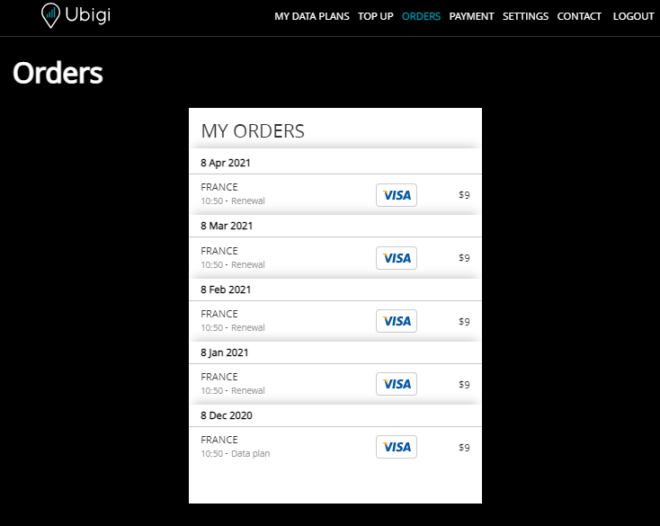
All One-Off purchases and renewals (for monthly and annual plans) will be listed on that tab.
In case you need an invoice, you can send your request to our Customer Service by precising: – which recharge (type of recharge, date, amount) you want an invoice for – your name, or company name – a complete billing address
Your request will be processed under 1-2 working days and you will receive your invoice by email.

Explore Ubigi eSIM data plans for seamless connectivity worldwide!
Install once, stay globally connected for life with a single eSIM, compatible with all eSIM-enabled devices : iOS Phone, iPad OS, Android, and Windows 10 and 11.
Are you a company with teams on the move?
Manage your employees' LTE/5G connectivity on smartphones, tablets, laptops, and hotspots while maintaining complete control over your costs.
Explore Ubigi eSIM data plans for seamless connectivity worldwide!
Install once, stay globally connected for life with a single eSIM, compatible with all eSIM-enabled devices : iOS Phone, iPad OS, Android, and Windows 10 and 11.
Are you a company with teams on the move?
Manage your employees' LTE/5G connectivity on smartphones, tablets, laptops, and hotspots while maintaining complete control over your costs.
Great
Based on 36454 reviews on
Verified
Verified review
This user has been identified as a buyer
Connectivity
Connectivity
MELISSA EMMANUEL, 06 May 2026
Verified
Verified review
This user has been identified as a buyer
This was my first time using an eSIM…
This was my first time using an eSIM while traveling abroad. Ubigi's connectivity in Japan was outstanding! My friends used travel plans from their carriers and noticed immediately internet service was extremely slow when information was needed. With Ubigi's service I was able to connect fast! The service kicked in upon landing in Japan (very easy transition).
VWalker, 06 May 2026
Verified
Verified review
This user has been identified as a buyer
Ubigi eSIM easy and reliable
Second time using Ubigi eSIM, service was reliable and easy to use. Will continue to choose Ubigi when traveling where ever it is available.
customer, 06 May 2026
Verified
Verified review
This user has been identified as a buyer
Queenstown Usage: Setting up was really easy and instant…
Setting up was really easy and instant when I landed, the connection was great in Queenstown and I ahd plenty data for a very reasonable price.
Mary Lola, 06 May 2026
Verified
Verified review
This user has been identified as a buyer
Reliable and Fast
No nonsense, reliable and super fast connection. Worth every penny
customer, 06 May 2026
Verified
Verified review
This user has been identified as a buyer
Ups and downs
It’s nice to have internet everywhere I go in Japan. However, I noticed that there was some issues whenever I would go into stores and shopping malls. The service would drop and slow down.
customer, 06 May 2026
Verified
Verified review
This user has been identified as a buyer
So far so
So far so
Good. Easy to install
Martin Batten, 06 May 2026
Verified
Verified review
This user has been identified as a buyer
Easy and working
Easy and working
Mony, 06 May 2026
Verified
Verified review
This user has been identified as a buyer
try Ubigi you won’t regret!
I’ve had good internet all the time while traveling.
Josefina, 06 May 2026
Verified
Verified review
This user has been identified as a buyer
Good connections and good price
Amine Benerradi, 06 May 2026
Verified
Verified review
This user has been identified as a buyer
Super easy to set up
Super easy to set up, great value for data volume, and I had no issues whatsoever when roaming within my purchased region.
Busy Lizard, 06 May 2026
Verified
Verified review
This user has been identified as a buyer
Good internet
The internet was very good. But the Installation was Not that easy..
Kate, 06 May 2026
Verified
Verified review
This user has been identified as a buyer
It’s good one
It’s good one
customer, 06 May 2026
Verified
Verified review
This user has been identified as a buyer
Smooth experience
Easy to install, no connection issues, works perfectly in China.
Jo, 06 May 2026
Verified
Verified review
This user has been identified as a buyer
Excellent eSim for Japan
Ubigi worked all the time and as fast as my normal sim in the US.
Meagan, 06 May 2026
Thank you
Your message has been sent. We’ll get back to you shortly.
Thank you
We have taken into account your subscription to the newsletter
How to check eSIM compatibility
Smartphones / Tablets:
Dial *#06#. → If an EID number appears, your device is eSIM-compatible.
Windows 10 / 11:
Press Windows+I. Go to “Network & Internet” → If you see "Cellular", your PC is eSIM-compatible.
How to check carrier unlocking
iPhone / iPad:
Go to Settings > General > About. Scroll to Carrier Lock. → If you see “No SIM restrictions”, your device is unlocked.
Android:
Go to Settings > Network & Internet > Mobile network. Disable Automatic network selection. → If multiple networks appear, your device is unlocked.
You already have an eSIM in your cart.
Each order can only include one eSIM data plan.
If you choose to add a new one, the current plan will be removed. What would you like to do?

