To check your Ubigi purchase history (with confirmed payment only):
1 – First, connect to your account on ubigi.me or use the Ubigi application on your smartphone
2 – Then, go to the « Orders » tab to see the list of all purchases done:
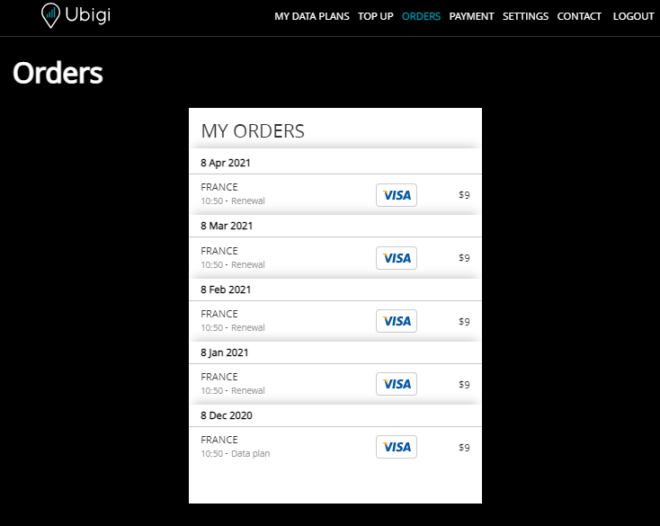
All One-Off purchases and renewals (for monthly and annual plans) will be listed on that tab.
In case you need an invoice, you can send your request to our Customer Service by precising: – which recharge (type of recharge, date, amount) you want an invoice for – your name, or company name – a complete billing address
Your request will be processed under 1-2 working days and you will receive your invoice by email.

Explore Ubigi eSIM data plans for seamless connectivity worldwide!
Install once, stay globally connected for life with a single eSIM, compatible with all eSIM-enabled devices : iOS Phone, iPad OS, Android, and Windows 10 and 11.
Are you a company with teams on the move?
Manage your employees' LTE/5G connectivity on smartphones, tablets, laptops, and hotspots while maintaining complete control over your costs.
Explore Ubigi eSIM data plans for seamless connectivity worldwide!
Install once, stay globally connected for life with a single eSIM, compatible with all eSIM-enabled devices : iOS Phone, iPad OS, Android, and Windows 10 and 11.
Are you a company with teams on the move?
Manage your employees' LTE/5G connectivity on smartphones, tablets, laptops, and hotspots while maintaining complete control over your costs.
Great
Based on 49484 reviews on
Verified
Verified review
This user has been identified as a buyer
It was easy to set up and use
It was easy to set up and use. The connection was excellent
customer, 24 Oct 2026
Verified
Verified review
This user has been identified as a buyer
Everything was smooth
Everything was smooth. Don't forget activate your e-sim in cellphone settings. I used two 10Gb package for a 10 days travel. Very good connection even in mountain zones in Kyushu Island, Japan
Jeard C Escobar, 24 Oct 2026
Verified
Verified review
This user has been identified as a buyer
Outstanding
I has great service with Ubigi right across Morocco, from the cities through the Atlas mountains to the deserts. In hotels I turned off the wifi as Ubigi was better.
Doug, 24 Oct 2026
Verified
Verified review
This user has been identified as a buyer
Simple booking
Simple booking, easy to use!!
Tanja W., 24 Oct 2026
Verified
Verified review
This user has been identified as a buyer
Reliable and cheap
I’ve been using Ubigi for a few years and it’s easy use. It’s also much cheaper than my network provider. The one time i had a problem, they sorted it out immediately.
Henry, 24 Oct 2026
Verified
Verified review
This user has been identified as a buyer
Worked in both Japan & Montenegro
This worked perfectly in both Japan and Montenegro. It was easy to purchase data, even without an existing data connection or Wi-Fi. Highly recommended.
Bob, 24 Oct 2026
Verified
Verified review
This user has been identified as a buyer
Thank you
Thank you, Ubigi, for providing reliable connectivity during my Japan trip. The eSIM was easy to install, worked immediately upon arrival, and offered excellent coverage throughout my journey. I highly recommend Ubigi to international travellers.
Shyam Poddar, 24 Oct 2026
Verified
Verified review
This user has been identified as a buyer
Easy to use
Easy to use, convenient, and accessible even in the most remote areas of Ireland. 10GB was plenty of data for 16 days of driving and audiobooks on the road.
Erin, 24 Oct 2026
Verified
Verified review
This user has been identified as a buyer
Great
Great! Work perfect! The help center was great !
Tzahy H., 24 Oct 2026
Verified
Verified review
This user has been identified as a buyer
Working well even in low reception areas
Jane Poulston, 24 Oct 2026
Verified
Verified review
This user has been identified as a buyer
Perfect, easy eSIM
Clear instructions and a seamless experience right upon landing in Japan. 100% recommend.
Lorena, 24 Oct 2026
Verified
Verified review
This user has been identified as a buyer
I had trouble to start using the esim
customer, 24 Oct 2026
Verified
Verified review
This user has been identified as a buyer
Very good Internet in Südkorea and…
Very good Internet in Südkorea and Japan.
customer, 24 Oct 2026
Verified
Verified review
This user has been identified as a buyer
Was a simple to use
Was easy to connect and had all access needed. Will definitely use again.
Augi, 24 Oct 2026
Verified
Verified review
This user has been identified as a buyer
Easy to use and to see how much data…
Easy to use and to see how much data remain.
SHcustomer, 24 Oct 2026
Thank you
Your message has been sent. We’ll get back to you shortly.
Thank you
We have taken into account your subscription to the newsletter
How to check eSIM compatibility
Smartphones / Tablets:
Dial *#06#. → If an EID number appears, your device is eSIM-compatible.
Windows 10 / 11:
Press Windows+I. Go to “Network & Internet” → If you see "Cellular", your PC is eSIM-compatible.
How to check carrier unlocking
iPhone / iPad:
Go to Settings > General > About. Scroll to Carrier Lock. → If you see “No SIM restrictions”, your device is unlocked.
Android:
Go to Settings > Network & Internet > Mobile network. Disable Automatic network selection. → If multiple networks appear, your device is unlocked.
You already have an eSIM in your cart.
Each order can only include one eSIM data plan.
If you choose to add a new one, the current plan will be removed. What would you like to do?

