I get an error message when I use the QR code on my Ubigi account to re-install my Ubigi eSIM profile, why?
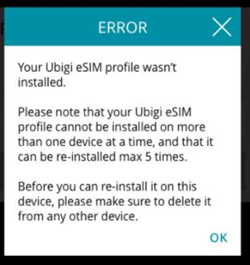
The error message below will be displayed in two cases:
1/ If the eSIM profile you try to re-install in a device is already installed in another device:
In this case, your Ubigi eSIM profile must be deleted on the first device before the re-installation on another device. If you do not delete your eSIM profile on the first device, the re-installation will not work (NB: this action won’t delete your Ubigi account).
If this deletion is not possible in case you don’t have your first device anymore (broken, lost, etc.), we invite you to contact our Customer Service for more help.
2/ Or if you already re-installed that same eSIM profile at least 5 times in the past on the same/or different devices:
All Ubigi eSIM profiles can be re-installed up to 5 times max after being deleted (NB: other providers usually allow the installation only once and re-installation is not possible).
This means that if you already did 5 re-installations in total for the same Ubigi eSIM profile (in same or different devices), it is no more possible to re-install it now.
Do not hesitate to contact our Customer Service for more help in case you want to keep your current Ubigi account and get a new Ubigi eSIM profile for it.
Explore Ubigi eSIM data plans for seamless connectivity worldwide!
Install once, stay globally connected for life with a single eSIM, compatible with all eSIM-enabled devices : iOS Phone, iPad OS, Android, and Windows 10 and 11.
Are you a company with teams on the move?
Manage your employees' LTE/5G connectivity on smartphones, tablets, laptops, and hotspots while maintaining complete control over your costs.
Explore Ubigi eSIM data plans for seamless connectivity worldwide!
Install once, stay globally connected for life with a single eSIM, compatible with all eSIM-enabled devices : iOS Phone, iPad OS, Android, and Windows 10 and 11.
Are you a company with teams on the move?
Manage your employees' LTE/5G connectivity on smartphones, tablets, laptops, and hotspots while maintaining complete control over your costs.
GET 20% OFF
⚽
FOOTBALL FEVER PLANS
Heading to the World Cup? Stay connected with our unlimited USA+Canada data plans. Use code FEVER20.
Verified review
This user has been identified as a buyer
Good signal, app not great
The app was often not working and had maintenance so couldn't check how much I had left. But had good signal.
customer, 09 Jul 2026
Verified
Verified review
This user has been identified as a buyer
Saved money and stayed connected!
The connection was comparable to the connection of the country and the price great. I would have paid a fortune in roaming fees had I not utilized Ubigi. Glad my brother told me about it.
Nathalie, 09 Jul 2026
Verified
Verified review
This user has been identified as a buyer
Most of the time it worked pretty well
Most of the time it worked pretty well; I had unlimited data for both Norway and Sweden, for one month each. However, I didn't have internet for two days in Norway and one day in Sweden, even though the signal was very strong.
Thomas S., 09 Jul 2026
Verified
Verified review
This user has been identified as a buyer
It was so easy to use and had no issues…
It was so easy to use and had no issues at all.
I will definitely us either again. Mahalo
customer, 09 Jul 2026
Verified
Verified review
This user has been identified as a buyer
Easy to install and Workshop very good.
Easy to install and Workshop very good.
customer, 09 Jul 2026
Verified
Verified review
This user has been identified as a buyer
Would recommend
Relatively easy to install when following the instructions.
I used an unlimited plan just to be sure to have enough for my work trip.
The connection was generally very good but I will deduct one star because sometimes it stopped working.
customer, 09 Jul 2026
Verified
Verified review
This user has been identified as a buyer
Reliable
Great travel companion
customer, 09 Jul 2026
Verified
Verified review
This user has been identified as a buyer
Easy to install the esim before the…
Easy to install the esim before the travel start. Ubigi started automatically after the arrival in Japan. So fare excellent connection here on Tokyo.
HW, 09 Jul 2026
Verified
Verified review
This user has been identified as a buyer
worked everywhere
worked everywhere
customer, 09 Jul 2026
Verified
Verified review
This user has been identified as a buyer
it was lifesaving during our Japan…
it was lifesaving during our Japan vacation. economic and reliable.
customer pusat, 09 Jul 2026
Verified
Verified review
This user has been identified as a buyer
My go to when travelling
My go to when travelling. I have been using it for a year now and I travel a lot. Great prices, thank you
Konstantina P., 09 Jul 2026
Verified
Verified review
This user has been identified as a buyer
Could not ask for more
It was easy to install. It was easy to use. It was 100% reliable.
Kendall, 09 Jul 2026
Verified
Verified review
This user has been identified as a buyer
Just one problem was that I didn’t know…
Just one problem was that I didn’t know I cannot normal call outside.otherwise good .
customer, 09 Jul 2026
Verified
Verified review
This user has been identified as a buyer
Good to use and thank you
Good to use and thank you
Hinh Bui:, 09 Jul 2026
Verified
Verified review
This user has been identified as a buyer
On arrival to Japan
On arrival to Japan, I received a notification to connect my sim, I made sure the sim was downloaded and showing on my phone before I left the Uk as previous experience with esims can be stressful if you arrive at your destination only to find out you cannot work out how to activate your travel sim. It is amazing to have the convenience of access to data and what’s app calls and google maps. So thank you Ubigi sim
paul carby, 09 Jul 2026
Thank you
Your message has been sent. We’ll get back to you shortly.
Thank you
We have taken into account your subscription to the newsletter
How to check eSIM compatibility
Smartphones / Tablets:
Dial *#06#. → If an EID number appears, your device is eSIM-compatible.
Windows 10 / 11:
Press Windows+I. Go to “Network & Internet” → If you see "Cellular", your PC is eSIM-compatible.
How to check carrier unlocking
iPhone / iPad:
Go to Settings > General > About. Scroll to Carrier Lock. → If you see “No SIM restrictions”, your device is unlocked.
Android:
Go to Settings > Network & Internet > Mobile network. Disable Automatic network selection. → If multiple networks appear, your device is unlocked.
You already have an eSIM in your cart.
Each order can only include one eSIM data plan.
If you choose to add a new one, the current plan will be removed. What would you like to do?





 How to check eSIM compatibility
 How to check carrier unlocking