Skip to content
← Back to questions
How can I purchase a data plan from the Ubigi application on a Windows 10 or Windows 11 device?

You can now purchase a data plan by 1) Connecting to your account from Ubigi.me or 2) By accessing your account from the network bar:

1/ From Ubigi.me by using a browser:
– Open a browser on your Windows 10 or Windows 11 device and go to Ubigi.me
– Enter your login and password to connect to your account
– Once connected, go to the Top-up tab and select the data plan you want to purchase
– Follow the instructions on screen to complete your purchase

2/ From the network bar of your Windows 10 or Windows 11 device:
>>
You can watch the last section of our video tutorial, section “Managing your Ubigi account on Windows 10 or Windows 11” from time lap 1:20 to 1:49
>> Or follow the instructions below:

If you are using Ubigi services on your laptop/tablet equipped with a Ubigi eSIM/SIM card, first make sure that you are connected to the cellular/mobile data network with your device:

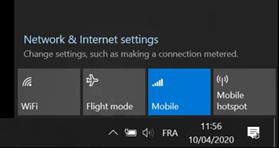
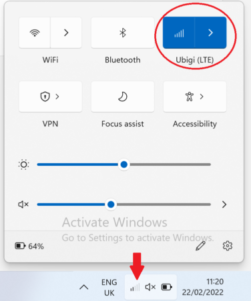
– First, deactivate WiFi option and activate “Mobile” (or “Cellular”) option in the networks bar to connect to the mobile data network with your device:

Windows 10:


Windows 11:

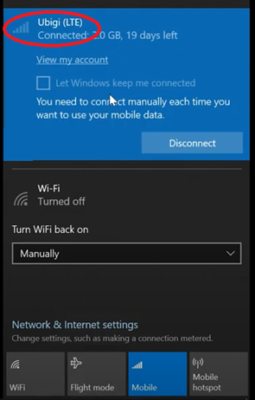
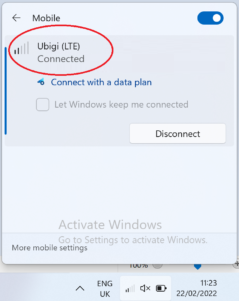
– Click on the Connect button that will appear, and you will see Ubigi appear as “Connected” at the top of the network bar (even if you have no credit left on your account):

Windows 10:

Windows 11:

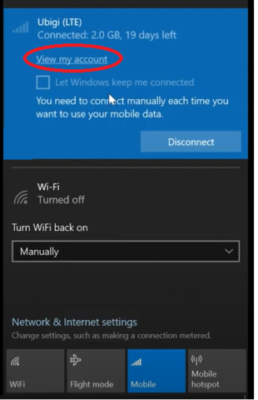
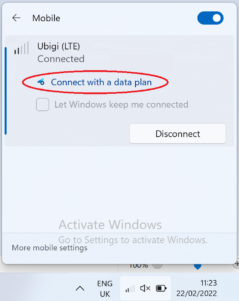
– Display your network bar and click on “View my account” or “connect with a data plan” at the top:

Windows 10:

Windows 11:

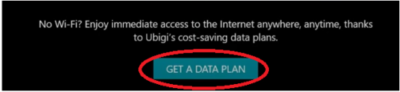
– Then on the displayed page, click on “Get a data plan”:

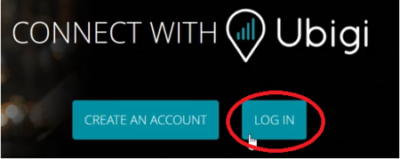
– Then, click on “Log in”:

– You will be automatically redirected to your Ubigi account
– Go to the Top-up tab and select the data plan you want to purchase
– Follow the instructions on screen to complete your purchase


Was this article helpful?
YesNo

Looking for something specific?

Other frequently asked questions:

Why is my Ubigi connection not working?

Will data latency be impacted by the IP location feature?

For which countries is the IP location feature available?

In which countries is the IP location feature supported?

IP location feature: Do I need to install an additional app to benefit from this feature?

Is the IP location feature free?

IP location feature: which devices are supported?

What is the difference between a Country of Residence IP address and a Regional IP address?

I am stuck on the "FINAL STEP" page, and the message "Waiting for Ubigi cellular connectivity" has been displayed for several minutes. How can I resolve this?

I restored my data on my (new) iPhone, but my eSIM profile does not work. What to do?

I am about to travel. How do I manage my Ubigi eSIM profile on my device ?

Resolve an issue with Ubigi eSIM profile on Android device

Resolve an issue with Ubigi eSIM profile on iPhone

iMessage does not work with my Ubigi eSIM profile. What to do ?

How do I know if my Ubigi eSIM profile is activated on my iPhone/iPad?

How to get and install a Ubigi eSIM profile on iPhone?

How to get and install a Ubigi eSIM profile on an Android device?

How to get and install a Ubigi eSIM profile on iPad?

How to get and install a new Ubigi eSIM profile on my Windows 10 or Windows 11 laptop or tablet?

How do I activate my Ubigi services with my Windows 10 or Windows 11 device equipped with a Ubigi physical SIM card?

How do I activate my Ubigi services with my Windows 10 or Windows 11 laptop or tablet equipped with a Ubigi eSIM?

How can I buy a data plan from the Ubigi application on iPhone or iPad?

How can I check if my Ubigi eSIM profile is installed on my iPad?

How do I know if my Ubigi eSIM profile is activated and ready to use on my Android device?

How can I check if my Ubigi eSIM profile is installed on my iPhone?

My Ubigi eSIM profile is installed and active on my iPhone/iPad but I don't have any network displayed, what can I do?

My eSIM Ubigi profile is installed and active on my iPhone/iPad, the network is displayed but I don't have access to the Internet, what should I do?

Mobile data is applied to the Ubigi eSIM profile on my iPhone/iPad but I can't access the internet, what can I do?

How do I know if my Ubigi profile is installed on my Android device?

My Ubigi eSIM profile is installed and active on my Android device but I don’t have any network displayed, what can I do?

I can not connect with my Ubigi eSIM

My Ubigi eSIM profile is installed and active on my Android device, the network is displayed but I don’t have access to the Internet, what should I do?

Mobile data is applied to the Ubigi eSIM profile on my Android device, but impossible to access the internet, what can I do?

Can I make phone calls with Ubigi eSIM data plans?

How do I know if my Ubigi eSIM profile is activated on my Windows 10 or Windows 11 device?

How do I check the APN configuration of my Ubigi eSIM on Windows 10 or Windows 11?

Which mobile devices support Ubigi eSIM?

My Ubigi eSIM profile is activated on my Windows 10 or Windows 11 device but I do not have a network, what should I do?

What is a one-off and a recurring Ubigi data plans?

How to use Ubigi with a dual SIM device?

How to use tethering with a Windows 10 or Windows 11 device to share the Ubigi connectivity?

How to use tethering with an iPhone/iPad to share the Ubigi connectivity?

How to use tethering with an Android device to share the Ubigi connectivity?

I did not use my Ubigi data plan, can I get a refund?

My device does not show "Ubigi" as carrier name, is it normal?

How can I find the ICCID of my Ubigi eSIM?

How to set the APN for Ubigi eSIM?

The Ubigi antenna pictogram is not displayed in Japan, why?

How to reset my password for my Ubigi eSIM account?

How can I create my Ubigi account on iPad?

How can I create my Ubigi account on an Android device?

How can I create my Ubigi account on a Windows 10 or Windows 11 device?

How can I create my Ubigi account on iPhone?

How can I change my Ubigi password?

How can I check the remaining balance of my Ubigi eSIM?

How to delete my Ubigi account?

How can I buy a data plan from the Ubigi application on an Android device?

Do I need Wi-Fi to purchase a Ubigi data plan?

I paid for a Ubigi data plan but it does not appear in my account, what should I do?

I purchased the wrong data plan and did not use it, how can I change it?

How to get an invoice for my Ubigi data plan purchase?

I do not get the “eSIM – Mobile Data in my device” button on my iPad to install my Ubigi profile. Why and what should I do?

How to reinstall the Ubigi eSIM profile I deleted on my Windows 10 or Windows 11 device?

I have a new Android device. How can I reinstall my Ubigi eSIM profile on it?

Does my Ubigi eSIM profile have a validity period and will expire one day?

I have a new Windows10 device. How can I reinstall my Ubigi eSIM profile on it?

How can I enable my Ubigi eSIM on my iPhone when I want to use it again?

I lost my device. How can I block my Ubigi eSIM account?

How can I disable my Ubigi eSIM on my iPhone when I travel or when I do not use it?

I have multiple  Ubigi eSIM profiles. Can I manage them all under one Ubigi account?

How can I enable my Ubigi eSIM profile on my iPad when I want to use it again?

How can I disable my Ubigi eSIM profile on my iPad when I travel or when I do not use it?

How can I disable my Ubigi eSIM on my Android device when I travel or when I do not use it?

How can I enable my Ubigi eSIM on my Android device when I want to use it again?

How to delete a Ubigi eSIM profile on iPhone/iPad?

How to delete a Ubigi eSIM profile on an Android device?

How to delete a Ubigi eSIM profile on a Windows 10 or Windows 11 device ?

How can I find PIN, PIN2 or PUK codes for my Ubigi eSIM?

Ubigi connection is not working. Should I disable any active DNS or VPN on my device?

Great Trustpilot stars Trustpilot
Trustpilot stars
Based on 29464 reviews on Trustpilot
5 stars Verified
Verified review
This user has been identified as a buyer
Would use again
Used Ubigi in Japan and it worked absolutely amazing! It was fairly straightforward to buy and install. I chose the unlimited one and don’t have any complaints at all. No dead spots in Tokyo, Kyoto, and Osaka. Only had a slow connection problem in Nara when it rained heavily (but everyone else’s connection through different Esims, even the local WiFi was the same so can’t really pin that on Ubigi). Was also able to use Tiktok no problem when we were out and about since Ubigi routes locally. Absolutely will use again!
First time customer, 07 Dec 2025
4 stars Verified
Verified review
This user has been identified as a buyer
French Polynesia 3 gigs
It’s understandable that French Polynesia doesn’t have the best coverage, nor 5G or 5G+, but there were periods of E and 3G in main towns of several islands. There needs to be more data options between 3 and 10 gigabytes to make it easier for me. I will note that even with full bars on LTE or 5G (when you got it) did not mean that the network was as fast as expected. Many website pages still did not load for more than 10 seconds. If you just need to have data to keep in touch occasionally with friends, mostly SMS or WhatsApp then it’s perfectly fine for that. I’m not even sure I can blame Ubigi as it’s up to the local providers to prioritize their network. I’d buy it again next time.
customer, 07 Dec 2025
5 stars Verified
Verified review
This user has been identified as a buyer
Its cheap were other are expensive so…
Its cheap were other are expensive so its a better deal
YASMIN, 06 Dec 2025
5 stars Verified
Verified review
This user has been identified as a buyer
Had trouble getting QR code the…
Had trouble getting QR code the supporting staff was prompt with the reply
AZ hiker, 06 Dec 2025
5 stars Verified
Verified review
This user has been identified as a buyer
First time using an eSIM
This was my first time using an eSIM so I was a bit suspicious. The whole process from selecting the correct option to installing and implementing the Ubigi eSim was effortless and everything worked exactly as it should.
customer, 06 Dec 2025
4 stars Verified
Verified review
This user has been identified as a buyer
Easy, reliable, but, be aware of fair use
Easy to install. Singnal was 9/10. Labeling the package as unlimited is kind of misleading where, at least, it should have said "unlimited with fair use" or something similar.
Mohamed Alali, 06 Dec 2025
5 stars Verified
Verified review
This user has been identified as a buyer
Smooth and fast
Smooth and fast
dr Abdul Hadi shikrani, 06 Dec 2025
5 stars Verified
Verified review
This user has been identified as a buyer
Easy to use
It was really easy to install and works great so far. And did not have to remove my sim card.
Vashti Ferretti, 06 Dec 2025
4 stars Verified
Verified review
This user has been identified as a buyer
I found the service to be good during…
I found the service to be good during my recent trip to the Caribbean. Would consider using the service again
D McCaulay, 06 Dec 2025
5 stars Verified
Verified review
This user has been identified as a buyer
Amazing
Amazing. It worked from the moment we arrived, easy, affordable, and convenient
Marta, 06 Dec 2025
5 stars Verified
Verified review
This user has been identified as a buyer
It works and of if not, they help you.…
At first no connection but with the step by step online helppage I was online in Asia. It’s working great.
Jan V. , 06 Dec 2025
5 stars Verified
Verified review
This user has been identified as a buyer
Very convernience
Very convernience
Bui Viet Dung, 06 Dec 2025
5 stars Verified
Verified review
This user has been identified as a buyer
Easy to use and good coverage while in…
Easy to use and good coverage while in Japan .
Dwayne Farmer, 06 Dec 2025
5 stars Verified
Verified review
This user has been identified as a buyer
In Japan for 3 weeks had no problem…
In Japan for 3 weeks had no problem with Ubigi e sim at all. Has been a great service and I will carry on using wherever I go.
customer, 06 Dec 2025
5 stars Verified
Verified review
This user has been identified as a buyer
Worked well
Worked well
customer, 06 Dec 2025

Your message has been sent.
We’ll get back to you shortly.

We have taken into account your subscription to the newsletter
